

A guestographic is a piece of visual content that breaks down complex data into digestible visuals, and guestographic post link building is a content marketing strategy that combines a standard guest post with an infographic. With guestographic guest posting, you create an engaging visual data graphic rather than a typical text blog post. The publisher posts it on their website, and you get a contextual backlink in return.
Guestographic link building is one of the most underrated and valuable forms of SEO link building, and we’ve seen a single infographic generate dozens or hundreds of backlinks for our guest post service clients.
Not only do you get a high-quality link to your site, but the guest post itself will generate backlinks, and this “powers up” that post so it sends even more SEO ranking equity to your site.
If this sounds like a powerful link building strategy, it’s because it is. Once you learn how to do it properly, you’ll generate high-quality backlinks with ease.
In this post, I’ll cover what guestographics are, how to pitch websites to post them, and how to evaluate potential link building partners. I’ll even cover how to optimize your anchor text and provide an example to illustrate my point.
Let’s begin.
What Is a Guestographic?
A guestographic is an infographic you pitch to another website along with a few hundred words of original intro copy. With guestographics, you give the publisher a finished visual plus unique text, and in return, you get a contextual link back to your site. Brian Dean coined the term at Backlinko around 2014, and it still works in 2026 because most site owners want engaging content they don’t have to write themselves.
Building infographics as guest posts provides the following benefits:
- They Build Backlinks: Links are still one of the top 3 Google ranking factors, so getting contextual backlinks from relevant websites improves your SEO.
- They Drive Traffic: If readers click the infographic, they visit your site (which is valuable referral traffic).
- They Save Time: A guestographic can be made in minutes with AI. A text article typically takes much longer.
- They Build Authority: Building links through guest blogging with your brand name on a relevant, high-authority site helps Google associate your brand’s entity with those related keywords, which improves search engine rankings and AI citations. The more brand visibility, the better.
Here’s how guestographics work.
You find sites that have already published infographics on your topic, email the editor with the graphic attached, then offer to write 200 to 300 words of intro copy tailored to their audience. All you have to do is add your link to the intro or as a source credit below the image, and you’re done.
We typically create guestographics for clients when building eCom links, SaaS links, or iGaming links, because they get approved more often and increase user engagement.
Guestographic Example
Here’s a great example of a guestographic for the brand Liveaction.com on the website SmallBizTrends.com:
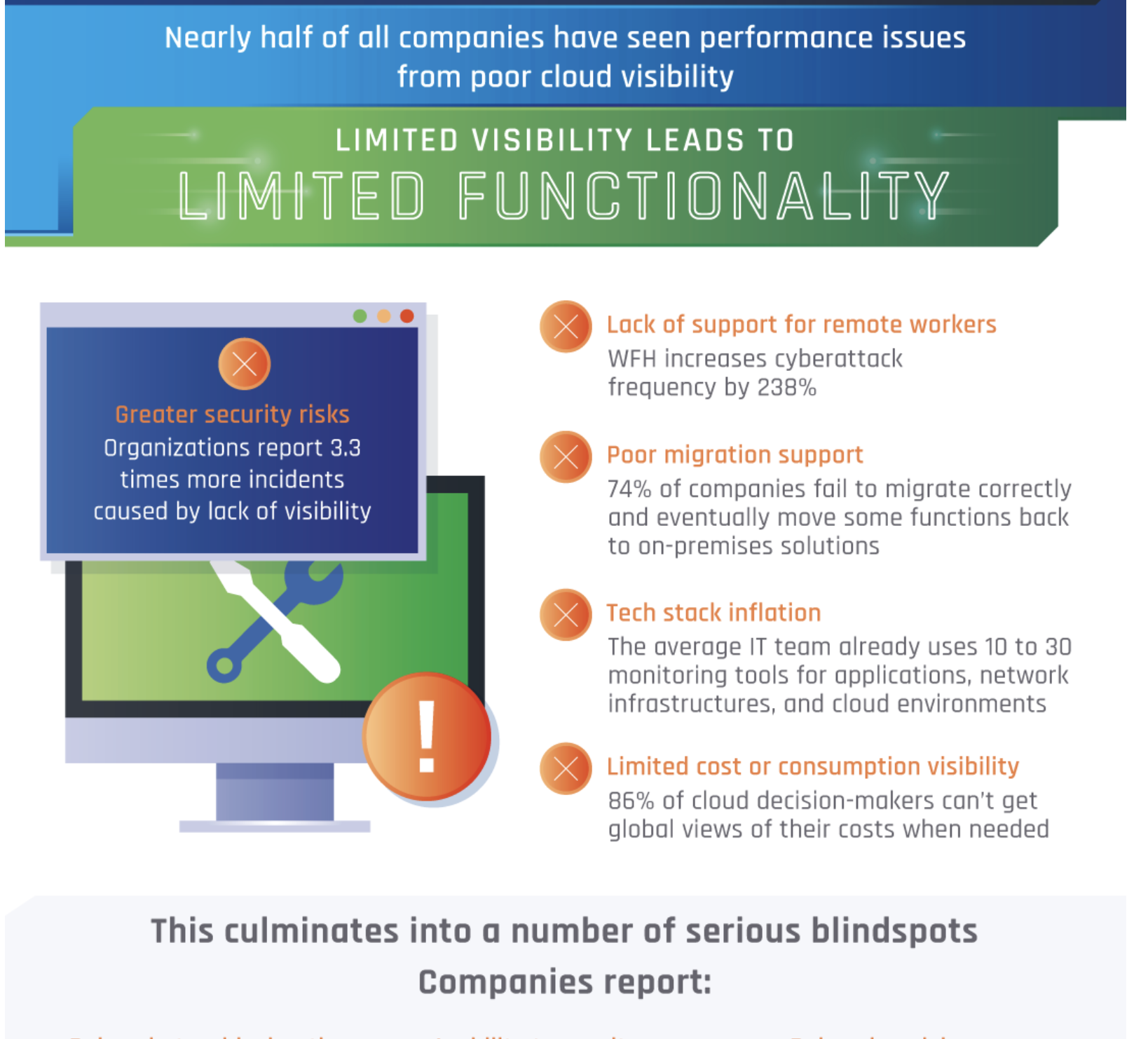
Live Action created this cloud monitoring infographic for the host site, the host published it, and Live Action got a link pointing back to their website for it.
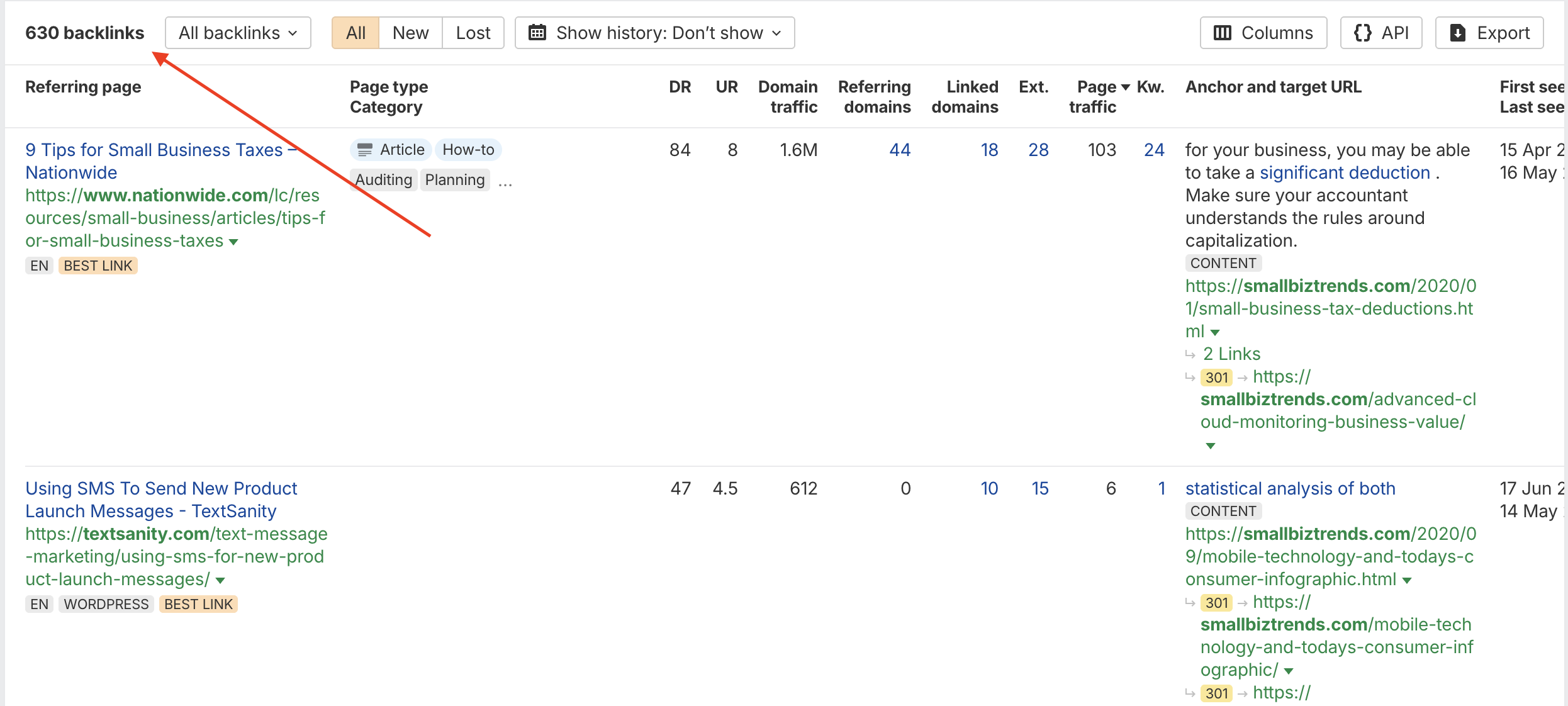
What’s even more incredible is that this one post has generated 630 backlinks for the host website. Yes, 600+ links from one infographic!
Why Guestographics Work for Link Building
Guestographics work for SEO and link building for several reasons, including earning their own backlinks, appealing to publishers, and increasing user engagement (which Google does track for SEO ranking purposes). Here’s more on each factor:
- Guestographics Earn Backlinks: As you just saw, a single infographic can earn hundreds of backlinks from bloggers, journalists, and content marketers who need to illustrate that topic. And guestographics can rank in Google Images and Pinterest search for years.
- Publishers Get Two Assets: Your publisher’s site receives a visual plus 200 to 300 words of original copy, which fills a slot on their editorial calendar without a Canva subscription, a freelance designer, or a writer invoice.
- Infographics Engage Readers: Readers hold onto about 65% of visual information after three days versus 10% of what they read, and a study in the Journal of Applied Psychology found people given visuals with written instructions followed them 323% more accurately. So, visually appealing content is much better for readers than text.
- Infographics Increase Approval Rates: When you submit an infographic and copy ready to go, it appeals to an editorial team much more than a simple “can I write a guest post” pitch. This should increase your approval rate exponentially.
- They’re Easily Shareable: Guestographics have serious viral potential. They’re easily shareable and tend to get more engagement on social media.
How to Vet a Website for Guestographic Guest Posting
Now, let’s move on to how to evaluate websites for link building purposes. One mistake I see time and time again in the SEO industry is that someone just looks at Domain Rating, sees a big number, and thinks “wow, this is a great link building opportunity”.
This is not how SEO works anymore. If you just pay attention to a site’s authority, you’ll either:
- Waste money
- Get no SEO benefit
- Get a penalty or algorithmic downgrade from Google
Sometimes, you’ll get all three.
You need to focus on relevance, keywords, organic traffic, and referring domains. Don’t worry, the PressWhizz link building team and I will show you our internal method for evaluating sites for link building in this section.
#1) Confirm the Site Is Topically Relevant
Topical relevance is the number one factor in link building. Domain Rating is no longer the be all and end all of building links.
Google uses core systems such as Contextual PageRank, Neural Matching, and their E-E-A-T framework to understand the relevance between two websites. If you build a link on an irrelevant site, it will get algorithmically downgraded. It may still provide an SEO boost or help reinforce your entity, but it won’t pass the same link juice as a niche-relevant website.
So, step one here is to ensure the site is either in the same niche as you or in an adjacent one.
#2) Check Organic Traffic and Keyword Rankings
Traffic and keyword rankings are the second thing you must research when vetting a site for building valuable backlinks.
In the past, Domain Rating or Domain Authority was the number one factor that determined the price of a link. But SEO has evolved. According to our Link Pricing Report for 2026, organic traffic was the leading factor in determining guest post pricing.
Plug the website into Ahrefs and check if it ranks for relevant keywords and gets steady organic traffic from Google.
Here is SmallBizTrends.com’s traffic and keywords report:
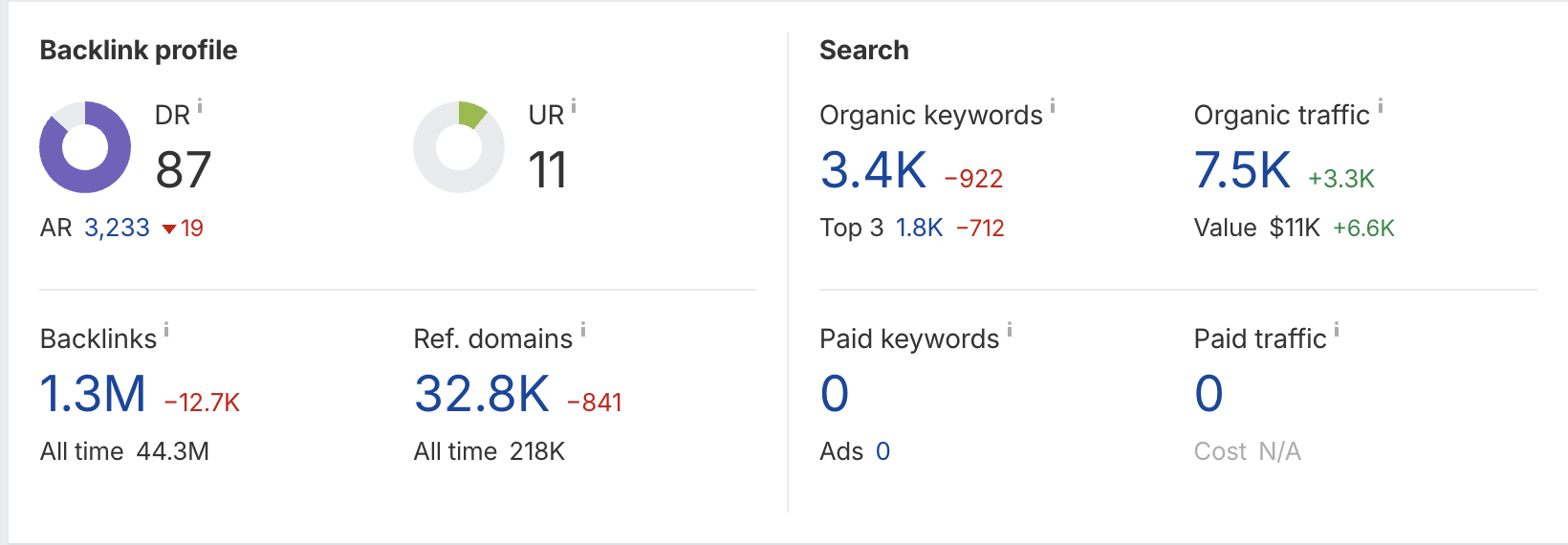
Plenty of business-related keywords and more than 7,000 in monthly organic visits. This is a great link building opportunity.
#3) Check Referring Domains
The number of referring domains a website has affects a few different SEO ranking factors:
- How much link juice you get from your guest post
- How many keywords a site ranks for and how much traffic a site gets from Google
- Whether Google sees the site as a link farm or not
Low-quality PBNs and link farms (sites that link out to every site) often have very low-quality link profiles. Actually, many have few to no referring domains at all. This is a dead giveaway to Google that this is not a real website, and links from it will possess no SEO equity. In other words, they are a waste of time and money (and can even hurt your SEO).
Go to Ahrefs, pop the site into Site Explorer, and click Backlinks on the left-hand side to check their backlink profile:
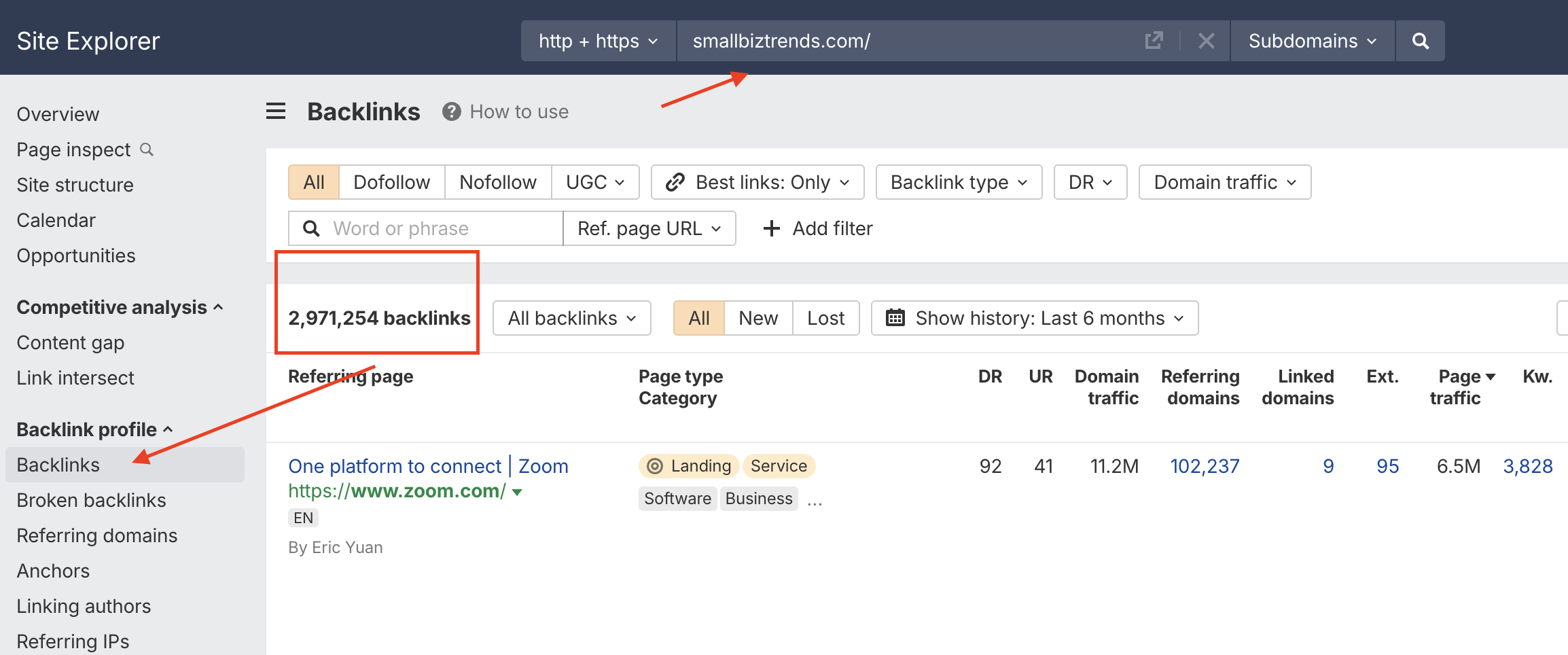
3 million links…I think this is a solid site to get a link from.
Pro Tip: Check how many sites they link out to, as well. If they link out to thousands of sites in your niche, and they all look like unnatural guest post links, Google may see it as a link farm.
#4) Verify They’ve Published Guest Posts Before
This one is easy.
Take a look at their blog or external link profile and look for pages that appear to be guest posts. You can also look for guest authors, search different brand names on their site, or even look at your competitor’s links in Ahrefs and see if they appear (though this is very time-consuming).
But if they have published guest posts in the past, they probably will again.
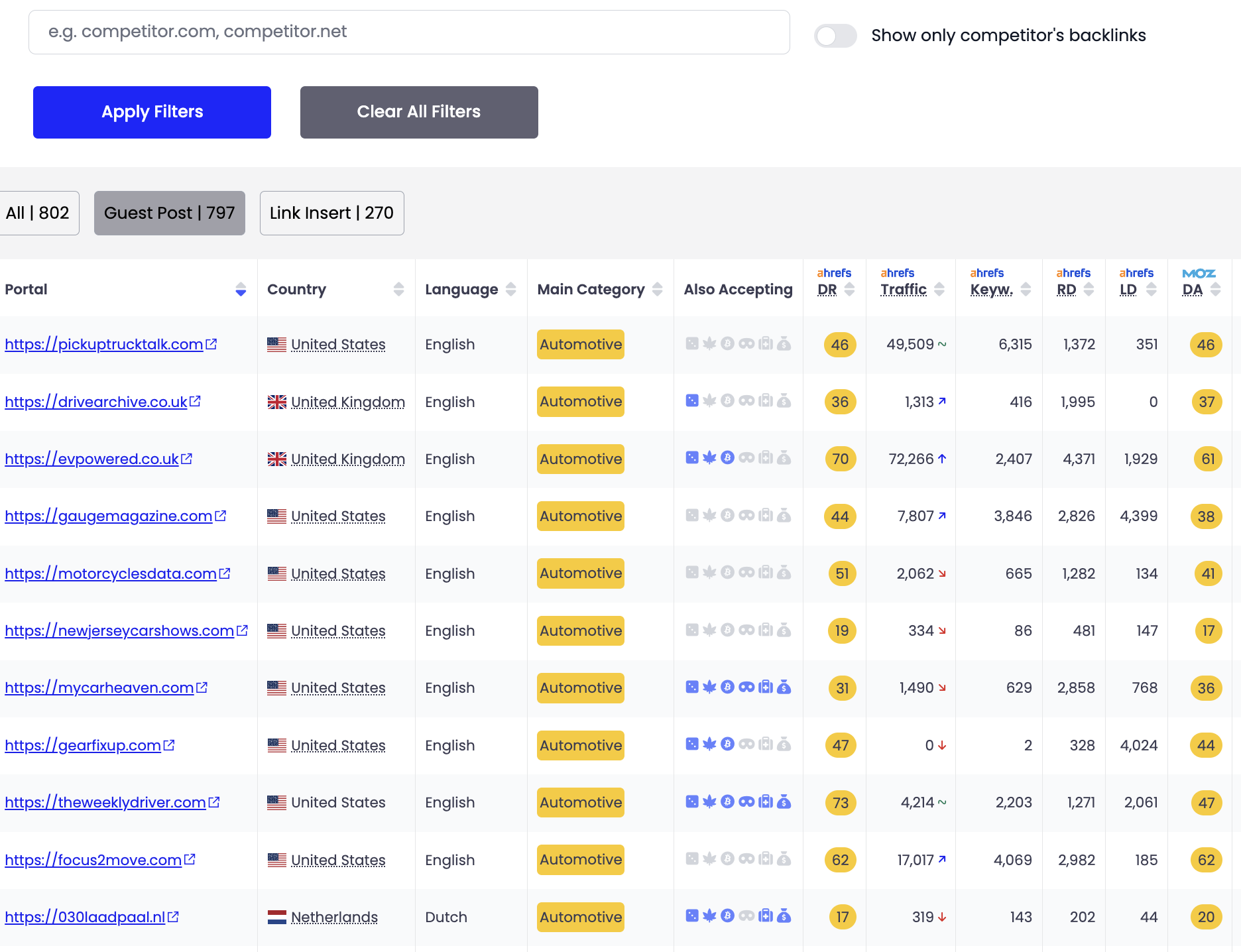
By the way, the easiest way to do this is to just check our guest post marketplace. We have thousands of websites listed that actively accept guest posts. If they’re in our database, they accept guest posts.
Just log in, add your target to the search box, and you’ll see if they are actively accepting guest posts:
#5) Find Real Contact Information or a Write for Us Page
Next up, search for contact information. Companies with public contact information, including team members, are much more likely to reply to you and accept your post.
Look for a Write for Us, Contribute, or Editorial Guidelines page. If you don’t find any of these pages, pull the editor’s name from recent bylines, then run it through LinkedIn or Hunter.io for a direct email. If you still don’t find anything, then we recommend just giving up. A site with no named staff, no author pages, and nothing but a form is either abandoned or not open for business. Or, perhaps they sell links through private networks, like marketplaces.
#6) Give It the Eye Test
Last up, visit the website and give it the eye test.
Trust me, you will know a link farm when you see it. Actually, private blog networks are not inherently bad for SEO. If the site is high-quality with real traffic and rankings, then it will pass link juice to you without risk. SEOs build links with these types of sites all the time and have no issues.
The problem is that most SEOs put little effort into their PBNs (these are sites we call link farms) and try to sell toxic links, usually by inflating the Domain Rating using manipulative tactics. Building these types of links is risky.
So, visit the site and make sure it looks legit and that it functions as a real website.
How to Create a Guestographic
The best way to create a guestographic is by researching competition, finding data gaps, creating a catchy title with entities and keywords, and then using the right tools to design it, such as Canva or LLMs like ChatGPT.
Let’s walk through the process step-by-step:
#1) Research the Competition and Identify a Target Website
Step 1 is to research the competition. Start by dropping your target keyword plus “infographic” into Ahrefs Content Explorer, then sort by referring domains to see which graphics in your niche have already earned links:
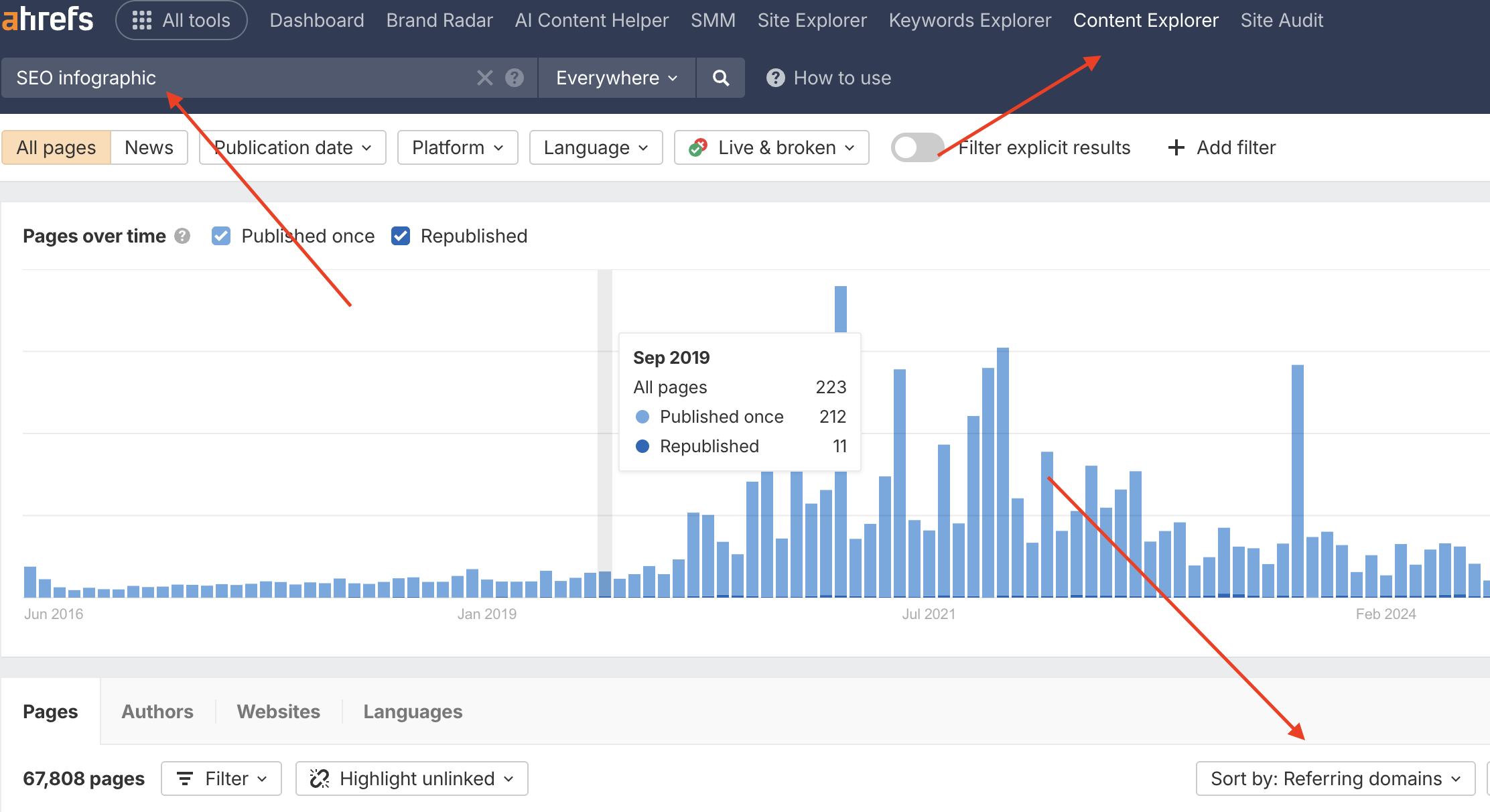
Then, pull the top 10 into a spreadsheet with their referring domain counts, publish dates, and organic traffic. Open each one and note what data they visualize, where the numbers came from, and how many sites embedded it.
Pro Tip: You can also use advanced search operators like site: (competitor site) + “infographic”.
#2) Find the Data Gaps
Step 2 is to find the data gaps.
Go back through the top 10 graphics from your spreadsheet and check the date on every stat.
Most link-earning infographics in any niche run on data from 2018 to 2021, and publishers embed them anyway because nobody built a replacement. Refreshing those numbers with 2026 sources is a major competitive advantage that could convince a website to swap their old infographic for yours (or publish a new page).
From there, find another gap and cover it. Make your graphic even more detailed. If eight competitors visualize average cost and nobody breaks it down by company size, region, or industry vertical, you build that version.
#3) Write a Catchy, Entity-Dense Top Line
Step 3 is to write a catchy, entity-dense top line. Your headline needs the target keyword and the entities Google associates with it, because that co-occurrence tells the algorithm what your graphic covers. Pull the entities from your SERP research: brand names, tools, metrics, and locations that appear across the top 10 results. Then pack them into a headline a publisher is likely to run.
Let me give you an example. Let’s try “remote work statistics” as the target. A weak top line reads “Remote Work Statistics 2026.” A stronger headline would be “Remote Work in 2026: Hybrid Adoption, Salary Gaps, and Return-to-Office Mandates Across 500 US Companies.”
These are the types of headlines that get published, help rankings, and drive reader engagement.
#4) Create the Guestographic
Now it’s time to create your guestographic. You can do this easily with AI. These days, AI is perfectly capable of creating highly engaging infographics. You can also use tools like Canva, but I don’t think it’s necessary.
Just add your logo, color palette, data, and basic instructions into ChatGPT, and ask it to create the infographic. It should only take about 2 minutes. This is one of my favorite AI link building strategies.
How to Get Backlinks With Guestographics Step by Step
We’ve written a whole post on guest post outreach that you should read. You can also check out our guide on how to find guest post opportunities.
In this guide, we will just stick to the basics of how to get your guestographics published.
Here is a quick step-by-step process:
Pitch the Host Site
Now that you have your guestographic, it’s time to pitch the host site and get it published.
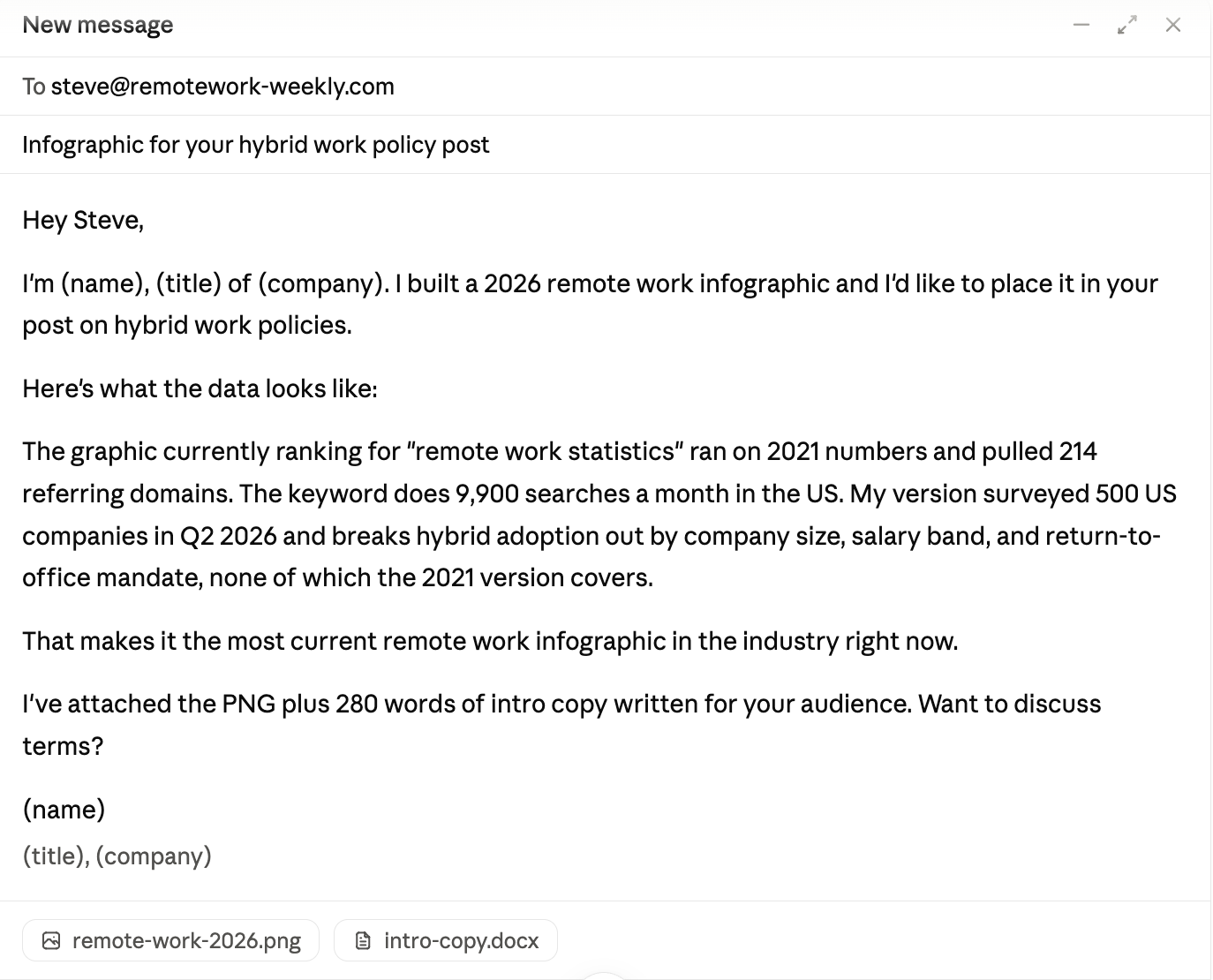
Skip the “hope you’re doing well” small talk. Instead, explain that you’d like to post a guestographic article. Then state what you’re handing over: a designed infographic plus 200 to 300 words of original intro copy written for your target audience.
Back it up with the numbers behind the asset. Cite your sample size, your data sources, and the referring domain count on the outdated graphic yours replaces. You can even add in keyword research and competitor backlink analysis to emphasize the value of the post.
Pro Tip: Attach the PNG and the draft copy directly so the editor can publish without replying once.
Negotiate Terms
Free guest posts are rare these days unless you specifically use free guest posting sites (which don’t provide much SEO value). And even publishers who accept your graphic without a fee attach conditions to the placement.
Negotiate these five points in writing:
- Price: Obviously, you need to negotiate the cost of the link placement. Guest posts can cost anywhere from $40 – $1,000 or more.
- Publishing date: Get a firm date so you know when to check the live URL and when to start tracking the link.
- Anchor text: Specify the exact anchor yourself rather than leaving it to the editor, who will default to your brand name or “click here” (more on this below).
- Dofollow vs nofollow: A nofollow passes no link equity, so confirm the attribute before you agree to a price.
- Link duration: Ask how long the link stays live and get it in writing, because sites often strip outbound links over time, especially if new SEO teams or agencies take over.
Follow Up Without Being Annoying
Lastly, I urge you to follow up gently without being annoying.
Editors block senders who email them five times in a week, and once you land in their spam filter, your relationship is done. You most likely won’t be able to build any links with them in the future. Burning a DR 70 publisher over one graphic is not worth it.
Here’s the follow-up timeline I use:
- Day 3: Reply in your original thread with one line asking whether the graphic fits their audience.
- Day 7: Send something new. A second data cut, a vertical version for their sidebar, or a different headline angle.
- Day 14: Two sentences telling them you’re taking the graphic to another site in the niche, but thank them for their time.
After two weeks, just give up. Don’t send more than 3-4 emails.
OK, the last thing we’ll cover is anchor text, because I see SEOs get this wrong often.
Guestographic Anchor Text Guidance
Anchor text confuses most people building links. Your anchor text tells Google what the destination page covers, and the Reasonable Surfer patent confirms that Google weighs a link’s surrounding context along with the anchor itself.
Translation: This is a lot more important than you think it is.
Editors who choose the anchor for you default to “click here” or a bare URL, which doesn’t tell Google anything about your page. You need to choose the proper anchor text for the target page to maximize SEO results.
Here are the anchor types you’ll work with:
- Branded: Your company or product name, like PressWhizz.
- Exact match: Your target keyword word for word, like buy backlinks.
- Partial match: Your keyword inside a longer phrase, like “this guide on how to buy backlinks safely”.
- Naked URL: The raw address, like https://presswhizz.com.
- Generic: Click here, read more, this article, etc.
My advice? Build primarily branded anchors and work exact-match anchors in where the sentence supports it. If you spam exact-match anchors across 40 placements with the same keyword, Google may see that as spam.
As you can see here, this company used a partial-match anchor text:
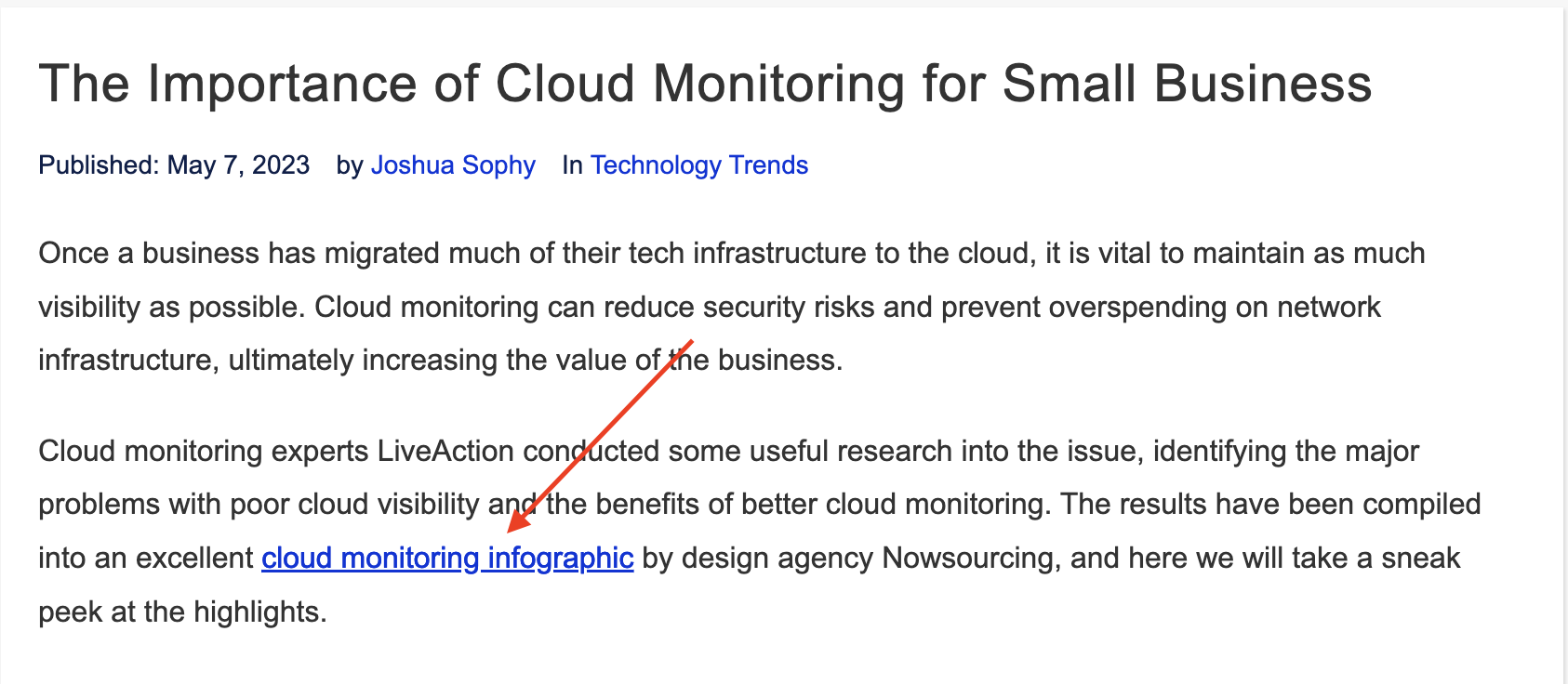
This is fine, too. It all depends on your niche’s anchor text ratios.
Final Thoughts
Guestographics are one of the best and most underutilized link building strategies in the SEO industry. They take just a few minutes to create, and in return, you get a contextual backlink, referral traffic, and entity reinforcement.
It’s hands down one of the best ways to build links, and, in our experience, publishers accept visual guest posts more often than text ones.
All you have to do is:
- Find the right sites
- Vet them
- Create your infographic
- Write high-quality content
- Pitch your post
- And link back to your site
It’s not that hard at all. Follow the advice you’ve read in this article, and you should be able to build high-quality backlinks with ease.
Good luck.
– Dusan Novakovic