So you spotted spam links in your backlinks report, and you’re worried they’ll have a negative effect on your search engine rankings.
My advice? Don’t worry too much…
Yes, spam links can damage your SEO, but usually only if you’ve built them en masse. In large quantities, spammy links can hurt your SEO because they may dilute the power of your high quality backlinks, lead to algorithmic suppression from Google, or even trigger manual penalties.
However, here’s what I’ve learned about spam backlinks over my 17+ years in the SEO industry:
Link spam refers to low quality links created solely to manipulate search engine rankings, which Google doesn’t like. BUT, Google’s anti-spam filters are scarily good at detecting spam and ignoring them these days. If you have just a normal amount of spammy or toxic links, that’s fine. Google doesn’t care.
Translation: Disregard low quality links in small amounts. And please don’t pay scammy link cleanup services thousands of dollars to do literally nothing.
Actually, immediately disavowing every low quality link could also hurt your SEO! I’ve seen some horror stories.
With that being said, mass amounts of low quality links built using abusive or manipulative tactics (including negative SEO attacks from jealous competitors) CAN destroy your rankings and get your site penalized. So, you still must be vigilant.
And that’s why I wrote this guide to spam links. In it, I’ll cover the real truth about link spam based on my 17 years in the link building game and overseeing tens of thousands of real link placements at PressWhizz.
I’m not selling you any link cleanup or disavowal services here. This is just 100% fact from my firsthand experience building links in some of the blackest hat (is this a word?) niches, like crypto, iGaming, and more.
What Are Spam Links?
Spam links are one or more of the following: low quality, mass produced, or malicious links.
They are usually manipulative in nature, and are used either to artificially boost your website up in Google’s search engine rankings or, conversely, to harm a competitor’s rankings.
Types of spammy links include weird TLDs (e.g., .xyz), link farm links, risky links from scammy markets, or mass amounts of links with over-optimized anchor text.
This is the common definition in the SEO world. However, Google says ANY type of link designed to manipulate its algorithm is a spam link. That would include any form of paid link.
According to Google Search Central, link spam is the practice of creating links to or from a website primarily to manipulate search rankings. This includes buying links, excessive link exchanges, automated link building, spammy directories, keyword-stuffed forum signatures, and more.
In other words, when you buy links, you are officially using black hat SEO link building tactics, according to Google.
In fact, here’s Danny Sullivan claiming that buying links could result in Google taking action way back in 2017:
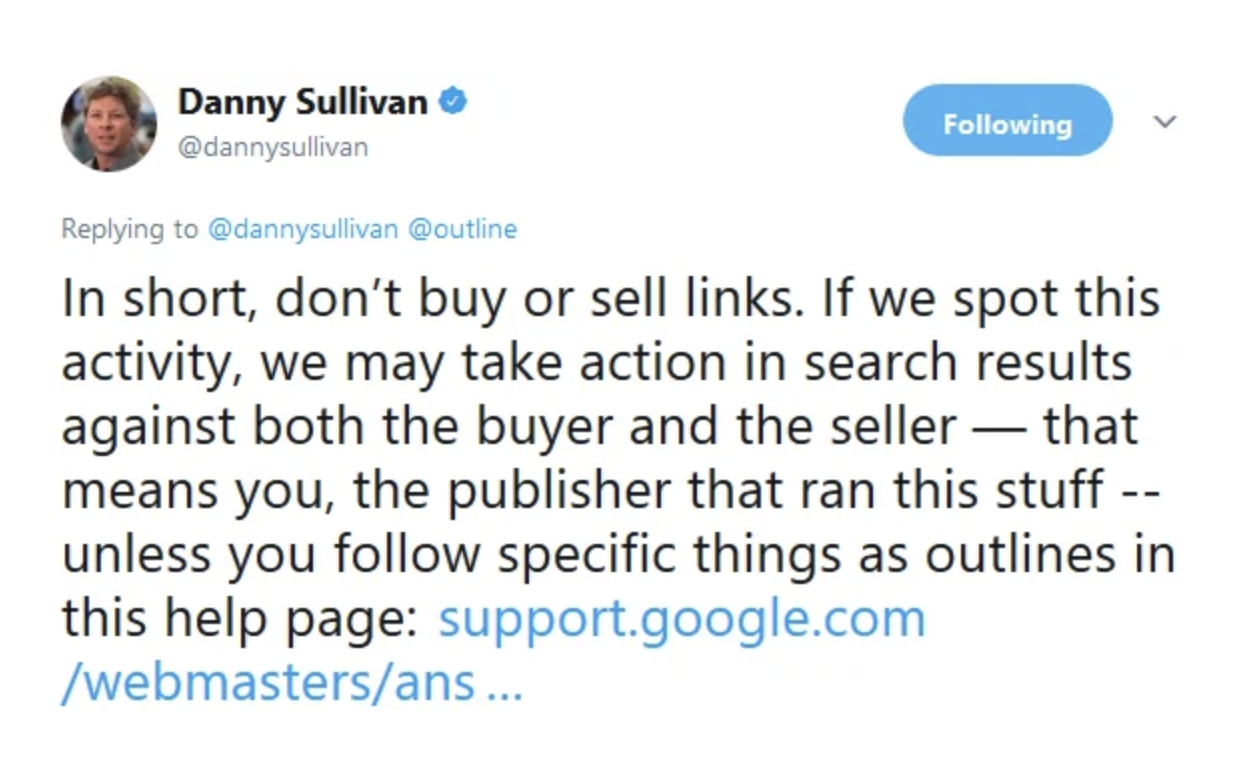
SEO has changed a lot since then, but Google’s stance hasn’t. They doubled down on it in 2023:
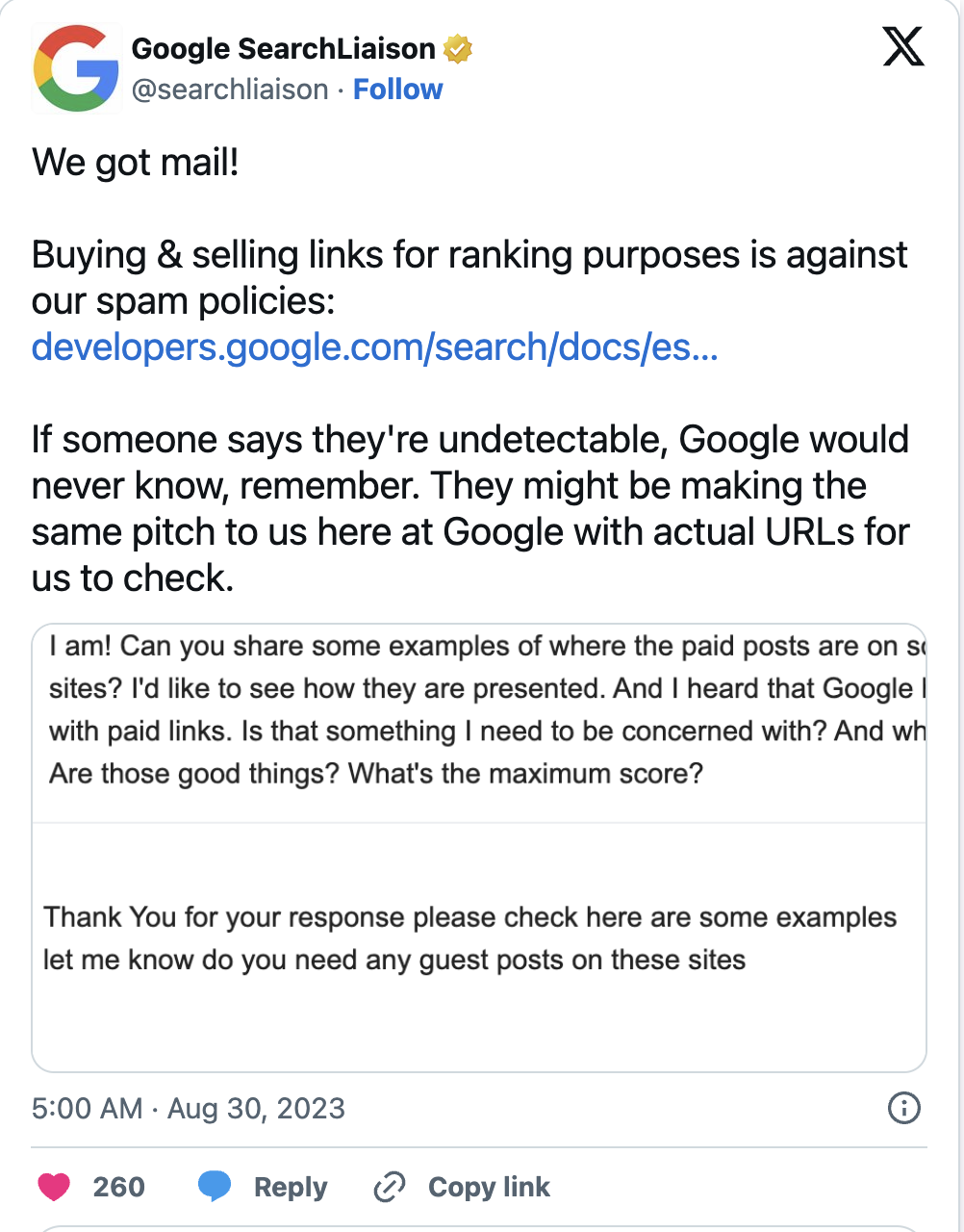
Now, you might be thinking this goes against everything you’ve ever learned about SEO (and everything yours truly has ever said or written about link building). And you’d have a point.
If you took Google’s definition literally, then practically every SEO on Earth would be a spammer. Guest posts, niche edits, link exchanges, digital PR backlink campaigns, and plenty of other top link building strategies that businesses use every day would all fall under the umbrella of “link spam.”
Clearly that isn’t the case. As long as you know where and how to buy backlinks properly, you’ll be fine. We’ve completed tens of thousands of link orders without a single issue. The web is simply too large for Google to police the entire link market.
Don’t get me wrong. REAL link spam is out there, and it can hurt you.
But in practice, Google is far better at evaluating the quality, context, and patterns surrounding links than determining whether money changed hands behind the scenes. As long as your links are “good”, Google usually will not flag them as spam.
For example, if you buy a guest post on a real website with organic traffic, relevant content, and reasonable outbound links, Google will treat it as a healthy link. There’s no magic Google spam button that says, “WARNING: Charles paid $200 for this one. NUKE”
From Google’s perspective, it’s just another contextual backlink. So, take its official definition with a grain of salt.
Still, it’s useful to understand what spam links are to avoid going overboard and putting your site at risk.
Are Spammy Links Bad for SEO?
Generally, yes, a high number of spammy links is bad for SEO, but a few won’t have any negative effect on your website’s rankings.
Despite what SEOs and toxic link cleanup services tell you, Google mostly ignores low quality backlinks in small quantities.
Ironically, some of the biggest, most successful sites dominating SEO these days have tons of spam links pointing at them. Look at this screenshot from a website that has thousands of low quality domains pointing at it:
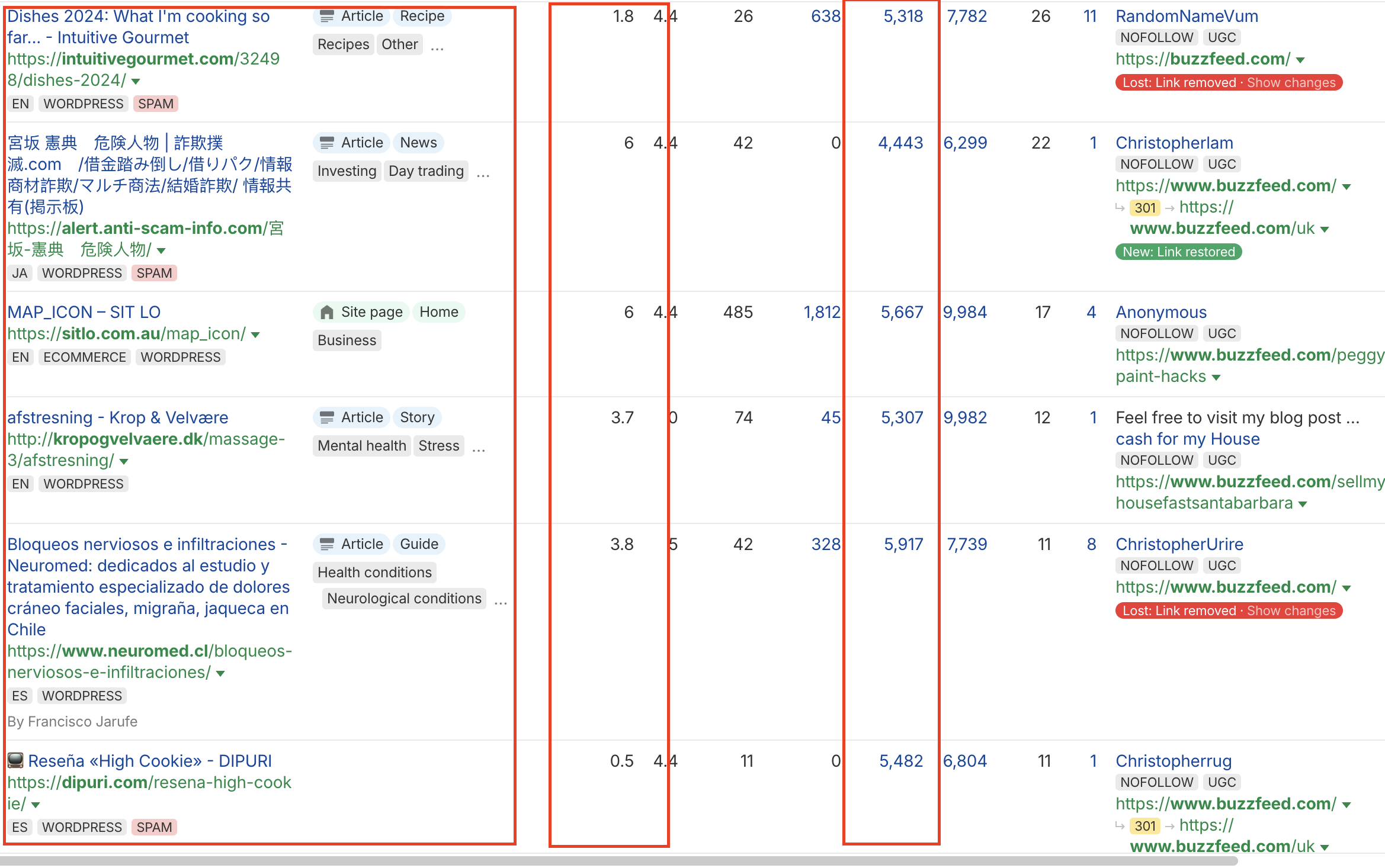
Weird names. Low DR. Little to no traffic. Tons of outbound links…definitely not editorial links here by any means.
But do you see on the right hand side which website this is? It’s not some random site that got nuked off the SERPs. It’s BUZZFEED.
BuzzFeed has 6.6 MILLION organic visitors per month:
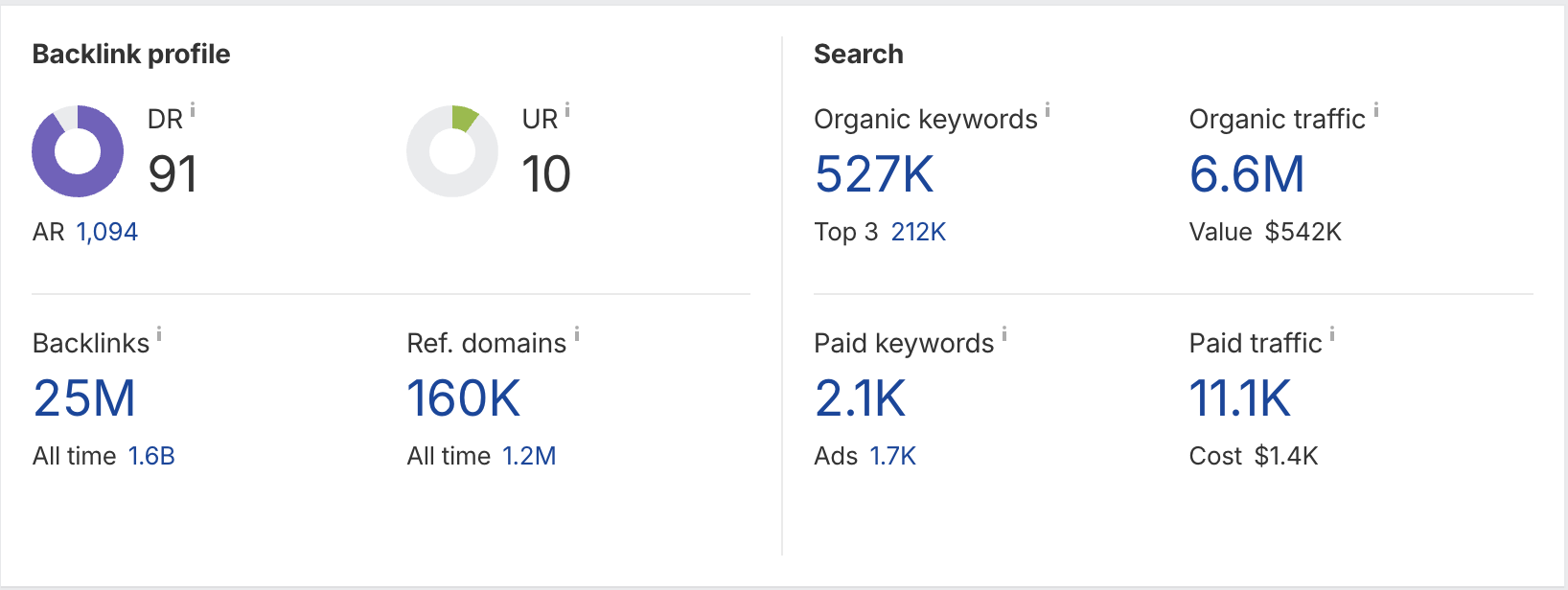
So clearly, it’s not going to hurt your site if you have these links in small quantities.
But if Google detects patterns of link manipulation at scale, such as building dozens or hundreds of spammy links in a day, then you almost certainly will receive a manual penalty or your site will be suppressed in Google’s search results.
However, I want to make a few things clear.
First, the above applies to links that Google recognizes as spam. You don’t have to worry about other types of links you’ve built using tactics Google considers to be grey or black hat, such as paid guest blogging, buying backlinks, link exchanges, etc., so long as you’ve done it properly.
If those links you built are genuinely high quality and you don’t blatantly abuse the system, Google probably won’t flag those links as spam.
Think of it like speed limits on highways: If the speed limit is 65mph, you can probably go 80mph with no issues. Everyone does. Just don’t go 120mph and you’ll be fine.
Back to link building…
The reason that a few low quality backlinks won’t hurt you is because Google automatically detects and neutralizes many forms of link spam. To its credit, it’s pretty dang good at it, too.
Rather than issuing penalties for every questionable backlink (which would destroy the web), Google reduces their effectiveness or ignores them.
All sites attract spam links. Period. Just look at PressWhizz’s backlink profile:
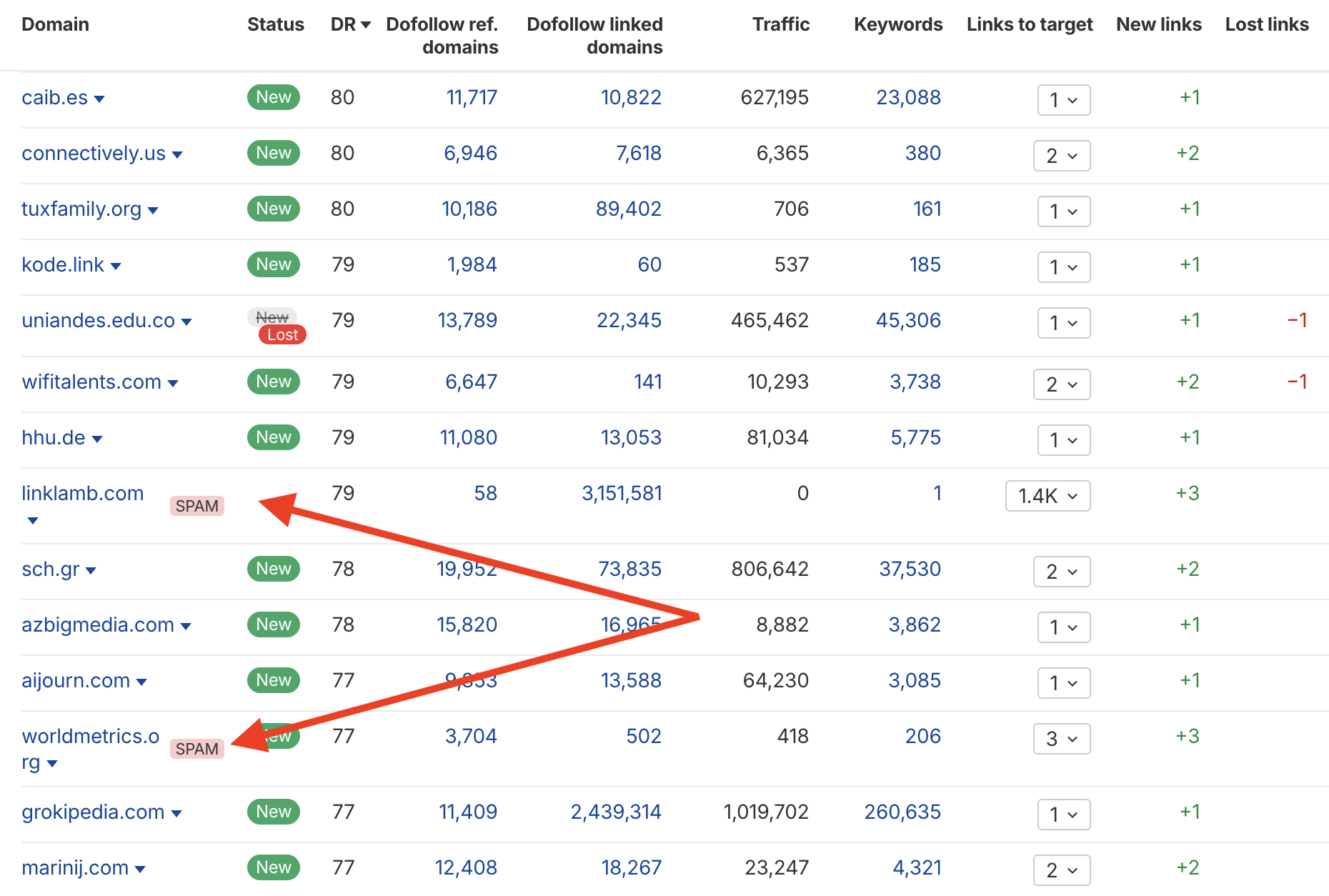
Google has likely flagged these referring domains as spam (we can’t know for sure, as this is based on Ahrefs’ spam scoring system and not Google’s secret spam detection algo). But it doesn’t bother me, because the vast majority of our backlinks are high quality.
So, to sum this section up…
The problems start when you actively build spam links en masse. Spending your time and money on obvious spam links such as junk directory links, forum profile spam, hacked links, or automated blasts is bad for SEO.
If Google detects that you’re abusing the system, it will almost certainly algorithmically suppress your site or slap you with a manual penalty.
TL;DR: As long as you buy backlinks from the right places using the right tactics, you’ll be fine.
What Are the Different Types of Spam Links?
The most common types of spam links include:
- Link farm spam (low quality PBNs)
- Weird TLDs
- Over-optimized anchor text links
- Hacked links
- Automated links
- Low quality forum and comment spam
- Toxic niche links
We’ll take a closer look at each type of link spam below.
Link Farms (Low Quality PBNs)
Link farms are networks of low quality websites created for one purpose: selling or exchanging backlinks to manipulate search rankings.
If you’ve ever browsed Fiverr or Upwork and seen someone selling “500 DA90 backlinks for $20,” you’ve found a link farm. I promise you this guy isn’t personally emailing Forbes editors from his basement:
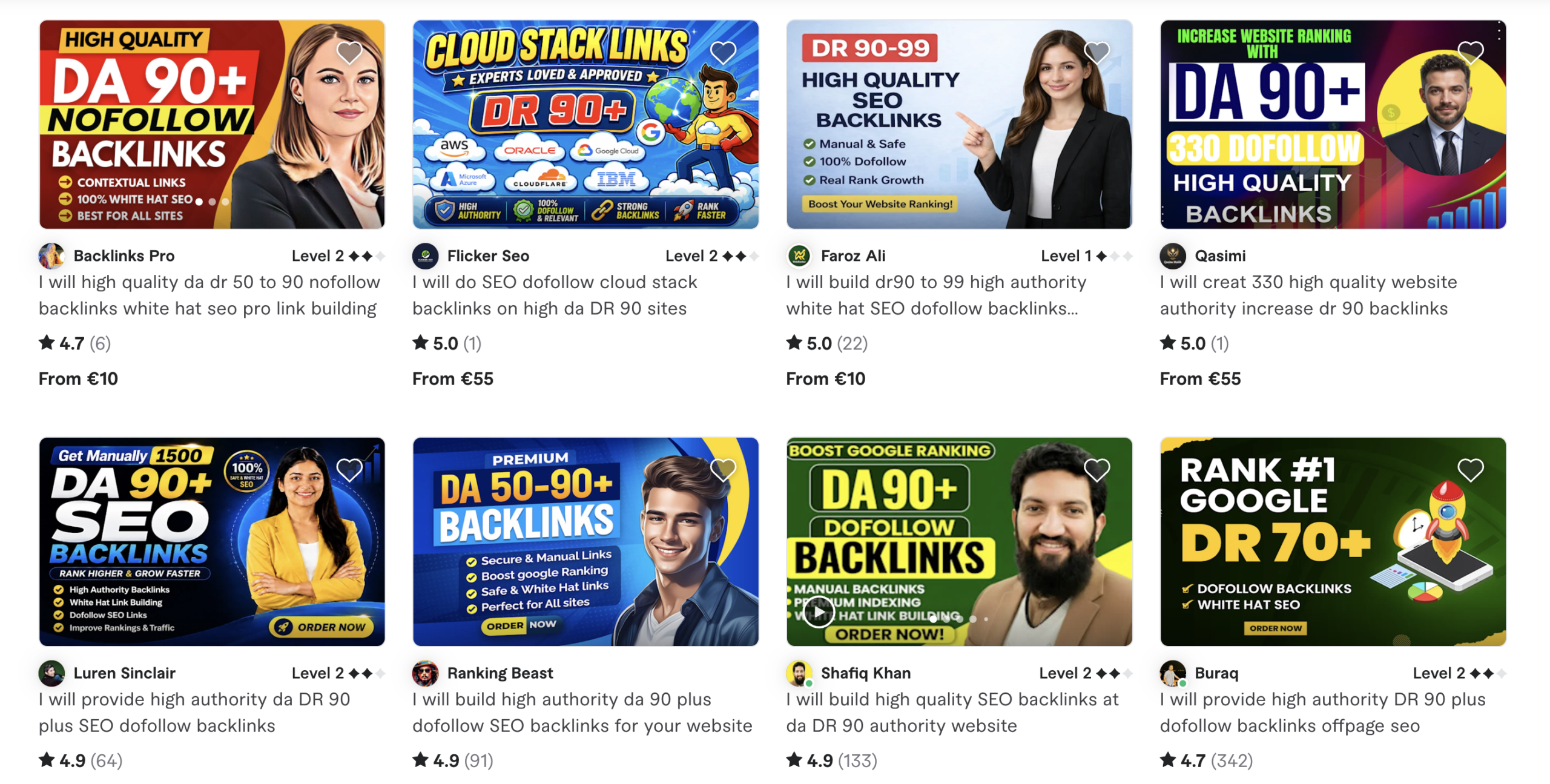
The way these link farms work is pretty simple.
Someone buys hundreds or thousands of cheap domains, throws AI-generated content on them, and stuffs every article with outbound links to paying customers. Sometimes they’ll even share the same IP addresses, WordPress themes, and footprints (which Google will easily detect…and destroy).
Here’s what a basic low quality PBN site looks like:

Google is pretty good at spotting these spammy link farms. These links are never worth it. You might think that for ~$50, you have nothing to lose by getting hundreds of backlinks, but what you’re actually doing is paying to dilute your backlink profile.
Even if Google ignores the spam, you’re still damaging trust and authority flowing into your site by having an overall weaker backlink profile.
Note: Not all PBNs are bad. Well built networks can still be extremely effective when used correctly. I use high quality PBNs for link building all the time, and I’ve outlined exactly how in my PBNs guide.
Weird TLDs
Unusual top level domains (TLDs) are sites that end in .xyz, .top, .online, .click, etc. Uncommon TLDs aren’t inherently bad for SEO (Google has repeatedly stated that all generic TLDs are treated equally), but many low quality sites, spam campaigns, and disposable link networks use cheap TLDs.
This means that in reality, these extensions have a much higher concentration of spam compared to established domains like .com, .org, and .gov.
Here’s an example of a spammy page with an .xyz TLD:

Now, I love German crypto scam groups as much as the next guy, but this page’s URL is “top-millionaire.xyz/?aff=3629.” Not super trustworthy.
It has all the signs of link spam, including affiliate tracking parameters in the URL (?aff=3629), an autoplay video on the homepage, and ad network connections.
Again, let me reiterate so I don’t get retweeted (re-Xd?): If your backlink profile contains a handful of .xyz or .top links, you have nothing to worry about. But when hundreds or thousands of your referring domains come from obscure TLDs with no organic traffic or keyword rankings, your backlink profile will start to look sketchy.
Over-Optimized Anchor Text Links
Anchor text is the visible, clickable text in a hyperlink link that’s usually blue in color. And one of the main types of anchors that SEOs build is known as an “exact match” anchor, meaning it matches the keyword you wish to rank for exactly. For example, if you want to rank for “best protein powder”, then your anchor would be “best protein powder”.
OK, now that SEO 101 class is over, let’s get to the fun stuff.
Anchor text is one of the easiest ways for Google to identify an artificial backlink profile. If the vast majority of your anchors are exact matches to the keywords you wish to rank for, you’re asking for a penalty. To be safe, keep exact match anchors to around 20-30% of your anchor text profile MAXIMUM.
If your anchor text profile looks like an SEO keyword spreadsheet (all exact match anchors), Google may decide that those links are “manipulative” and ignore or penalize your site.
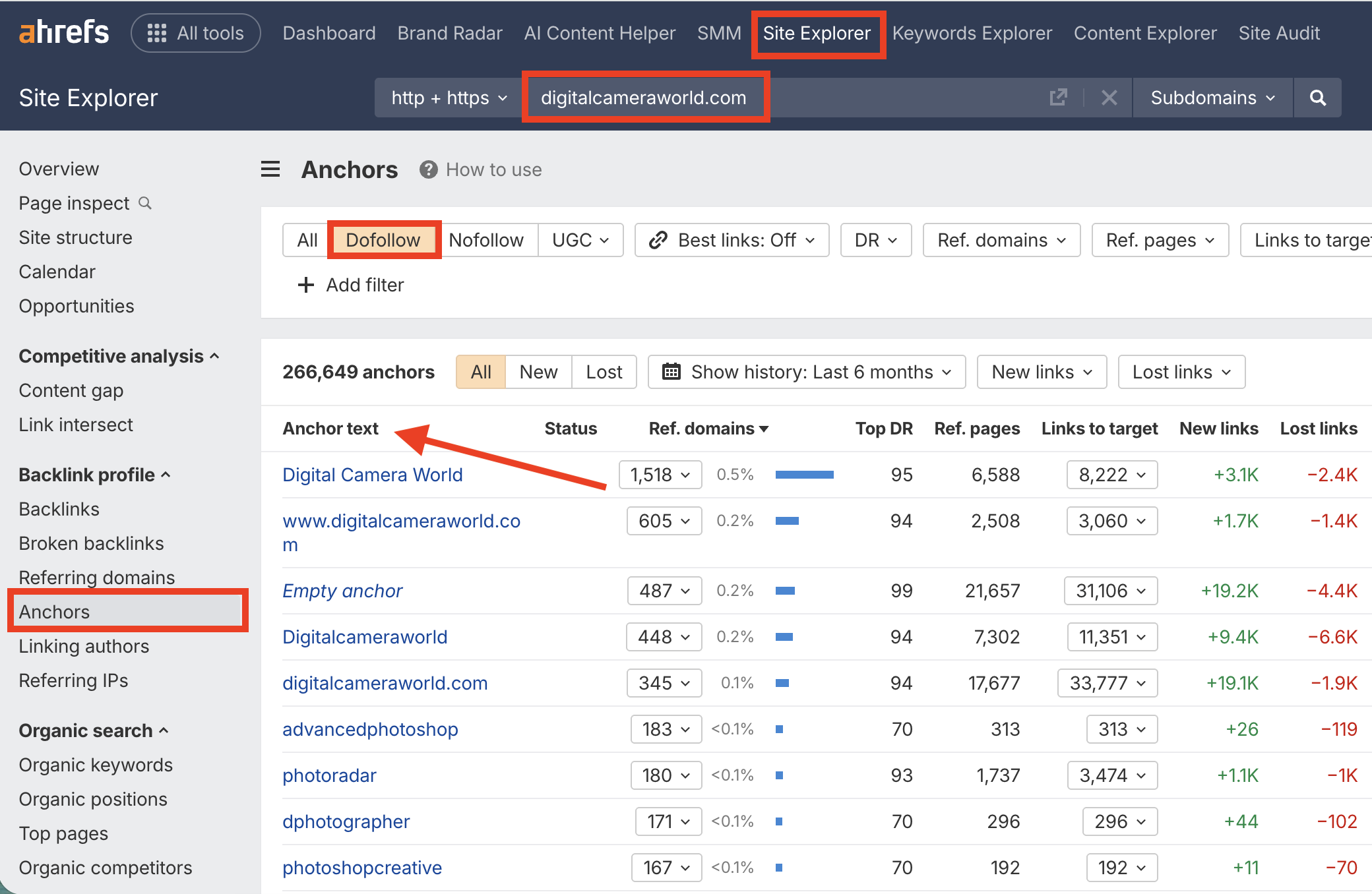
A backlink profile with spammy anchor text might look like this:
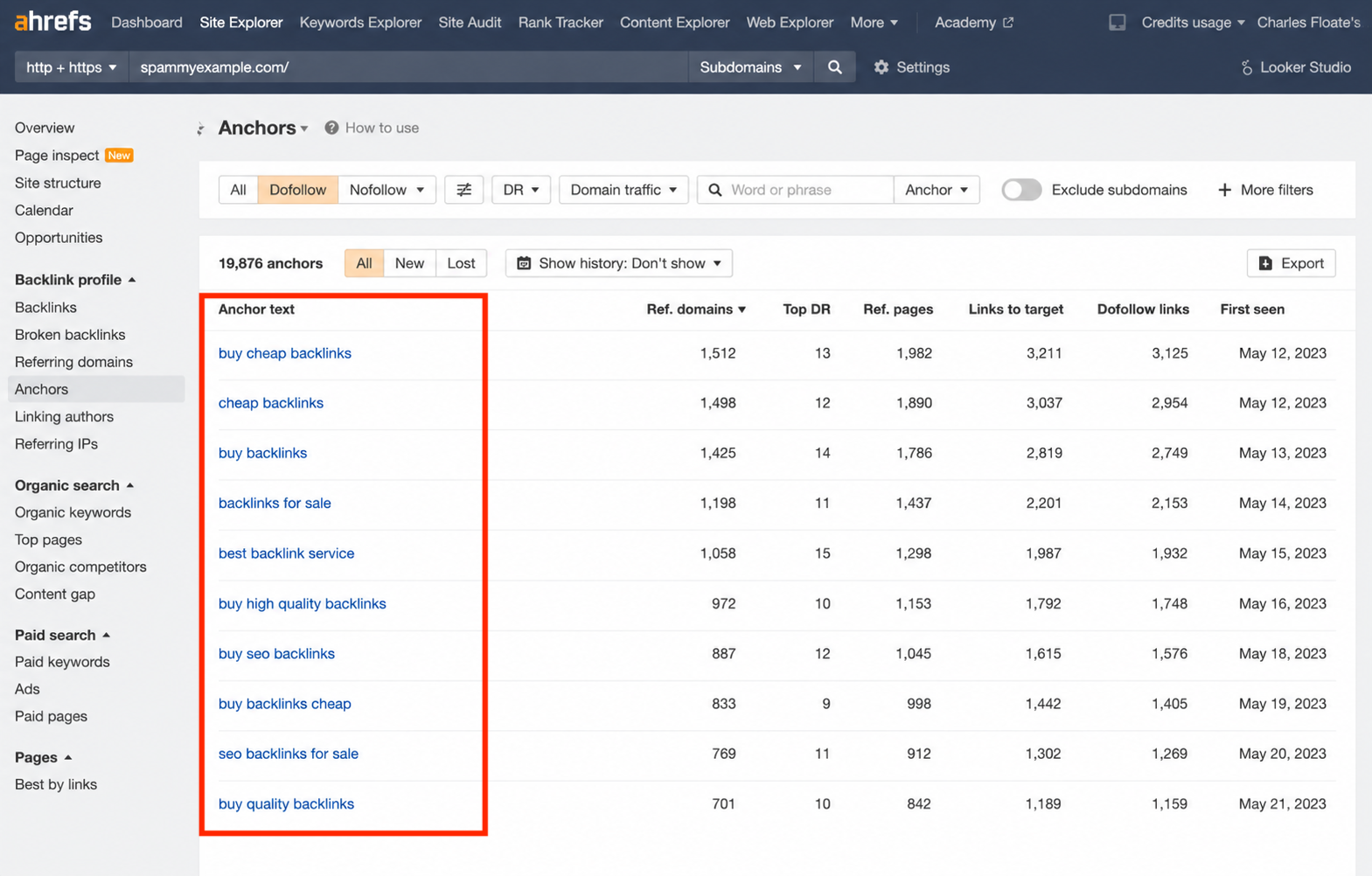
Notice how all of the anchors here are obvious exact match keywords. That makes this backlink profile look like an SEO person created it in a lab.
So, how many exact match keywords can you use? Look to your competitors as a guide. If your competitors all have roughly 5-10% exact match anchors in their backlink profiles, you should match that. It might be more or it might be less. I’ve seen exact match anchor ratios as high as 25% before. Every niche is different. You need to do the research.
To check your anchor text profile and investigate your competitors:
- Enter a domain into Ahrefs Site Explorer
- Click Anchors in the side menu
- Sort by Dofollow
Hacked Links
Want to find yourself in real jail instead of just Google jail? Build some hacked links.
Hacked links are backlinks placed on websites without the owner’s permission. This is considered hacking, and it is illegal. I 100% recommend you NOT to do this.
Many hacked links lead users to malicious websites or malware, but some SEOs get it into their heads that placing their own hacked links is a shortcut to authority. This is a terrible idea.
To sum up: don’t build hacked links.
Automated Links
Next up is automated link building. This is just a fancy term for the good ol’ link blasting that everyone used to do back in the day.
If you were around in 2015, then you used software to automatically blast thousands of links across blog comments, forums, guestbooks, directories, wiki pages, and other user-generated platforms.
The crazy thing was it worked by some miracle of science.
Back in the day, this tactic printed money. Today, it’s useless. However, some SEOs still offer these spammy link building services.
Here’s a good one:
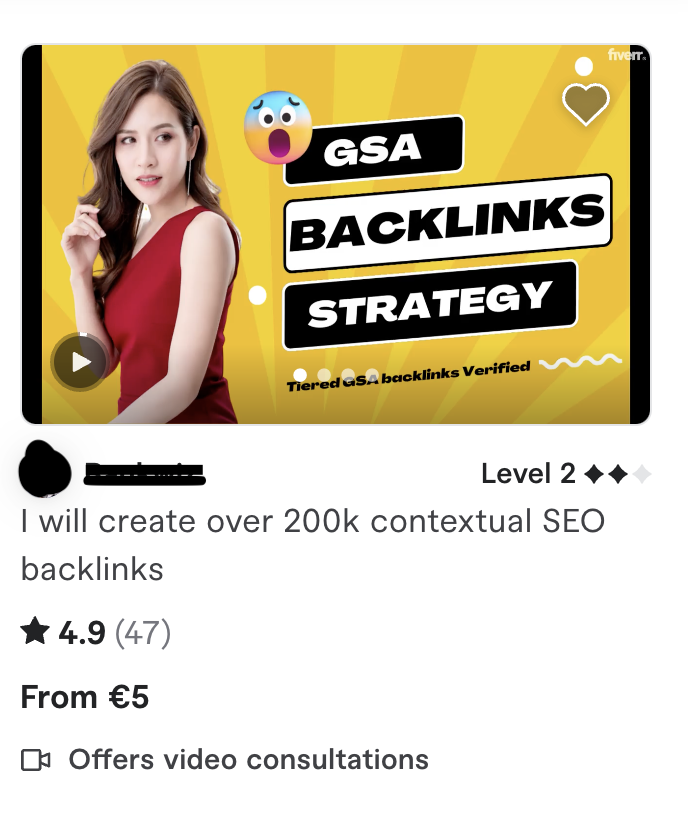
200k links for 5 bucks? Amazing. WHERE DO I SIGN?
Jokes aside, these packages are worse than useless. Google’s anti-spam systems catch automated links instantly, and because they’re created quickly and en masse, they can pose a serious threat to your site.
Having said that, not all automation is bad in link building. I use automation for indexing, entity building, and building Web 2.0 links (but it’s a bit complicated and not fully automated). I cover this in my guide to the tiered link building strategy, if you’re interested.
But generally, you should stay away from automated link blasts.
Low Quality Forum and Comment Spam
Forum and comment spam is mostly self explanatory. These are links placed in forums, comment sections, user profiles, etc. They’re sneaky links that add nothing of value, and Google almost always ignores them.
Here’s an example of someone spamming an article on Medium with their backlink:

Seriously, though. Who are these people? Who has time for this?
This is done poorly and is painfully obvious. If you create comment links like this, Google ignores them instantly.
However, forum and comment links can be valuable IF you do them right. Smart SEOs use forum profiles, comments, and community links as lower-tier assets.
Mentions in comments and forums can also benefit entity reinforcement and help boost brand mentions in AI search results (AEO).
So, forum and comment sections are still relevant and valuable for SEO. But outdated, low quality spam is not worth your time.
Toxic Niche Links
Toxic niche links include adult, crypto, pharma, payday loans, gambling, and other niches where links tend to be spammy looking. Entire link networks exist around these industries, and many of them are complete garbage.
Google usually considers these to be toxic backlinks (but not always), and it’s especially vigilant about links coming from these industries. So, if your backlink profile is flooded with Bitcoin forums and Viagra blogs, it might be a problem.
This of course doesn’t apply to you if you’re actually in those niches. If you’re running an online casino, crypto exchange, or similar “taboo” website or business, links from those industries are expected. And of course there are always exceptions to the rule. If a sports blog gets a lot of links from gambling related websites, it’s probably fine, so long as those sites are legit.
Unfortunately, toxic niche backlinks are common in negative SEO attacks. So, you might see 10,000 of them suddenly appear in your backlink profile.
Here’s what it looks like in Google Search Console (GSC):
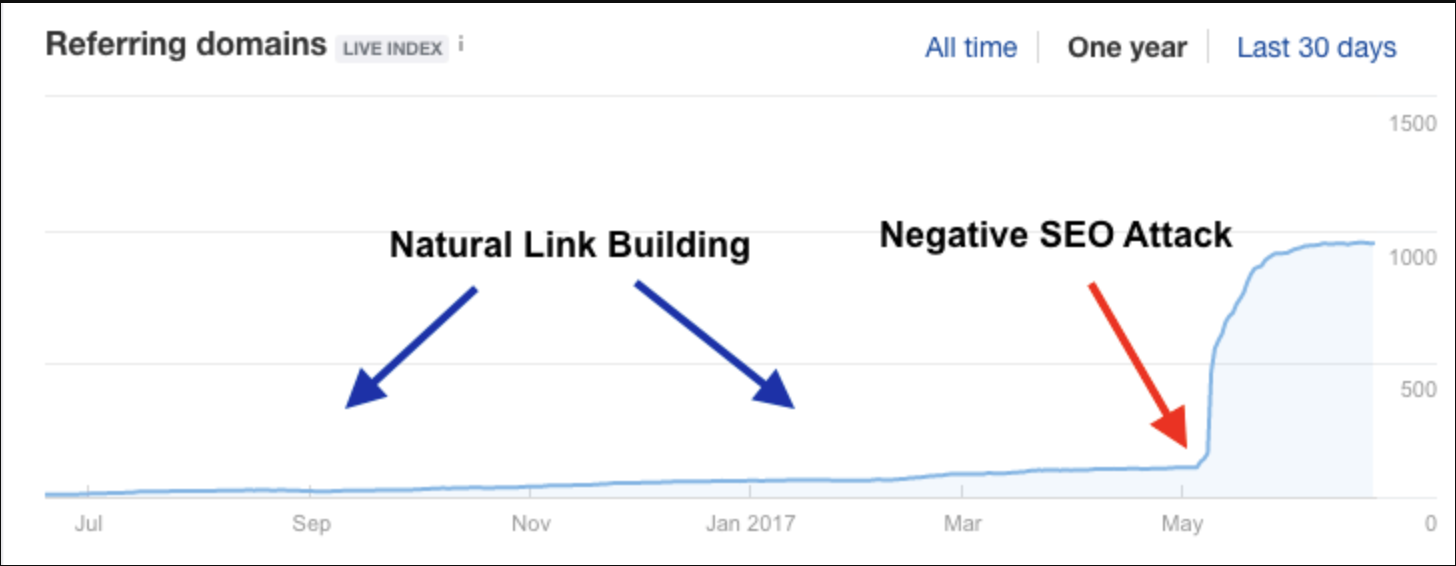
These days, Google is pretty good at ignoring this stuff, but if toxic links keep appearing, they can put your site at risk.
It’s important to keep an eye on your backlink profile and consider disavowing links if you experience sustained or regular negative SEO attacks.
How to Identify Spam Links
Next up, I’d like to show you how to identify spam links so you can start both evaluating potential link building opportunities and cleaning up low quality links in your existing link profiles.
It’s all part of good backlink management anyway, which you should be practicing at all times.
Here are the best ways to identify spam links and protect your website (and wallet).
Google Search Console
Google Search Console (GSC) should be your first stop when checking for spam links because it’s Google’s own data. The downside is that Google won’t tell you specifically which links it considers spam.
However, you can still see:
- Top linked pages
- Top linking sites
- Top linking text (anchor text)
- Internal links
Now, you’ll have to do a little detective work by reviewing your top linking sites for signs of spam.
Here’s how to do it in GSC:
Look at Top Linking Sites:
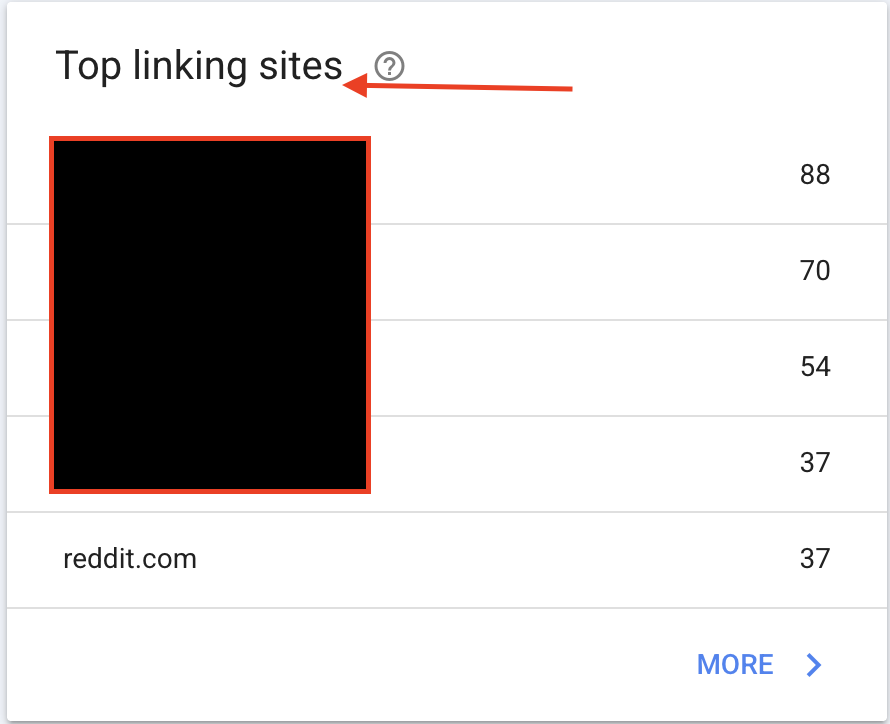
Then, click More to see all referring domains:
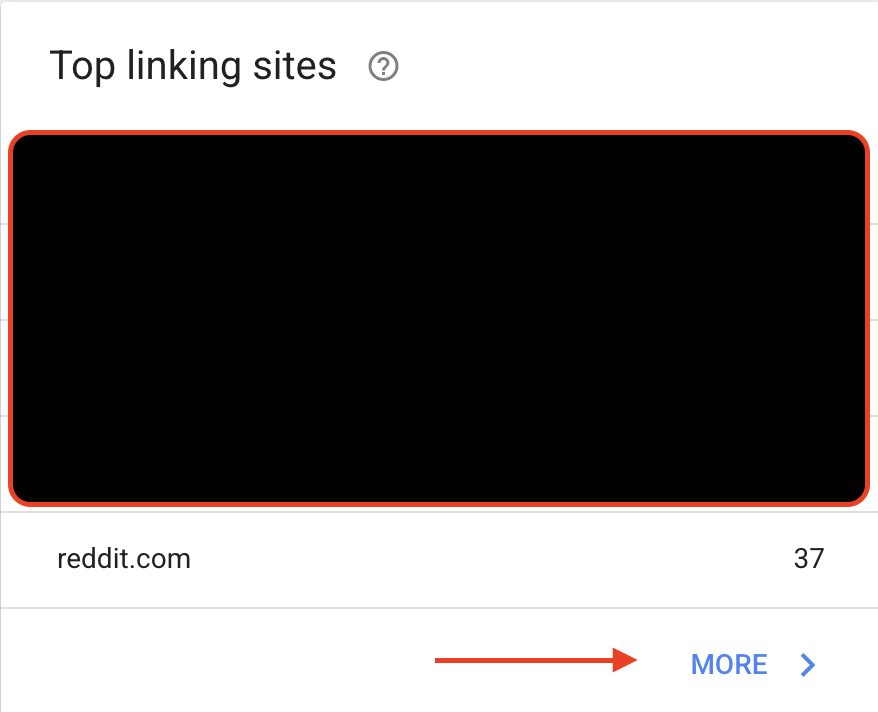
Then, look for obvious red flags such as:
- Strange foreign domains with random names
- Huge numbers of links coming from a single website
- Adult, casino, crypto, or pharma sites unrelated to your niche
- Weird TLDs like .top, .xyz, .click, or .site appearing repeatedly
- Domains you don’t recognize and never intentionally acquired links from
Next, go to Top Linking Text to check your anchor text profile:
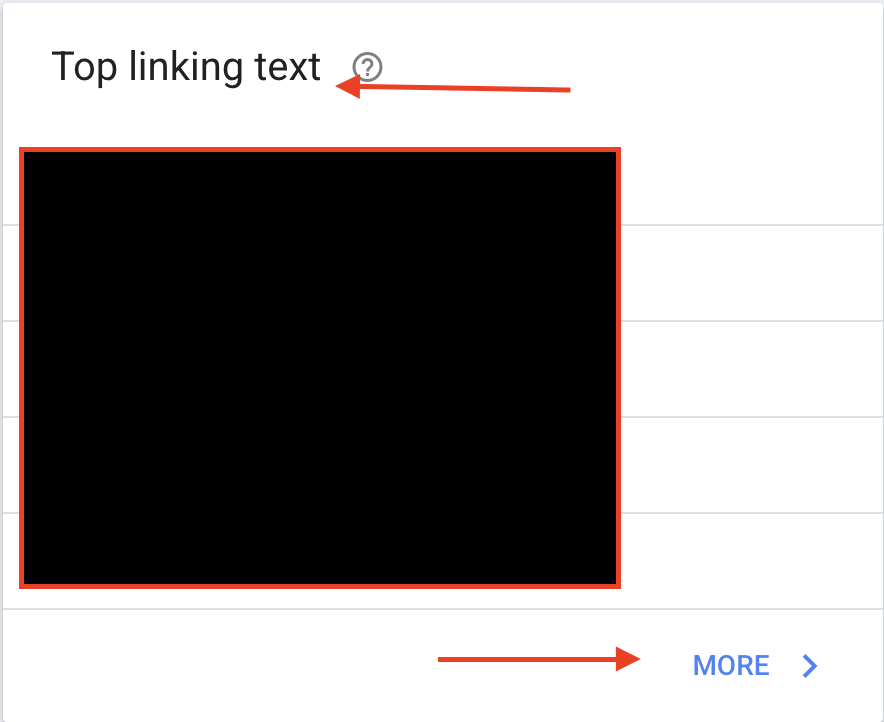
Watch for:
- Too many exact match keywords
- Foreign language anchors
- Toxic niche keywords
- Anchors that have nothing to do with your business
- Hundreds or thousands of identical anchors
Again, Google won’t tell you outright which links it trusts and ignores. But if you’re familiar with the different types of spam links I’ve covered in this article, you should be able to spot obvious spam patterns quite easily (especially if there are many of them).
Ahrefs Metrics
Ahrefs is my favorite tool for link building, so it’s obviously going to make the list here.
Unlike GSC, Ahrefs labels potential spam links as “spam.” This makes it easier to evaluate the spam in your backlink profile at a glance, unlike GSC, which requires you to actively search your backlink profile for spam signals.
Just keep in mind that Ahrefs’ spam labels are based on its own algorithms, not Google’s (the spam label is not a Google metric). So, take it with a grain of salt. Sometimes it’s wrong.
However, I’ve found it to be quite reliable (just make sure to sense-check things).
Here’s how to check your website for spam links using Ahrefs:
Enter your domain into Site Explorer and navigate to Referring Domains under Backlink Profile in the side menu.
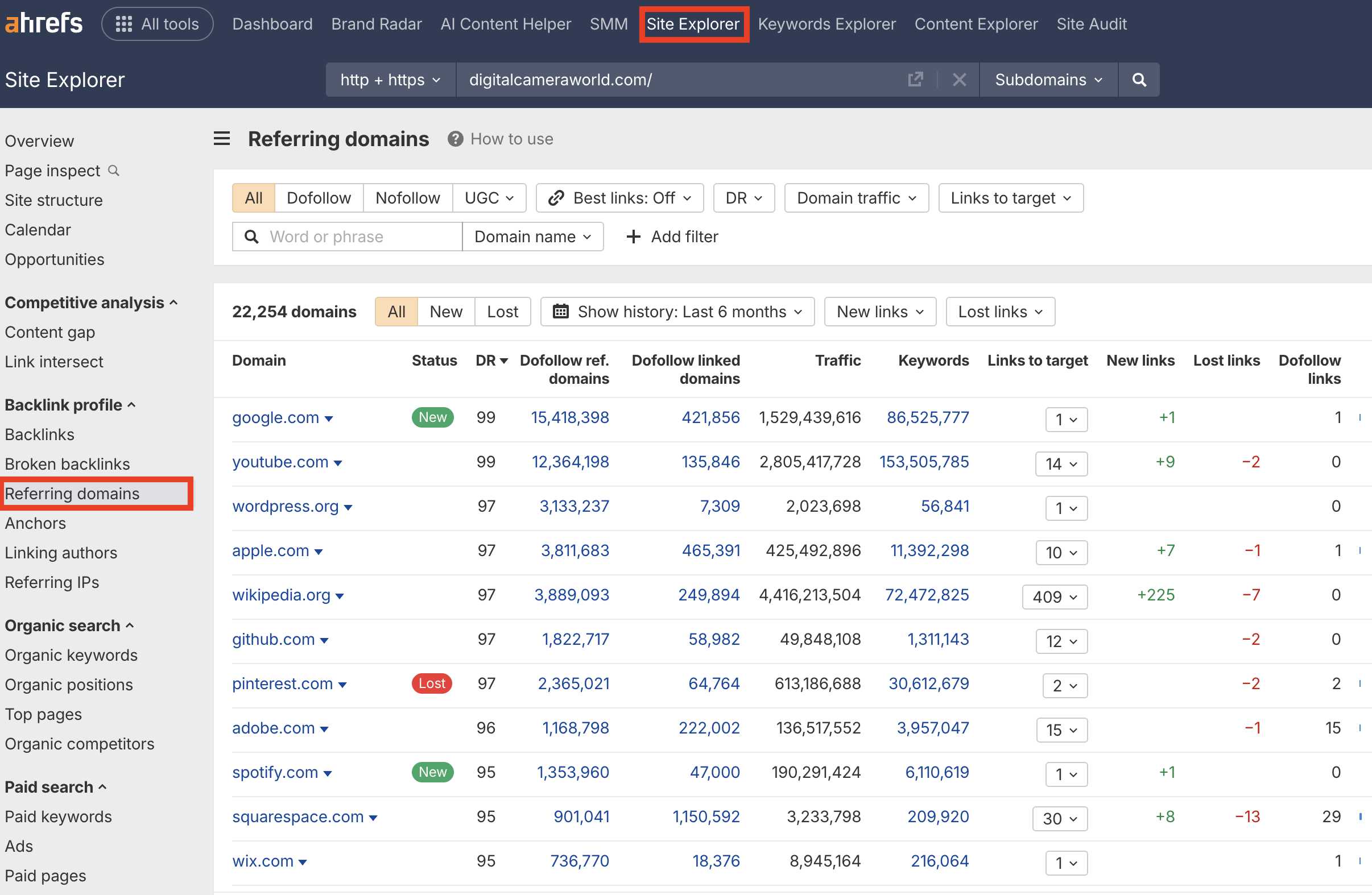
We haven’t applied any filters yet, so the backlink profile looks nice and clean.
Next, filter your results by Traffic and set a range of 0–10. Many low quality domains (PBNs, etc.) have little to no traffic, so this should highlight potential spam. Also, click the Dofollow linked domains column and sort by descending. This helps identify link farms that link out to hundreds of thousands of domains (or more).
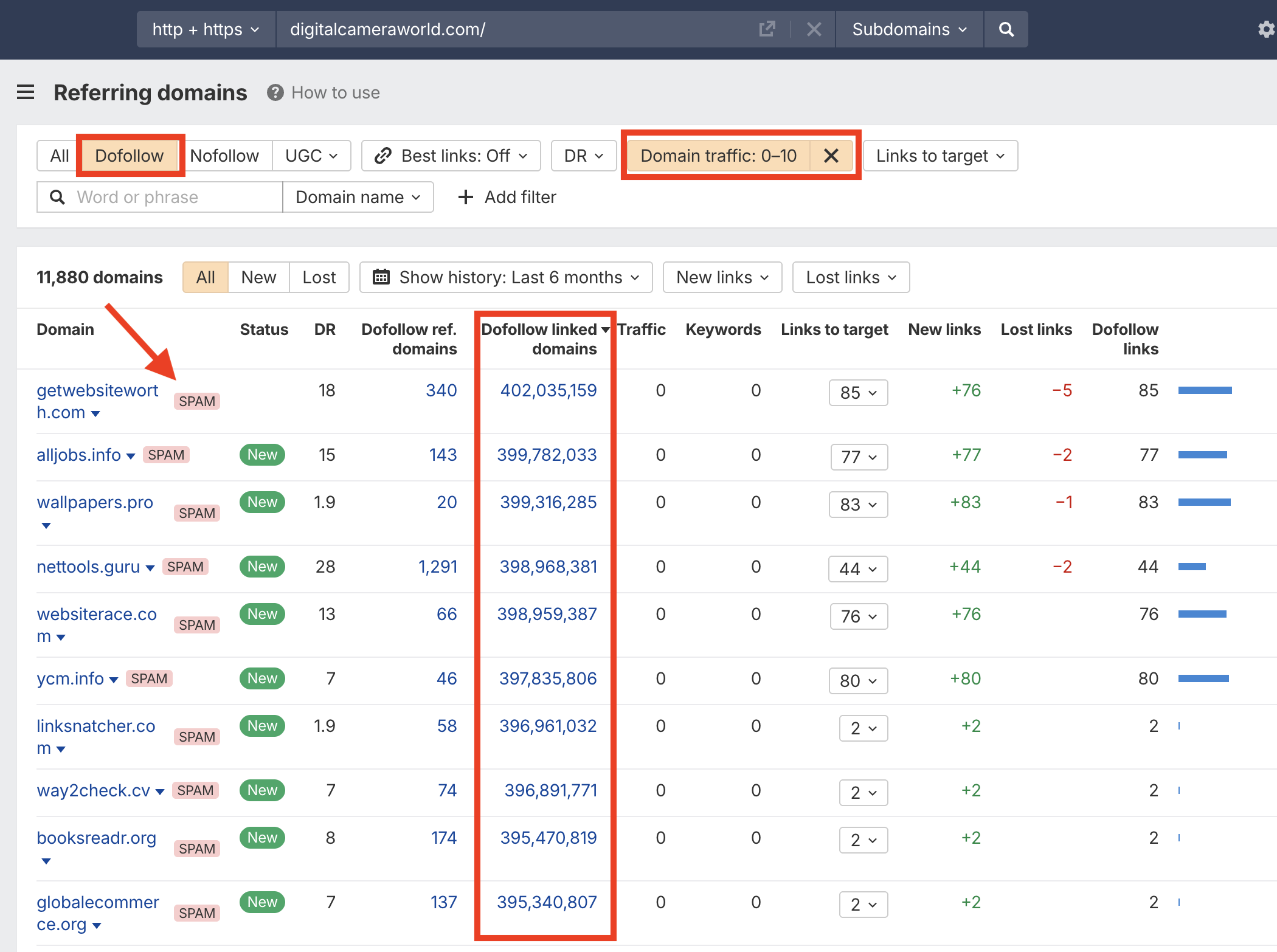
See how these links have low DR, no traffic, hundreds of thousands of linked domains, and weird TLDs? There’s no question these are spam links.
Semrush
I typically use Ahrefs to check for spam, but Semrush has a similar system for detecting toxic links, which is slightly more nuanced. Instead of just assigning a “spam” label, Semrush gives spammy links a Toxicity Score (TS), from low to high. TS is based on dozens of signals, including suspicious TLDs, link networks, low authority, and unnatural patterns.
Here’s how to use it to identify spam links…
After setting up a project, navigate to Backlink Audit and let Semrush crawl your backlink profile. The tool assigns a TS to your backlink profile as a whole and to each referring domain.
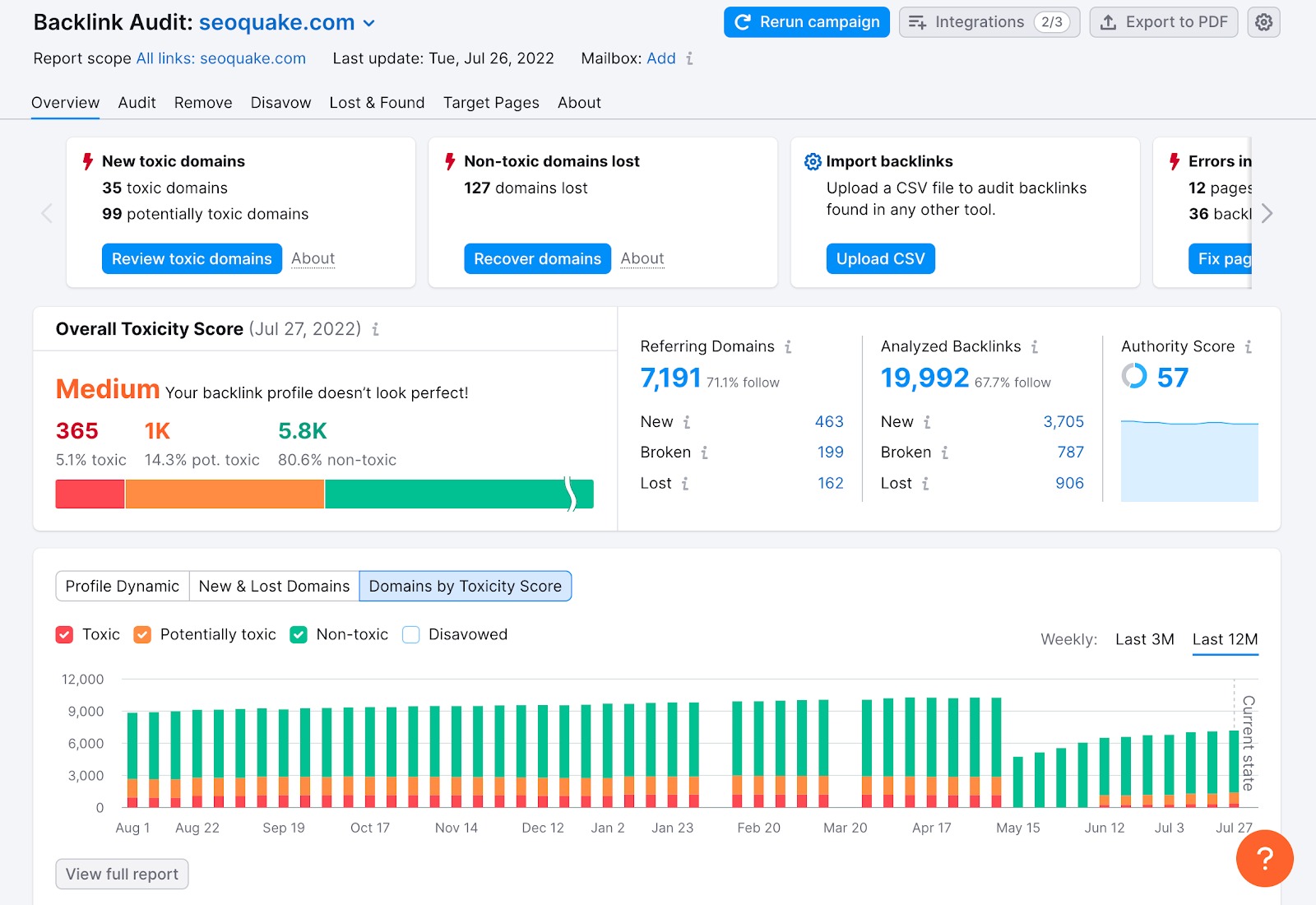
View your backlinks and sort the results by TS to investigate the most suspicious domains.
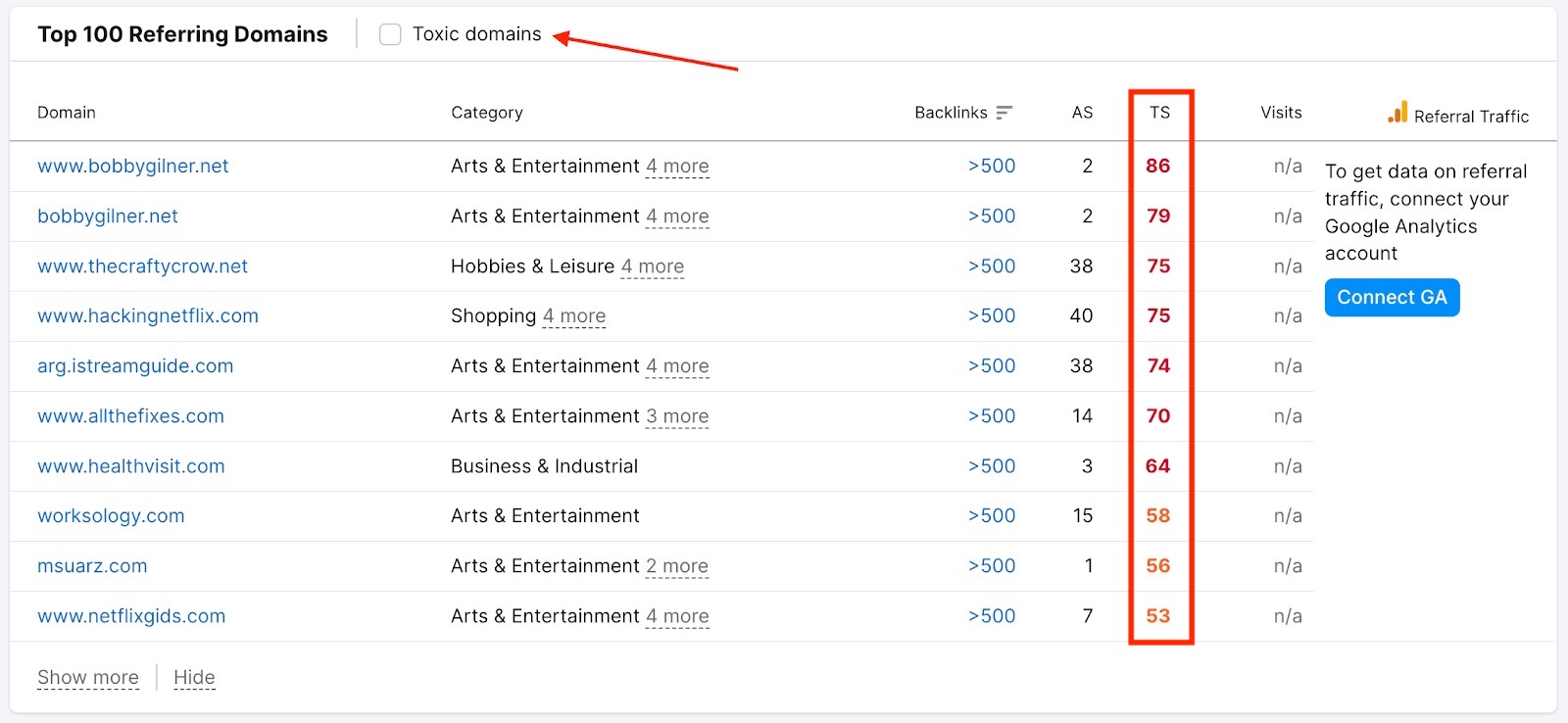
Remember that, like Ahrefs’ “spam” label, Toxicity Score is not a Google metric. It’s just an estimate, but it is good for highlighting obvious spam links.
Moz Spam Score
Moz’s Spam Score is probably my least favorite way to identify spam links, but if you have a Moz account, I still recommend using it.
This scoring system tries to determine if a domain resembles spammy websites that have been penalized or banned by Google in the past and assigns them a score from 1% to 100% (again, this is an estimate and not a Google metric). It also assigns an overall spam score to your domain.
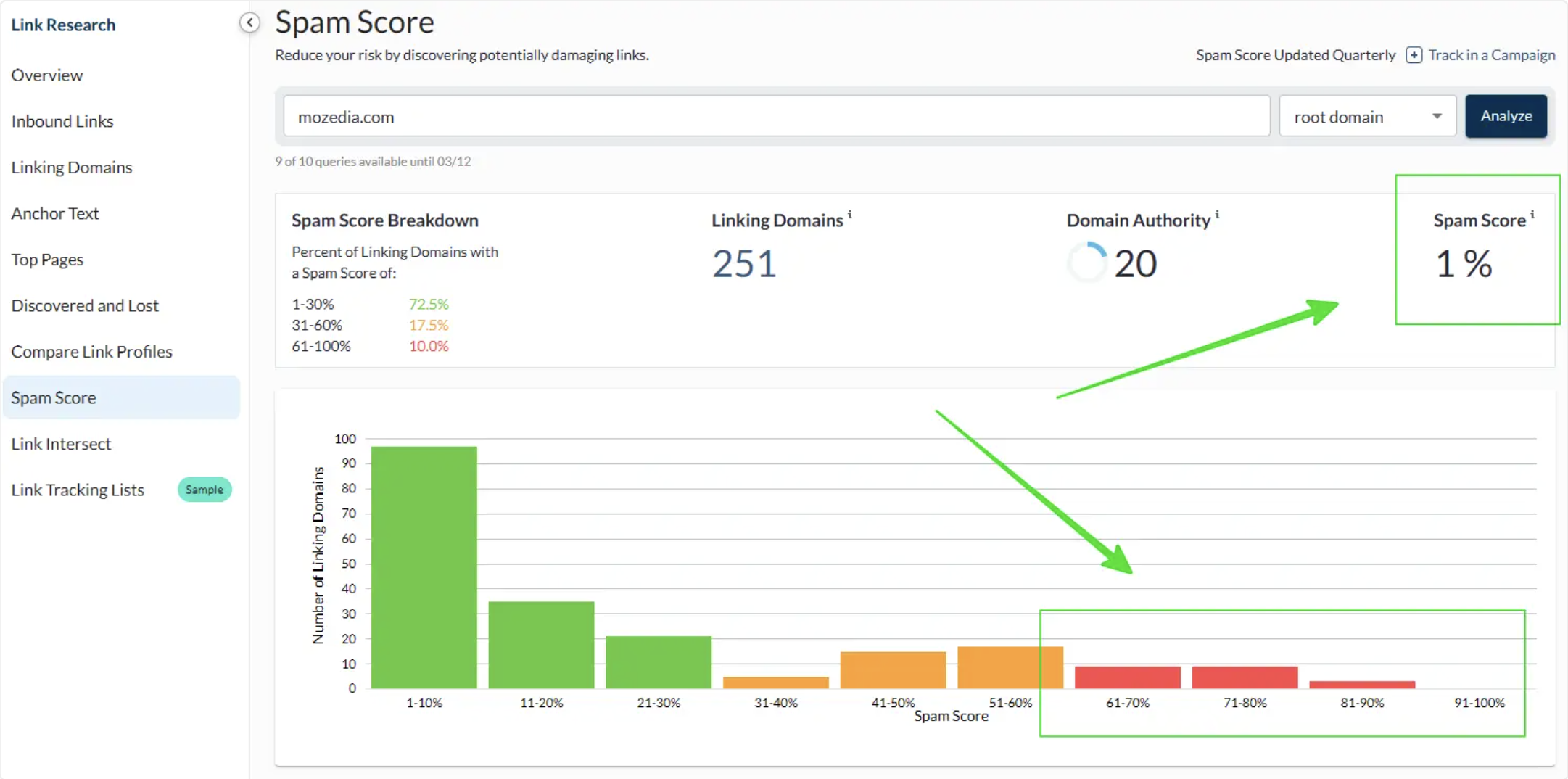
Moz’s Spam Score can help:
- Flag obviously suspicious domains for manual review
- Identify patterns across large backlink profiles
- Prioritize which sites deserve investigation
But it also has issues, in my opinion.
For example, a high-quality PBN with little traffic and lots of outbound links might get a 60% Spam Score and still pass excellent value. And a legit directory site may score poorly according to Moz just because of its structure.
I’ve seen plenty of “spammy” domains with 50%+ Spam Scores deliver incredible SEO results. Moz’s own metrics consider a Spam Score of 30% as healthy, which is kind of confusing.
Still, it isn’t bad for flagging obvious spam links. If a website has a 70% Spam Score, it’s probably toxic.
How to Disavow Spam Links
Disavowing links tells Google to ignore certain links in your backlink profile. It’s very straightforward. Just add the links you’d like to disavow to a .txt file and submit it using the Google disavow tool. I walk you through it step-by-step in my guide, How to Disavow Links Safely.
Just remember that disavowing links is very rarely necessary. It’s not intended as a tool for removing random spam from your backlink profile. Google already ignores spam links very effectively.
Disavowing is only for rare occasions when a domain has massive amounts of spam, such as:
- Negative SEO attacks
- Aged domains with lots of legacy spam
- Massive concentrations of exact match anchors
- High numbers of hacked links
Even if your backlink profile is 20-30% spam, you should be fine (although this is worth investigating). If you have above 40-50% spam, you might want to consider disavowing.
Here’s a brief breakdown of how to disavow links on Google:
1. Create a Disavow File (.txt)
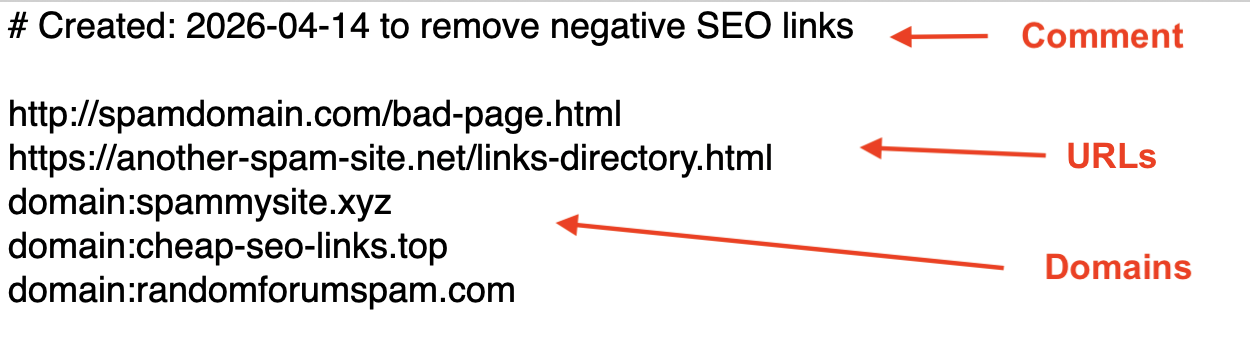
A disavow file is a basic .txt file that consists of just three elements:
- URLs (max 2,048 characters)
- Domains (starting with “domain:”)
- Comments (starting with ”#”)
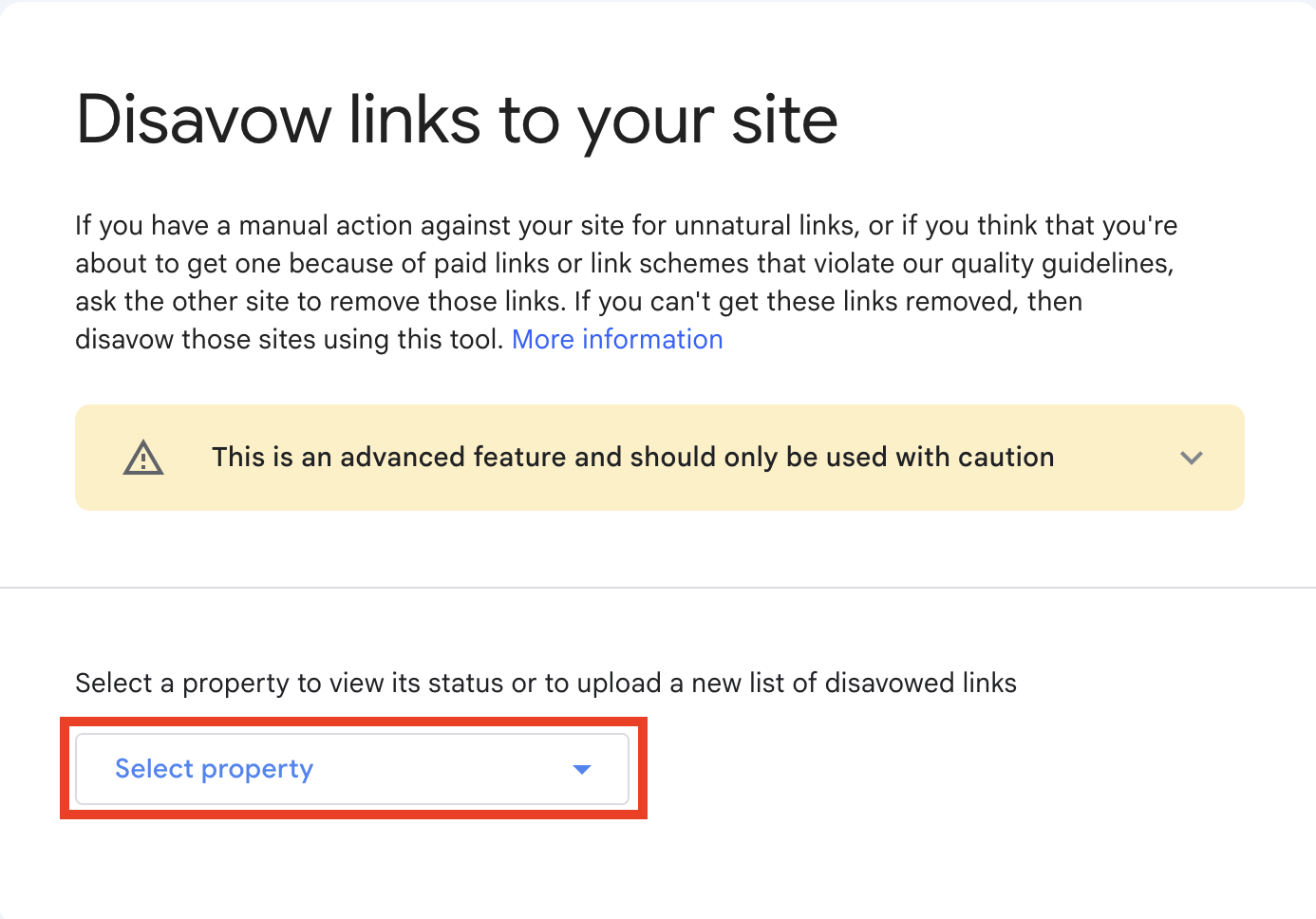
2. Go to the Disavow Links Tool
Visit Google’s disavow links tool and select the domain that you’d like to disavow links to.
3. Submit Your Disavow File
Upload your disavow file and click Submit. That’s it. It takes 2-12 weeks for Google to disavow the links.
If you have tens or hundreds of thousands of links to sort through, disavowing can be a pain. But tools like Ahrefs and Semrush can make it easier to identify spam links and export them to a .txt file (or something easy to copy/paste into a .txt file).
Final Thoughts
Spammy backlinks are not the existential threat to your SEO that some link cleanup services and gurus on X claim.
A few links from .xyz domains selling crypto or male enhancement pills will not trigger a penalty. Every single website has some bad links. It’s inevitable. Google recognizes this, and their anti-spam filters almost always ignore these links.
How do I know? Because I’ve either personally built or overseen hundreds of thousands of link placements over my career.
You can verify this yourself if you’d like. Go reverse engineer the backlink profiles of the top ranking sites in your niche and try to find one that DOES NOT have some weird backlinks. Like I said earlier, literally everyone has them.
The real danger comes from actively building manipulative links at scale or allowing obvious spam patterns to dominate your backlink profile.
A handful of weird domains pointing at your site? No issues. But build hundreds of automated comment, forum, or link farm links in a few days using blatantly manipulative patterns? Now you’ve got a problem.
For the vast majority of sites, if you just ensure that you don’t have so many bad backlinks that it dilutes your overall link quality, you’ll be fine.
Focus your energy on building high quality links from PR, guest posts, niche edits, HIGH QUALITY PBNs, and link exchanges, and you’ll be fine.
I wish you luck.