


So, you want to use ChatGPT for SEO content writing?
Good idea.
ChatGPT and other AI tools have made writing SEO blog posts easier, more profitable, and more efficient than ever before.
With artificial intelligence, you can create SEO-friendly, engaging, and humanized content that ranks in Google and LLMs in just minutes flat without the long lead times, pricing, or headaches of a human writing team.
…but you need to know what you are doing. If you use ChatGPT for digital marketing content the wrong way, you risk de-indexing, penalties, suppression, or ranking issues.
That’s why we created this guide on using ChatGPT to create SEO content. In it, we’ll show you how we create content that ranks and converts for our AI SEO services clients.
We’re going to cover:
- Prompts for copywriting
- Different tasks you can use AI for
- How we write using ChatGPT
- How to edit
- How to overcome writer’s block with AI brainstorming
- How to give AI better contextual understanding via projects
And a lot more.
Let’s begin with the highest ROI SEO writing tasks you can automate before moving on to the prompts themselves.
How to Use ChatGPT for Content Writing: 9 High-ROI AI SEO Tasks You Can Automate
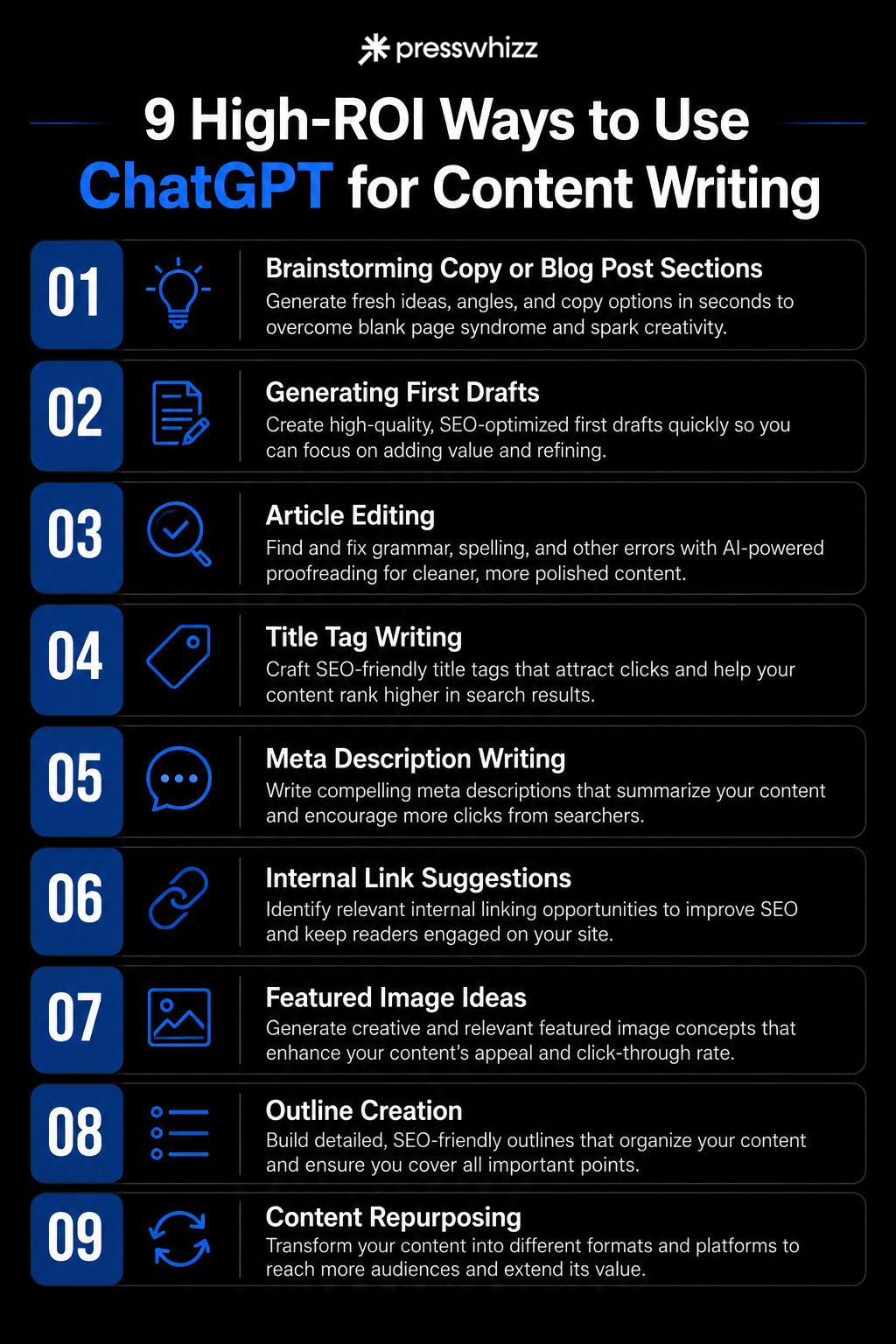
Our favorite ways to use ChatGPT for content writing include brainstorming, content brief creation, competitor research, editing, and writing each section one by one.
When trained properly on your voice and with proper prompting, ChatGPT can create high-quality SEO content that’s better than most humans.
Currently, we use artificial intelligence models to help with a number of tasks, including guest post article creation, AI link building, general AI SEO tasks, and keyword research.
Here are all of the SEO writing tasks broken down in detail one by one.
#1) Brainstorming Copy or Blog Post Sections
Brainstorming is the #1 AI search engine optimization task you should be using ChatGPT for. Hands down. LLMs are unrivaled at generating content ideas.
AI tools like Claude, GPT, or Gemini can speed up the content creation process and come up with new ideas, wording, phrases, angles, or catchy copy lines in milliseconds. The same work that would take you hours of staring at a blank page can be done instantly by well-trained LLMs.
Here at PressWhizz, we use ChatGPT to help brainstorm for the following tasks:
- Landing page copy
- Blog article angles
- Blog section content (for example, “here’s my h2 on (topic). What should I write here?”)
- Intros
- Sales page copy
Here’s an example from our guest posting services page:
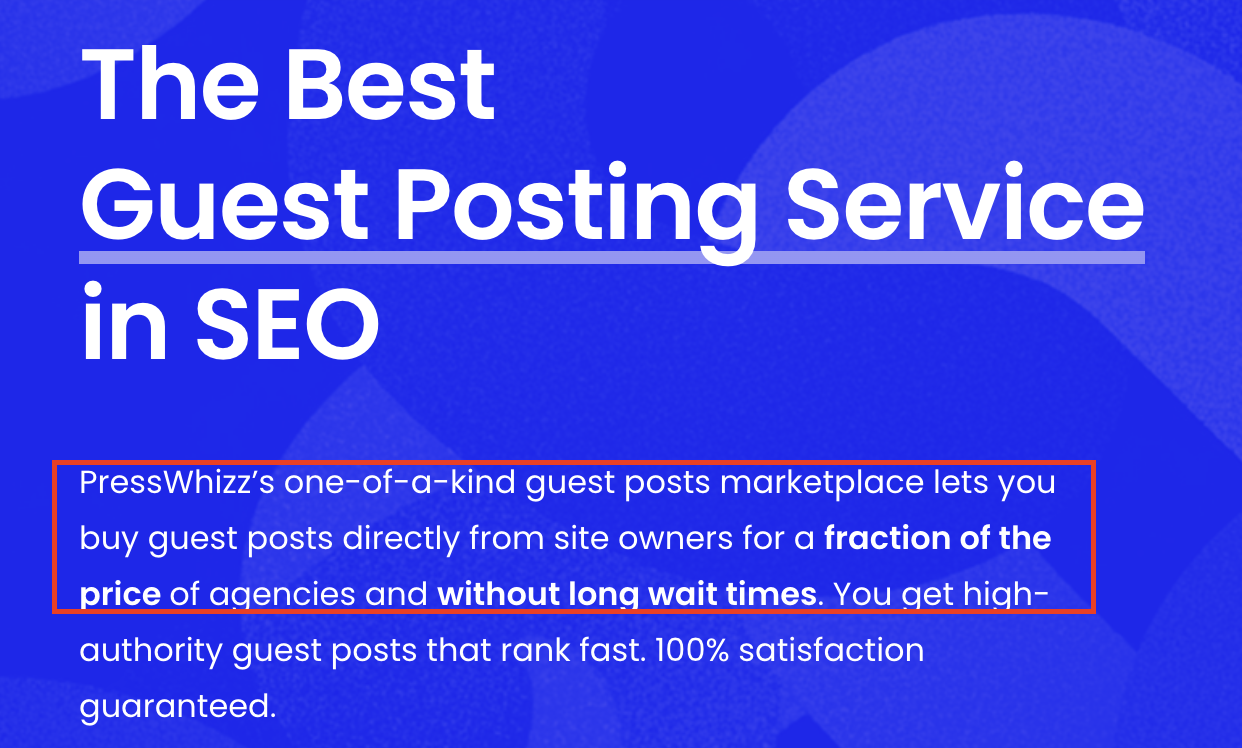
We used AI to come up with a list of ways to write this sub-header in the hero section of our guest post services agency page. Most of the suggestions were typical AI cringe, but this one, “for a fraction of the price…without long wait times”, sounded great.
Most of the page was done by our writing team, but they used AI to help write some of the harder lines of copy.
And of course, they use a custom GPT project trained on our personal writing style and based on endless examples of high-converting copy. This isn’t just “hey, GPT, write me a sales page” style prompting.
This same tip also applies to brainstorming blog sections. When we have a new, complex blog section to write with GPT, we first use it to brainstorm how to write the section and what to include. Like this:
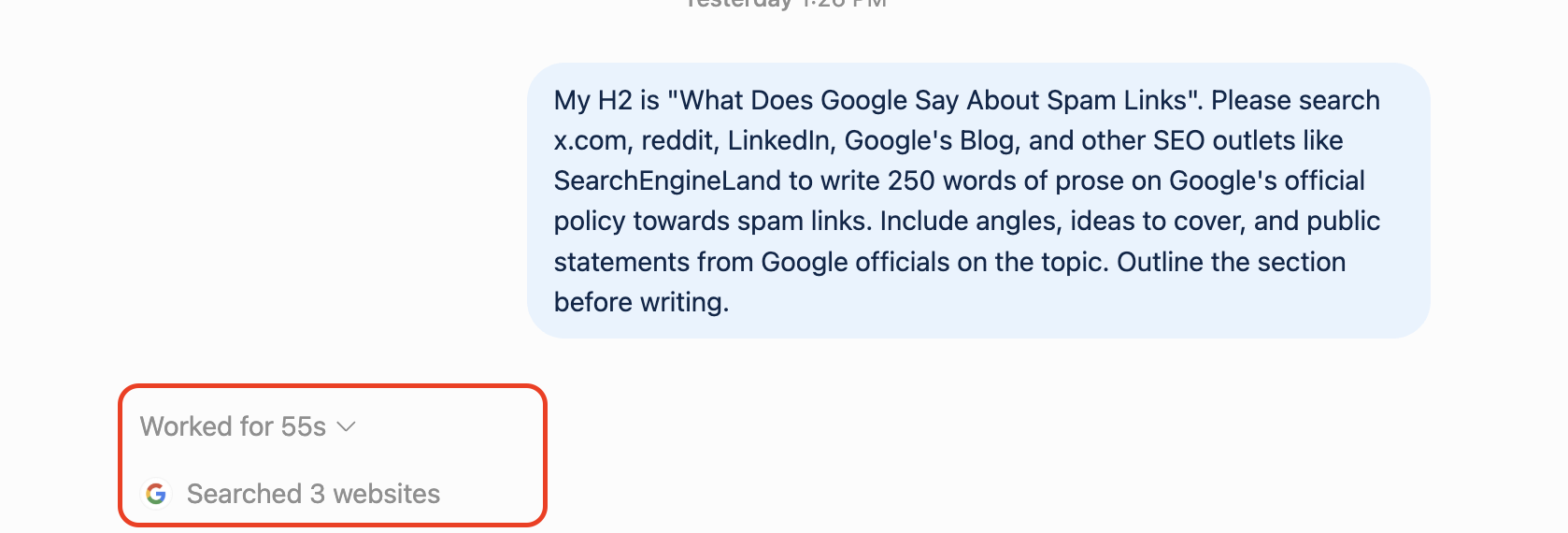
Then, it searches the web for the info we need and places it into an outline. Of course, we check everything and add our own thoughts before writing, but the outline it returns is excellent:
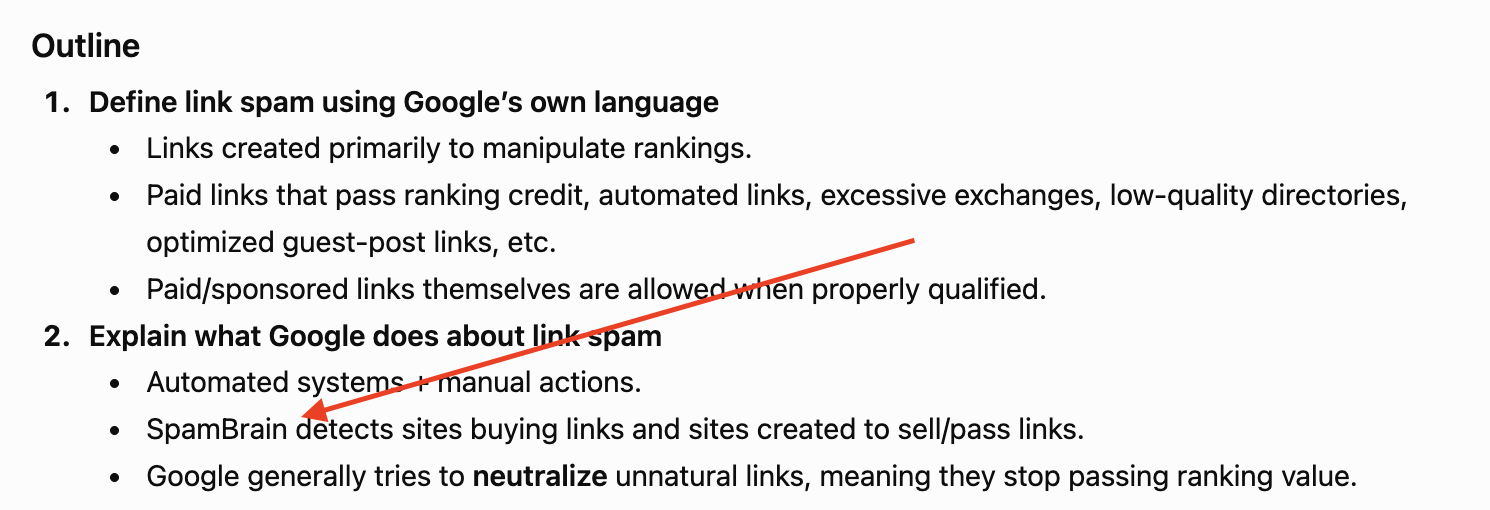
And notice that it includes helpful information such as SpamBrain and how Google uses automated systems to detect link spam or manipulation.
Once we have an outline, we can create a first draft…
#2) Generating First Drafts
AI writing tools like ChatGPT are perfect for content creation. ChatGPT is capable of writing high-quality, optimized first drafts very quickly and without wasting the writer’s brain power.
When trained and prompted the right way, GPT can create detailed, humanized, and highly readable SEO content that fits all of the criteria for high-quality content, such as:
- Entity density
- Readability
- On-page optimization
- Humanization
- Flow
- Reader engagement
- Formatting
For example, using the outline we created in the previous section, you can see how well GPT writes a first draft:
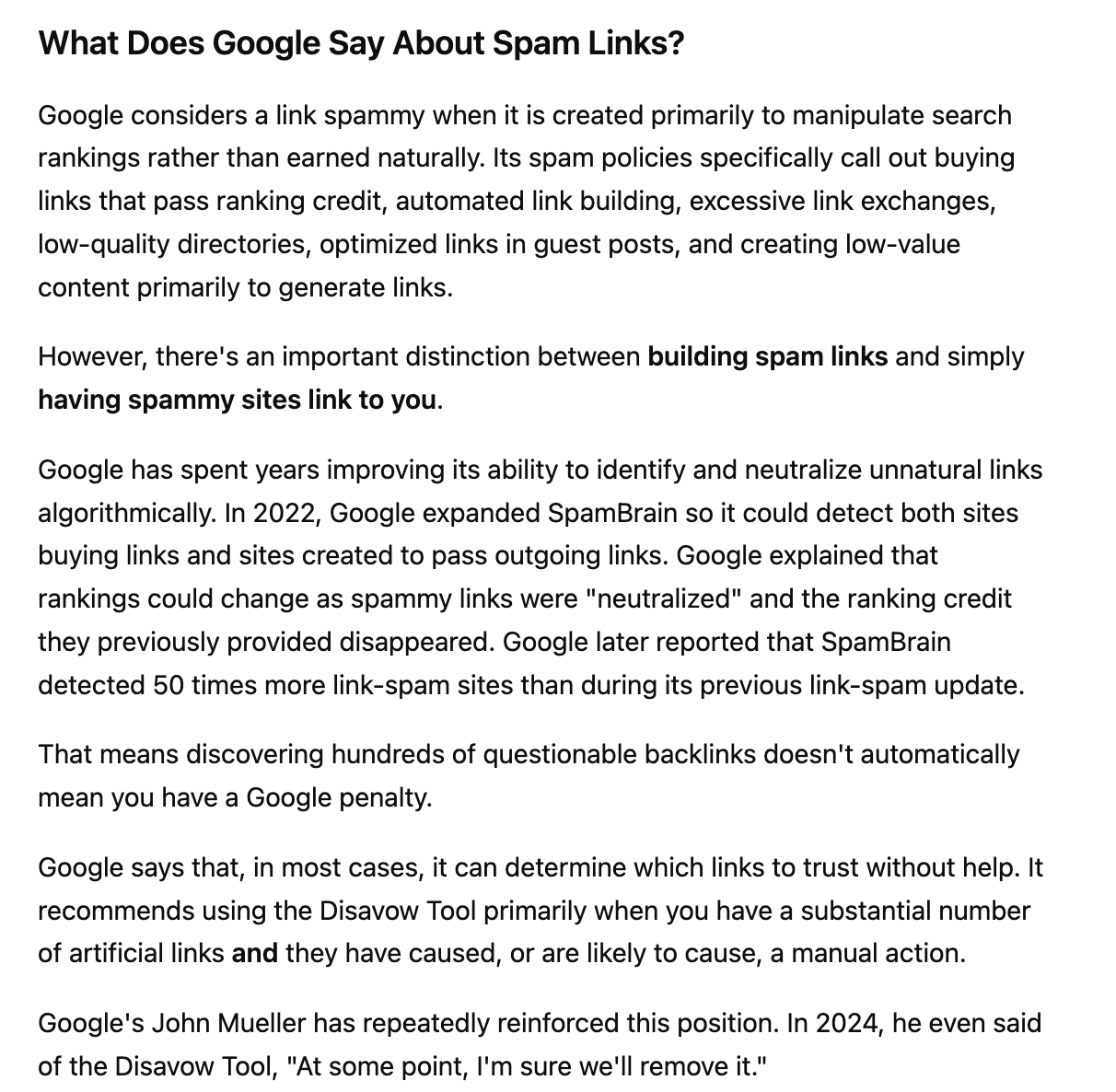
This section is written in our voice, has all of the right keywords, flows well, contains a detailed explanation, and even has some analysis of industry events. This was all done mostly automatically. I don’t think the average reader could tell this was done by AI rather than a content writer. Though, to be fair, this AI was trained on our content writer’s voice.
Of course, when we create content, we always review it and fix AI issues, such as repetition or generic statements. And we always fact-check. But ChatGPT does roughly 80-90% of the writing, which frees our time to add value rather than type.
Note: We are writing using our custom projects and workflows in our AI content writing process. This is not how AI performs “out of the box”. You must train ChatGPT to sound like your brand, use your tone, and understand your writing style, then engineer a workflow that produces high-quality outputs. If you just ask it to write, you will get AI slop.
#3) Article Editing
LLMs like ChatGPT are infinitely more precise than professional human proofreaders, so article proofreading is another task you should be automating with AI (with final human quality checks, of course).
ChatGPT can read, analyze, and process an article almost instantly. Then, it can notice small errors that tired human eyes miss.
If you aren’t using AI for proofreading, you are wasting time.
However, you need to do it the right way. You can’t just say “proofread this for me”. You need to give specific instructions.
As with all things AI, it comes down to how good your prompting is. And, with prompt engineering (I hate this term, but it’s necessary here), you need to be specific and include direct instructions with examples.
Your job is to identify and fix mistakes. You are NOT a stylistic editor and should not rewrite sentences simply because another version might sound better.
Review the entire article for:
- Spelling mistakes
- Typos
- Grammar errors
- Incorrect word usage
- Missing words
- Duplicate words
- Incorrect verb tense
- Subject-verb disagreement
- Pronoun disagreement
- Incorrect articles (a, an, the)
- Incorrect prepositions
- Singular/plural errors
- Incorrect possessives
- Incorrect contractions
- Sentence fragments
- Run-on sentences
- Comma splices
- Misplaced or dangling modifiers
- Incorrect punctuation
- Missing punctuation
- Incorrect capitalization
- Incorrect hyphenation
- Inconsistent number formatting
- Inconsistent percentage formatting
- Inconsistent date formatting
- Incorrect quotation-mark usage
- Incorrect apostrophe usage
- Obvious formatting mistakes
- Accidental double spaces
- Missing spaces
- Repeated sentences or accidentally duplicated text
Use US English.
Pay particular attention to sentences that are grammatically plausible but contain the wrong word.
Examples include:
- affect vs. effect
- then vs. than
- its vs. it’s
- their vs. there vs. they’re
- lose vs. loose
- fewer vs. less
- principle vs. principal
- compliment vs. complement
- who vs. whom
Also look for words that appear to be typos but happen to form another valid English word.
Make sure every sentence:
- Has the necessary subject and verb
- Contains all words needed to make grammatical sense
- Does not accidentally repeat a word or phrase
- Does not appear to have text missing from an edit
- Connects grammatically to the sentence around it
Flag clear inconsistencies such as:
- A company or person’s name spelled two different ways
- An acronym capitalized differently throughout the article
- Inconsistent capitalization of the same term
- Switching between singular and plural versions of the same defined term
- Inconsistent formatting of numbers, dates, percentages, or currencies
Do not enforce consistency when the difference is grammatically or contextually appropriate.
Do not flag or change:
-
- Sentences merely because they are long
- Sentences merely because they are short
- Word choice that is unusual but correct
- Conversational language
- Informal language
- Repetition used intentionally
- Sentence rhythm
- Tone
- Voice
- Paragraph length
- Heading style
- Reading level
- Passive voice when grammatically correct
- Sentences that you personally think could “flow better”
Do not suggest stronger verbs, clearer phrasing, better transitions, or more concise alternatives unless the original contains an objective error.
Do not evaluate whether factual claims, statistics, names, dates, or arguments are accurate unless there is an obvious internal contradiction or apparent typo.
Your job is proofreading, not fact-checking.
If a sentence is grammatically correct, leave it alone.
Do not manufacture errors to provide feedback.
If you are uncertain whether something is actually incorrect or simply a stylistic preference, do not flag it.
Do NOT rewrite the full article.
Only show errors that need correction.
For each error, use this format:
Original: [exact problematic text]
Corrected: [corrected version]
Reason: [brief explanation of the objective error]
Group the results under:
Objective spelling, grammar, punctuation, word-use, or formatting mistakes.
Only include this section when something genuinely appears wrong but depends on the author’s intended meaning.
If there are no objective errors, say:
No definite errors found.
Do not include compliments, general feedback, stylistic recommendations, summaries, or comments about what the article does well.
#4) Writing Meta Descriptions
Meta descriptions are short summaries that tell searchers what a page is about and appear beneath the title in Google search results.
Writing meta descriptions manually is tedious at best, and nobody likes busy work.
AI tools like ChatGPT can generate them in seconds based on your title, target keyword, and article content. For repetitive tasks like this, ChatGPT outperforms manual writing because it can process dozens of pages quickly, follow the same formatting rules every time, and generate multiple options without getting tired. We very rarely write meta descriptions here anymore.
Here is the prompt we use for writing meta descriptions:
Use this template:
Page Title: [TITLE]
Primary Keyword: [KEYWORD]
Article: [ARTICLE TEXT]
Write a meta description for this page.
- Keep it between 140–155 characters.
- Accurately describe the page.
- Include the primary keyword naturally.
- Give the searcher a reason to click.
- Use active voice.
- Match the search intent of the page.
- Do not use clickbait or make claims the page doesn’t support.
- Do not use generic phrases such as “learn everything you need to know.”
- Make it sound natural.
- Return 3 options.
Exemplar:
(Add meta description example).
#5) Updating Previous Content
ChatGPT is great at updating previous content for three reasons:
- It’s fast: You can review and update an entire article much faster than editing it manually.
- It can execute quickly: Give it specific instructions and it can immediately rewrite outdated sections, replace old information, or add missing details.
- It’s consistent: You can give ChatGPT the same editing rules for every article, which makes it easier to update content at scale.
Updating existing content is one of the most important parts of SEO. Content gets outdated quickly, and SERPs are always changing. For example, statistics change, links break, products evolve, or competitors publish better information. Even search intent can shift over time.
And we all know how much Google loves freshness (must…feed…the…content borg).
You may also be taking over a website from a previous digital marketing provider. In that case, you could have hundreds of older articles that haven’t been touched in years.
Whatever the reason, old content needs to be freshened up or else it weighs down your whole website. Rather than combing through every article manually, you can have GPT do 80-90% of the work.
Here is the exact prompt we use to update out-of-date or low-quality articles on client websites and turn them into fresh, human-like text:
Edit the article directly. Preserve its meaning, factual claims, examples, statistics, links, citations, and overall structure unless a change is necessary to follow the rules below.
Find and replace all banned words and phrases.
BANNED WORDS/PHRASES:
[INSERT LIST]
Do not simply delete them if doing so makes the sentence worse. Rewrite the sentence naturally.
Use the following preferred terminology where appropriate:
[INSERT REQUIRED/PREFERRED WORDS]
Do not force these words into sentences where they don’t fit naturally.
Rewrite the article to approximately a 9th-grade reading level.
Prefer:
- Common words over unnecessarily complex words
- Short, clear explanations
- Concrete language
- Sentences that are easy to understand on the first read
Do not dumb down technical concepts or remove necessary industry terminology.
Improve sentence structure throughout the article.
- Break up unnecessarily long sentences.
- Combine short, choppy sentences when appropriate.
- Vary sentence length naturally.
- Avoid repeatedly starting sentences the same way.
- Prefer active voice.
- Fix awkward or inverted sentence structures.
- Make the subject of each sentence clear.
- Keep modifiers close to the words they modify.
Rewrite language that sounds generic, formulaic, overly polished, or AI-generated.
Remove or rewrite:
- Empty introductory statements
- Unnecessary conclusions
- Repetitive summaries
- Excessive transitions
- Fake emphasis
- Rhetorical filler
- Overexplaining obvious points
- Repeated sentence patterns
- “Not only X, but Y” constructions
- “It’s not just X; it’s Y” constructions
- Unnecessary three-item lists
- Repeated use of words such as “however,” “additionally,” and “furthermore”
Do not add conversational filler simply to make the article sound human.
Correct:
- Spelling
- Grammar
- Punctuation
- Capitalization
- Missing words
- Wrong words
- Subject-verb agreement
- Pronoun agreement
- Incorrect possessives
- Formatting inconsistencies
Use US English.
Update references to the previous year when they are intended to describe the current or upcoming year.
TARGET YEAR: [2027]
For example:
- “Best SEO Tools for 2026” → “Best SEO Tools for 2027”
- “In 2026, businesses need to…” → “In 2027, businesses need to…” when the sentence is clearly referring to the current year.
- “2026 SEO Guide” → “2027 SEO Guide”
Search the entire article for references to outdated years, including:
- Titles
- H1s
- H2s and H3s
- Body copy
- Introductions and conclusions
- Meta titles and descriptions, if provided
- Calls to action
- Tables and lists
Do NOT blindly replace every instance of the previous year.
Do not change years when they refer to:
- Historical events
- Publication dates
- Study dates
- Statistics tied to a specific year
- Laws or regulations that took effect in a specific year
- Quotes
- Citations
- Past Google updates or announcements
- Any factual claim where changing the year would make the information inaccurate
Return the completed edited article.
After the article, provide a short “Editor Notes” section containing only:
- Factual claims that should be verified
- Dates or years that may need manual verification
- Places where the intended meaning was unclear
- Rules you could not follow without changing the author’s meaning
#6) Competitor Research
ChatGPT takes competitor research that used to take 30–60 minutes and turns it into a 30-second task. Instead of searching your target keyword, opening every ranking page, copying headings, comparing content, and manually looking for patterns, you can automate most of the process.
Here at PressWhizz, we use a ChatGPT project (or sometimes a Claude Skill) with a pre-programmed workflow trained on our competitor research process. Then, whenever we need research, we just give it a keyword and tell it to go.
Boom. It’s all done automatically from there while we prepare a second coffee.
If you’re worried that AI isn’t advanced enough for SEO research, don’t be. ChatGPT can analyze competing pages for:
- Word count and content depth
- Heading structure and topics covered
- Entity density
- Keyword research
- Search intent
- Topical coverage
- Topical gaps
- Information gain opportunities
- Common questions and definitions
- Statistics, examples, and supporting evidence
- Similarities across ranking pages
Instead of simply copying what already ranks, you can use this research to see why competitors rank, what Google expects, and where your article can add something better.
And, once it’s done researching, it can create a topical brief complete with key points, bullets, stats, instructions, headings, info gain opportunities, and more.
Speaking of content briefs…
#7) Content Briefs
A content brief is a guide for creating a piece of content that typically includes the goal, audience, headings, word count, keywords, and competitor URLs for inspiration. Content briefs may also include internal linking opportunities and writing instructions.
This used to be a grueling and time-consuming process. Used to be!
Instead of researching the competition, scouring Ahrefs, and combining headings (plus doing some back-of-the-napkin math), you can have AI do all of that for you while you do more important things.
Here’s an example of a brief that our ChatGPT project creates automatically based on competitor research:
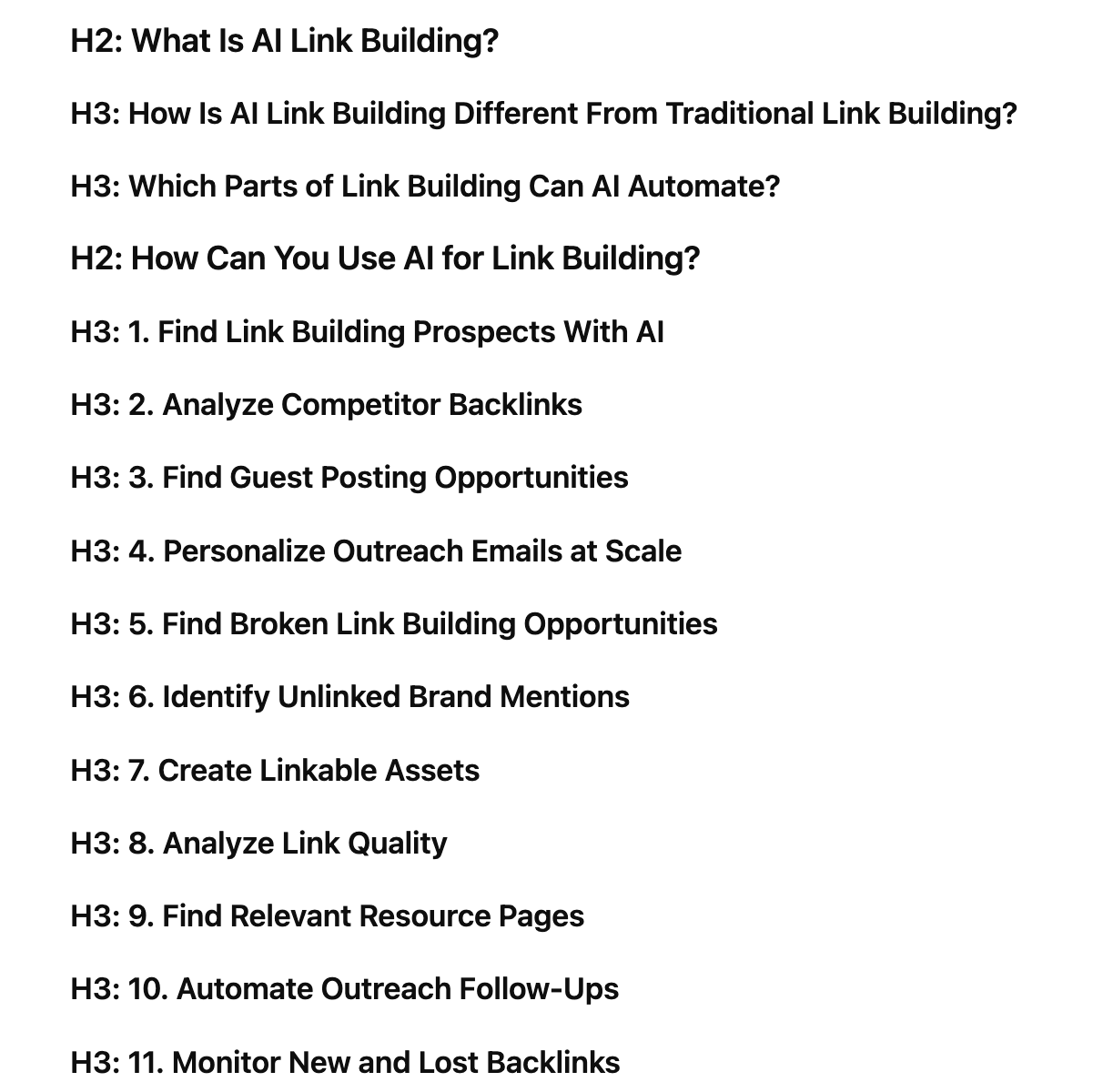
Not bad. That saved us about an hour or two of work. Thanks, ChatGPT.
#8) Summarizing
ChatGPT is great at summarizing long-form content because it can identify the main points of an article in seconds. One of the best uses for this is creating a Key Takeaways section at the top of your content.
Instead of rereading a 3,000-word article and manually deciding what matters most, you can give the finished article to ChatGPT and ask it to extract the three to five most important points.
This gives readers a quick overview before they start reading and makes longer articles easier to skim. Just make sure ChatGPT summarizes the existing content rather than introducing new claims or information.
#9) Scraping AI Overview Results (For AI SEO/GEO)
If you want to rank in Google’s AI Overviews, you need to include the most common words and phrases used in the overview.
Plus, you need to write high-quality, semantically driven content in chunks to give yourself the best chance at winning the overview (due to improved trust and extraction).
When using ChatGPT, make sure to instruct it to scrape the AI Overview and add verbatim language to key areas of the article in chunks so Google can crawl and extract more easily.
ChatGPT Prompts for Content Writing
We’ve shown you the SEO content writing tasks that we use ChatGPT for, but in this section, we want to take it a step further and show you some plug-and-play prompts you can use in your content writing processes.
We’re going to cover everything from writing intros to final quality control.
One quick note on AI prompts for writing SEO content…
We don’t recommend generating entire articles in one go. Instead, start with an article outline and build from there section by section. As with all things artificial intelligence, when you produce content, in order to maintain quality, you need to break things down into simple steps and ensure human oversight. This is how you’ll get personalized content with your own insights.
OK? Let’s get into the prompts.
Intro Writing Prompt
Write an introduction for the article using the template below.
Article Title: [INSERT TITLE]
Primary Keyword: [INSERT MAIN KEYWORD]
Target Audience: [INSERT TARGET AUDIENCE]
Word Count: 80–120 words
Tone: Conversational, direct, and helpful
Follow this exact structure:
Welcome the reader and immediately introduce the topic.
Template: “If you’re [READER SITUATION/GOAL], you’re in the right place.”
Naturally use the primary keyword while directly addressing what the reader wants to know.
Template: “[MAIN KEYWORD] can help you [MAIN BENEFIT/GOAL].”
Briefly tell the reader what they will learn.
Template: “In this guide, we’ll cover [TOPIC 1], [TOPIC 2], and [TOPIC 3].”
Finish with a short transition into the main content.
Template: “Let’s start with [FIRST TOPIC/QUESTION].”
- Use the primary keyword within the first 50 words.
- Match the search intent behind the keyword.
- Do not answer the entire article in the introduction.
- Do not use generic filler or throat-clearing.
- Do not make unsupported claims.
- Keep each line concise.
- Avoid clichés such as “In today’s digital world.”
- Return only the finished introduction.
Content Brief Creation Prompt
Create a topical content brief based on competitor analysis for the target keyword below.
Target Keyword: [INSERT KEYWORD]
Website: [INSERT WEBSITE]
Internal Link Target: [INSERT INTERNAL LINK URL]
Internal Link Anchor: [INSERT ANCHOR TEXT]
Competitor URLs:
[INSERT COMPETITOR URLS]
Analyze the competing pages and create a brief that shows a writer what topics need to be covered to compete with the current search results.
At the top, include:
H1: [Recommended Article Title]
Target Keyword: [Keyword]
Recommended Word Count: [Range based on competitors]
Recommended Heading Count: [12–15]
Search Intent: [Informational / Commercial / Transactional / Navigational]
Internal Linking Opportunity: [ANCHOR TEXT] → [URL]
Create a recommended H2/H3 outline based on the competitor research.
Format it like this:
H2: [Heading]
H3: [Subheading]
H3: [Subheading]
H2: [Heading]
H3: [Subheading]
Requirements:
- Organize headings in a logical order.
- Cover the core topics consistently discussed by ranking competitors.
- Prioritize headings based on search intent and topical importance.
- Use H3s only when they logically belong underneath an H2.
- Do not copy competitor headings verbatim unless there is no natural alternative.
Use the competitors to identify:
- Topics covered by most ranking pages
- Important entities
- Common terminology
- Questions competitors answer
- Definitions readers expect
- Processes or steps commonly discussed
- Tools, products, companies, or examples frequently mentioned
Use this analysis to determine what belongs in the outline.
Look for useful topics that ranking competitors overlook or cover poorly.
Consider:
- Missing questions
- Outdated information
- Weak explanations
- Missing examples
- Missing data
Select the strongest opportunity for adding original value and label that H2:
— INFORMATION GAIN
Estimate the appropriate word count based on:
- Competitor length
- Search intent
- Number of topics that need to be covered
- Depth required to answer the query properly
Do not recommend a longer article simply because competitors are long. Recommend enough words to cover the topic completely without unnecessary filler.
Return only the finished content brief.
Use this format:
H1: [TITLE]
Target Keyword: [KEYWORD]
Recommended Word Count: [WORD COUNT]
Recommended Heading Count: [HEADING COUNT]
Search Intent: [INTENT]
Internal Linking Opportunity: [ANCHOR] → [URL]
H2: [HEADING]
H3: [SUBHEADING]
H2: [HEADING]
H3: [SUBHEADING]
H2: [HEADING] — INFORMATION GAIN
Competitor gap: [EXPLAIN WHAT COMPETITORS ARE MISSING]
H3: [SUBHEADING]
Continue until the brief is complete.
ChatGPT Content Writing Prompt
When writing content with ChatGPT, you 100% CANNOT just say “write this”. That’s going to create generic AI content that won’t rank or convert.
And you also can’t create extremely complex prompts full of abstract instructions that AI can’t understand. Instead, you need to write in short sections, and when you do write, you need to give concrete instructions that AI can easily execute.
Here’s an example of a sectional content writing prompt we use here at PressWhizz:
Write the following section of an article:
Heading: [INSERT HEADING]
Target Word Count: [INSERT WORD COUNT]
Tone: [Conversational / Professional / Expert / Friendly]
Style: [Direct, concise, practical, 9th-grade reading level]
Cover these three points:
- [POINT 1]
- [POINT 2]
- [POINT 3]
Write naturally in complete paragraphs. Answer the heading directly in the first sentence, then expand with useful details.
Pro Tip: Put all of your stylistic rules into a project and write within that project. This will make writing so much easier for you. GPT will remember all of your company’s brand rules and style guidance, and you won’t have to input the same information over and over again.
ChatGPT Readability Prompt
Readability is one of the most important parts of SEO content writing. Content that’s too hard to read won’t engage readers and could lead to low user engagement metrics, like dwell time and clicks.
Here’s a content writing prompt that will make your content more readable.
Edit the following content to improve readability without changing its meaning, facts, examples, or overall voice.
Target Reading Level: 9th grade
Follow these rules:
- Use simple, common words where possible.
- Shorten overly long or complicated sentences.
- Break up dense paragraphs.
- Prefer active voice.
- Remove unnecessary words and filler.
- Make each sentence easy to understand on the first read.
- Keep technical terms when necessary.
- Vary sentence length so the writing sounds natural.
- Fix awkward or confusing sentence structures.
- Avoid corporate, academic, or overly formal language.
- Keep paragraphs focused on one main idea.
- Preserve the author’s personality and conversational style.
- Do not remove useful details simply to make the content shorter.
- Do not add new facts, examples, opinions, or claims.
- Do not rewrite sentences that are already clear and readable.
Return only the revised content.
Quality Control
Last up, we have quality control, where you ensure that your article meets your content quality standards. We use rigorous quality control mechanisms here at PressWhizz, including both human and AI review.
We start with an AI review. Anything that fails a quality-control gate is sent back for re-optimization. Anything that does pass goes through our expert human editors before getting posted.
Here is an SEO content writing quality control prompt you can use to check the quality of your outputs:
Perform a final quality-control check on the article. Analyze the content against the requirements below and flag anything that needs to be fixed.
- Reading Level:
Confirm the article is approximately a 9th-grade reading level. Flag sections that are too complex. - AI Word Usage:
Identify generic, repetitive, overly polished, or obvious AI-style words and phrases. - Entity Density:
Check that important people, companies, products, concepts, and topic-specific entities are covered naturally. Flag important missing entities or obvious overuse. - Heading Count:
Compare the number of H2s/H3s against the content brief. - Word Count:
Compare the final word count against the target range. - Keyword Usage:
Check that the primary keyword and important secondary terms appear naturally without stuffing. - Information Gain:
Confirm the article contains useful information, examples, data, experience, or analysis that goes beyond simply repeating competitors. - Internal Linking:
Confirm all required internal links are included with relevant anchor text and natural placement. - Search Intent:
Confirm the article directly satisfies the intent behind the target keyword and does not drift into unrelated topics.
Give each category a PASS, WARNING, or FAIL.
For every WARNING or FAIL, explain exactly what needs to be changed.
Finish with an Overall Quality Score: [X/100] and list the three highest-priority fixes.
Do not rewrite the article.
Final Thoughts
ChatGPT is the single greatest technological innovation in SEO in my career.
If you use the right techniques, workflows, training, and prompting, you can create unique, SEO-optimized content that ranks and converts in a fraction of the time and at a fraction of the cost of human teams.
Our team uses a combination of ChatGPT, Claude, and other AI tools plus automated workflows and human-in-the-loop oversight to drastically improve quality, efficiency, and speed. And all while reducing costs.
This is how we are able to regularly publish high-quality SEO content, produce optimized and engaging articles for guest blogging, and rank our clients in LLMs and AI Overviews using AI-generated content.
If anyone tells you AI doesn’t work, they are either misguided or lying. We rely on AI to deliver results for our AI SEO agency services, and it delivers time and time again.
If you want to rank in LLMs and AI Overviews, you can use ChatGPT for writing content. Just make sure to create custom projects, use a step-by-step workflow, use the prompts we’ve given you here, and make sure there’s a human overseeing the process.
– Dusan Novakovic
ChatGPT for SEO Content F.A.Q.
Q: What are some alternatives to ChatGPT for content writing?
A: The best alternatives to ChatGPT for content writing are Claude, Gemini, and Jasper. We prefer Claude, since it’s easier to create automated workflows using Claude Skills.
Q: What is the best ChatGPT model for writing content?
A: The best ChatGPT model for writing content is ChatGPT-5.5 due to its advanced thinking and fast processing times.
Q: Are there any free AI tools for writing content like ChatGPT?
A: Yes, there are free AI tools for writing content, but they are mostly LLMs like ChatGPT or Claude with free versions. You could also try Perplexity or Gemini’s free versions.
Q: Can you use ChatGPT for SEO content writing?
A: Yes, you 100% can use AI tools like ChatGPT for writing content. Google only cares about quality, not how you created the content.