Disavowing links is one of the most misunderstood concepts in all of SEO. And honestly, most of the advice out there about disavowing links is either:
- Expensive misinformation that will hurt your SEO or
- Google propaganda that could lead to manual penalties or even de-indexing
Here’s the truth: You should only disavow links in Google Search Console if you’ve received a penalty, have tons of low quality links (that will dilute your good links or lead to penalties), or you’ve inherited a site with a dirty link profile.
If that’s you, keep reading this guide.
If not, you’re probably fine, but I recommend you keep reading anyway. In general, you do not need to disavow low quality links. In fact, doing so can actually hurt your SEO. I’ve seen people pay thousands of dollars for “link detoxing”, where they clean their link profile and it destroys their traffic.
It’s a complex topic. Some links look bad, but actually pass some ranking equity or decent referral traffic. Google also likes seeing a natural looking link profile, which will contain at least some spam links.
So you have to be very careful when disavowing links.
That’s what this guide is about. I don’t work for Google, so I don’t care what you think about me. And I’m not trying to sell you a $1,000/hour link detox scam package, so I have no reason to lie to you.
This guide is nothing but a black hat SEO being honest with you about what he’s seen work (and not work) on real websites. The good, the bad, and the ugly. I’ll cover when to disavow links, when NOT to, some examples that will help prove my point, and my thoughts on Google’s overall philosophy on spammy links.
What is Disavowing Links in SEO?
Disavowing links is a risk management tactic that tells Google to ignore harmful or spammy backlinks pointing to your website. It’s common for SEOs to disavow links during negative SEO attacks, when they’ve received a manual “unnatural links” penalty, or when they have an unusually high volume of low quality links.
Disavowing backlinks involves submitting a file to Google that tells it to ignore a specific link that you think might harm your search engine rankings. You’re essentially telling Google “don’t count this against me”.
When you disavow a link, Google doesn’t consider it when it evaluates your rankings.
So, if you bought a domain with a backlink profile full of forum blasts, PBNs, and blog comments from 2012, you can clean it up by disavowing the spammy links. Or, if some competitor is blasting Fiverr links from .xyz domains at your business, you can tell Google “hey, that’s not me. Don’t count these”.
Let me just clear up some confusion before we proceed. Disavowing a link is not the same as a nofollow link.
A nofollow link is an SEO backlink that tells search engines not to pass authority (link juice) to your site. These are often used in forum comments, social media posts, and other types of low quality link scenarios. Technically, Google “requires” that all “paid” or “sponsored” links be nofollow as well (*wink wink*), which everyone always complies with.
I also use them when I think I might get referral traffic from a link but don’t necessarily want it influencing my site’s authority.
By disavowing a link, you’re telling Google to ignore it as part of your backlink profile, regardless of whether it’s a dofollow or nofollow link.
OK, all clear? Let’s get back to disowning those links you don’t like.
To disavow links, all you need to do is:
- Create a text file listing the domains and URLs you don’t want pointing to your site
- Submit your disavow file through Google Search Console
- Wait for Google to recrawl the disavowed sites
Once processed, the disavowed links still exist, but they won’t pass ranking signals to your site.
Should I Disavow Links?
In general, you should not disavow links. Disavowing links regularly leads to “over cleaning” your link profile, which wastes time, looks unnatural, and can even harm your rankings. However, you should 100% disavow links in certain circumstances. I recommend you disavow links in the following situations:
- You’ve received a manual penalty from Google and want to recover
- You’ve purchased an old website with a low quality backlink profile
- You’re working with a new client whose backlink profile is full of spam links, comment links, and random, irrelevant backlinks
- Your site has accumulated hundreds of low quality links and you’ve noticed your rankings stalling and/or decreasing
Other than that, you do not need to specifically tell Google to ignore a handful of spammy links. It is smart enough to ignore them (usually). By the way, you really shouldn’t be having this problem in the first place if you’re in charge of building links. If you just stick to buying placements on the right sites, you’ll be fine. I have an entire guide on how to pick the right sites when buying links.
TL;DR: Don’t panic over 1 or 2 bad links. Everyone has them.
By the way, if you practice good backlink management, you’ll probably never find yourself in a position where you need to disavow en masse.
Before we move on, I just want to say…
There’s a lot of confusion, bad advice, and outright propaganda from Google about how it ignores certain types of backlinks. As always, look at what’s actually happening to real websites and don’t listen to Google’s Ministry of Truth.
I’m at odds with Google here (big surprise…), which says that disavowing links is basically a waste of time. It’s gone so far as to say that disavowing links is a terrible idea and that spammers love it when you do it.
Why does it say this? To stroke its own ego.
Google claims that it’s so good at evaluating backlink profiles that it ignores low quality or spammy links automatically even when it looks like manipulation, so there’s no need for you to step in and disavow. It wants to look like it’s amazing at its job.
Sorry, Google (not sorry…), but that’s total BS. While Big G is good at ignoring low quality links individually or in small numbers, it 100% is not good at differentiating between manipulation at scale done by you vs. done by someone else in an effort to hurt your website.
Just look at this recent case of a negative SEO attack:
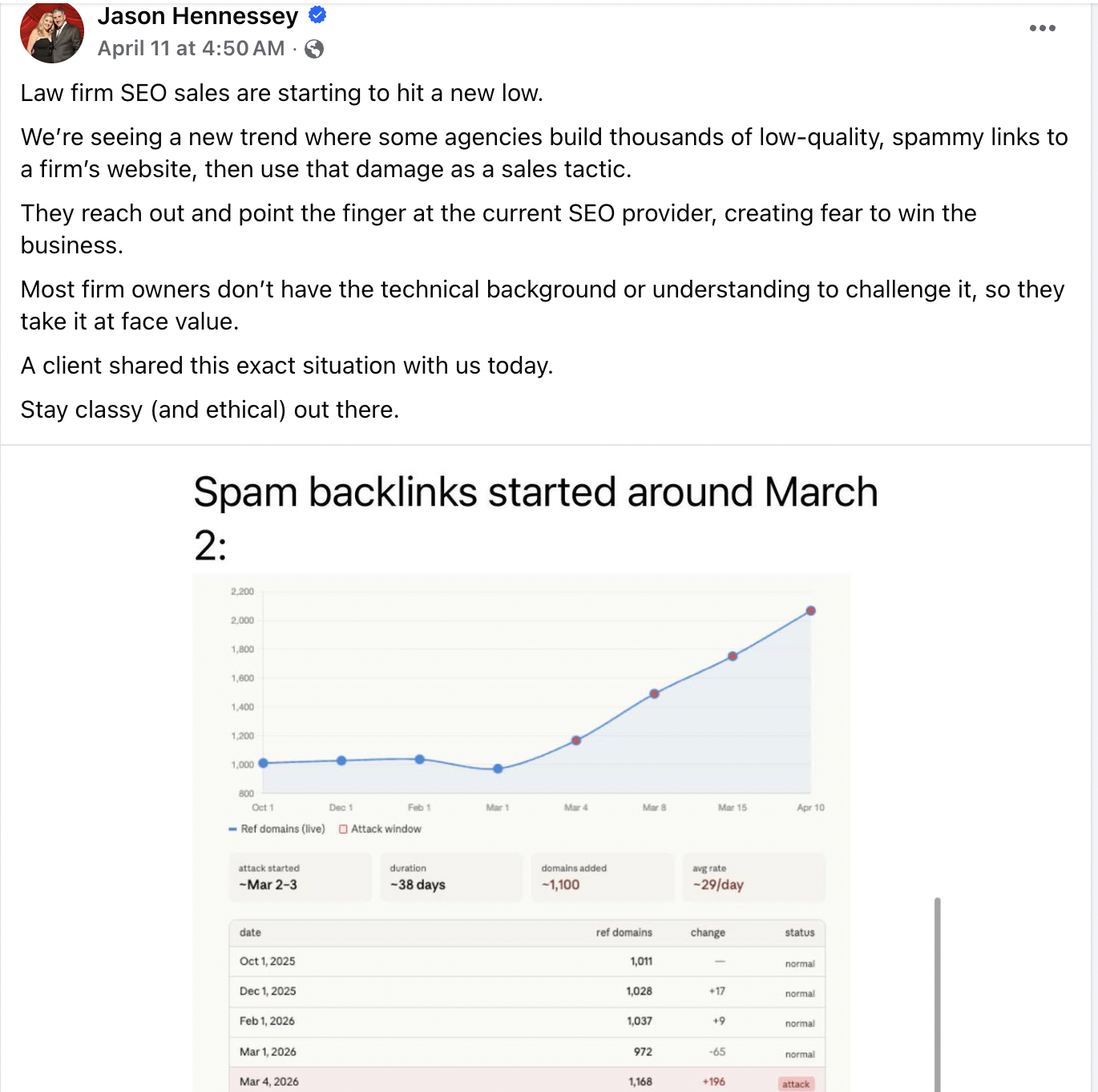
I promise you that Google is demoting websites frequently because its automatic spam detectors are not nearly as effective as they claim.
And Google knows it too….
Why would they maintain their disavowal tool despite threatening to remove it for years if it weren’t needed?
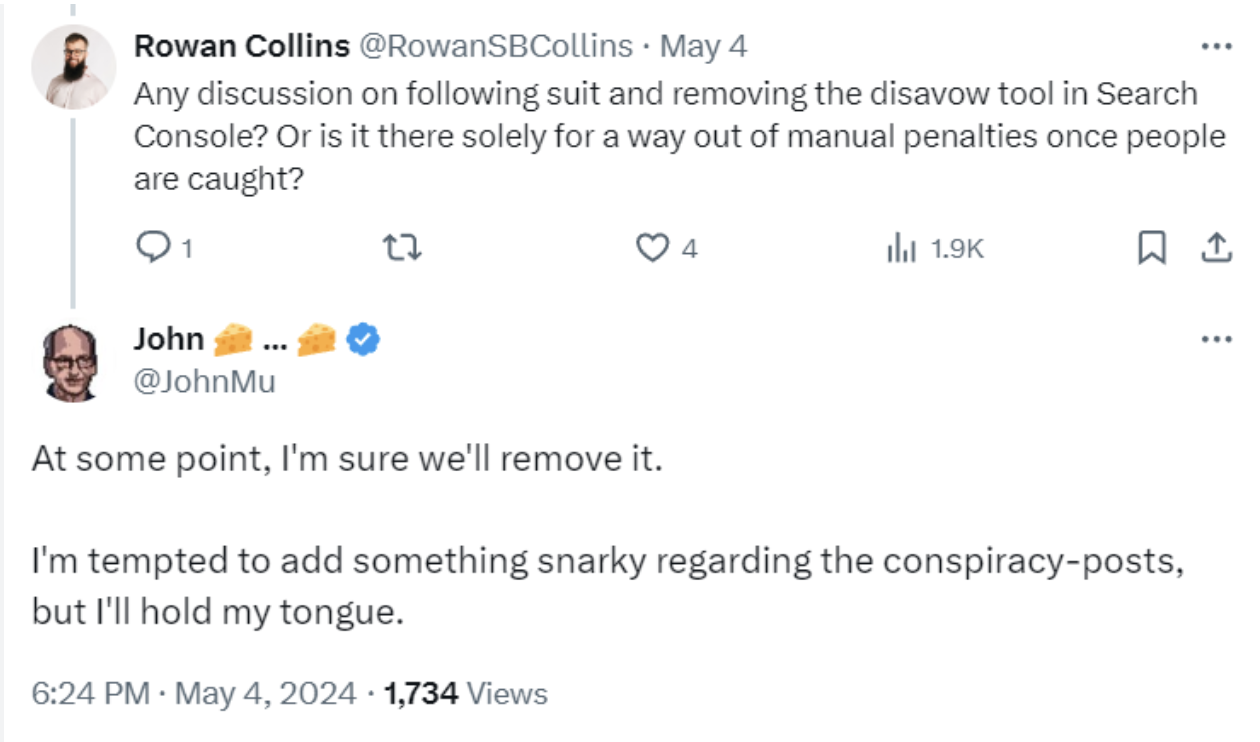
This was in early 2024…by the way, does John Mueller do ANYTHING or is he just a propagandist puppet?
If Google automatically ignored these links, we wouldn’t even need a disavowal tool. And yet, it persists.
So, circling back, should you disavow links? If you have a healthy site with a handful of random spammy links pointing to it, then no. There’s no reason to disavow links, and it might hurt your site.
But, if you have lots of toxic links, and they appear to be manipulative (such as repeated exact match anchors, large scale forum or comment spam, PBNs, or bulk links from irrelevant niches) you should definitely disavow them.
Does Disavowing Links Work?
Yes, disavowing links 100% works.
If your backlink profile is dirty, it can help clean it up and reduce your chances of getting slapped with a manual penalty. And it might improve your rankings if you’ve been the victim of a negative SEO attack.
Data like this shows why the disavowal tool still exists:
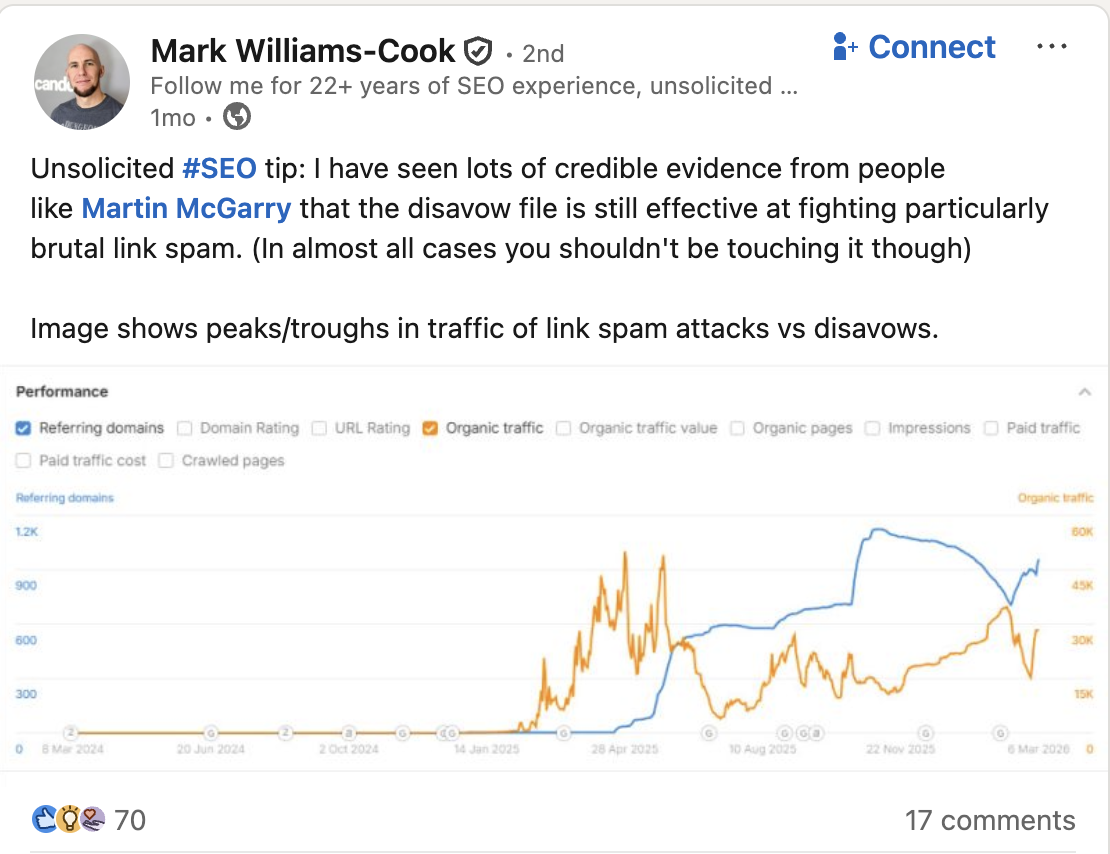
If you’ve built hundreds of low quality links too quickly, you might see an immediate bump in traffic followed by a massive dip when Google catches on. If you’re like Mark Williams-Cook here, disavowing will probably help you.
Just remember that it can be a double-edged sword.
If you disavow the wrong links because you assume they’re spammy, you might reduce the flow of link juice that’s powering your site.
FYI, that’s bad.
Also, you want to have a natural looking profile. Natural profiles are a bit messy and have imperfections. Link profiles built by SEOs tend to be perfect (all high DR, relevant links with optimized anchor text).
So having random links also helps your website look natural.
You need to disavow links carefully and only in the specific cases I mentioned in the previous section. Let me elaborate a bit more on those.
When to Disavow Spammy Links
The only times you should be disavowing links are when you’ve been the victim of a negative SEO attack, you’ve got loads of toxic links, or you’ve got a manual penalty from Google (or believe you are at high risk of getting one).
Even then, disavowing links should come after a full audit of your backlink profile. Never do it on a whim or because you have a “bad feeling” about a link. I’ve seen that lead to ruin on multiple occasions over my career. This should be data and experience driven, so don’t use your gut.
Let’s take a closer look at when you should consider disavowing links.
Negative SEO Attacks
A negative SEO attack is when a competitor builds spammy backlinks to your site in order to decrease your search engine rankings. These malicious attacks bombard your site with thousands of low quality links in as little as a few hours. Despite what Google says about its aMaZiNg spam detection capabilities, these attacks often work (as you saw from Jason Hennesy’s post earlier).
Negative SEO also includes fake negative reviews, mass links with exact match anchor text, or even hacking your site.
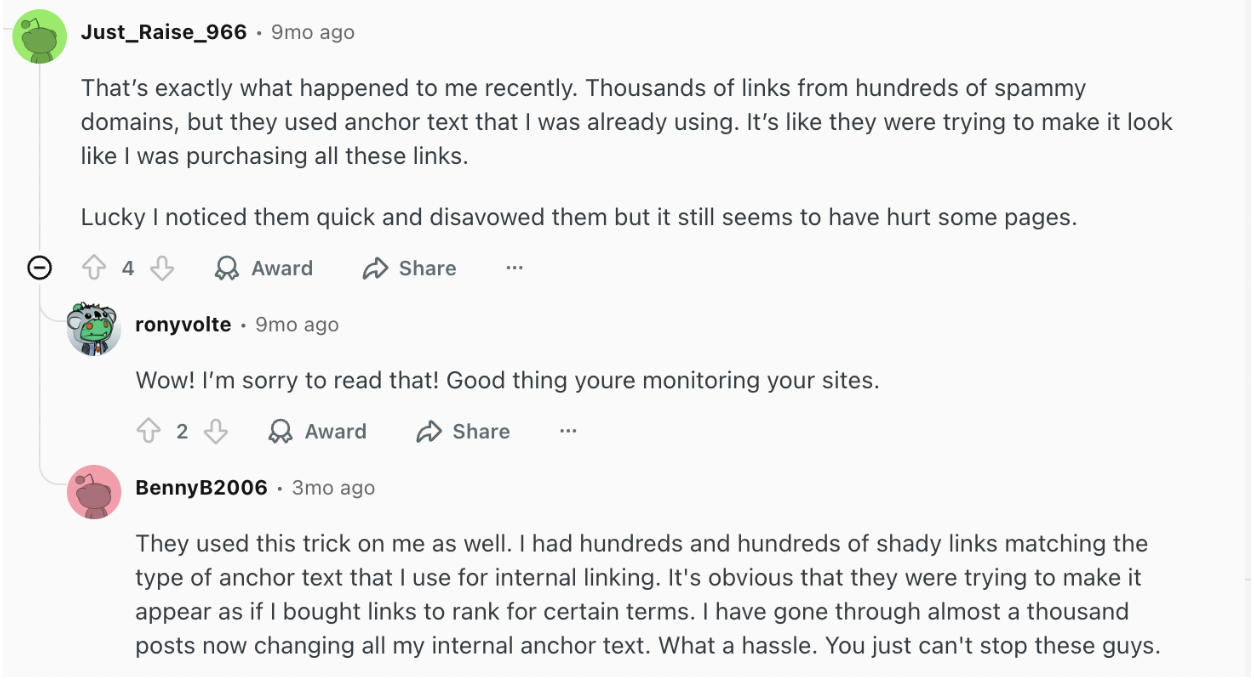
It happens all of the time. Take a look at this post on R/SEO about negative SEO:
So, what does a negative SEO attack look like?
Luckily, they’re fairly easy to spot.
It looks like you won the link lottery:
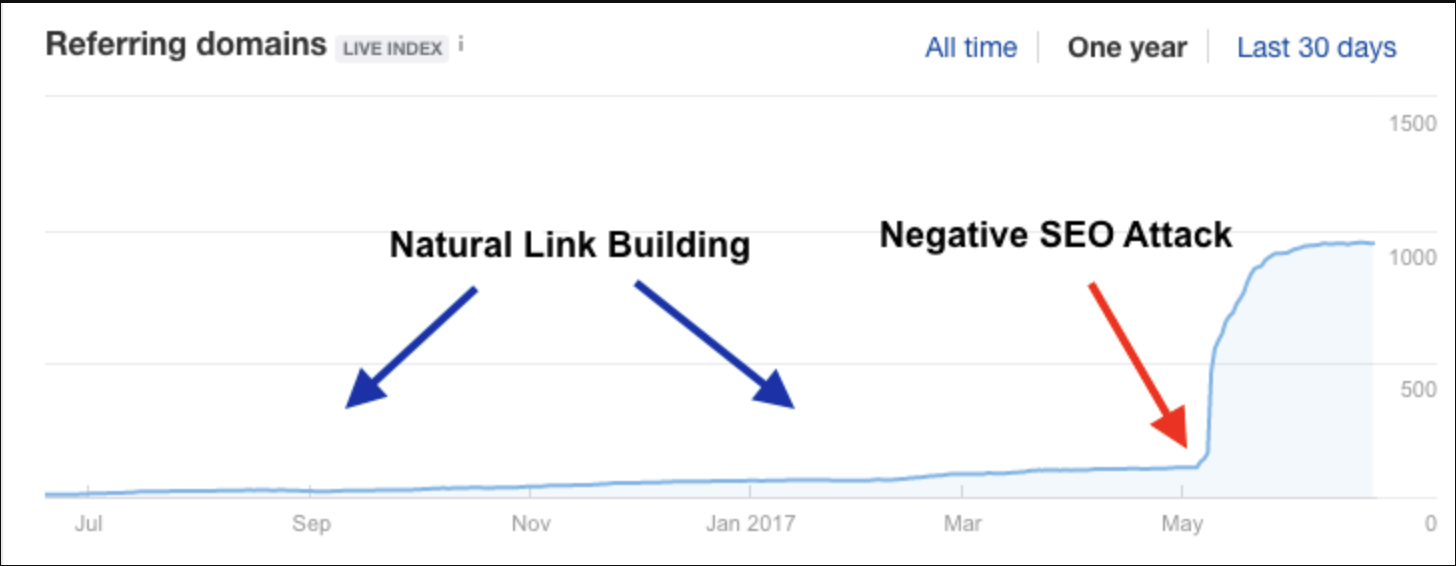
According to Google, you should just ignore this. That’s why Google is, in my opinion…a special search engine. They want you to risk your entire livelihood on doing nothing and trusting them to do their job properly.
Screw that.
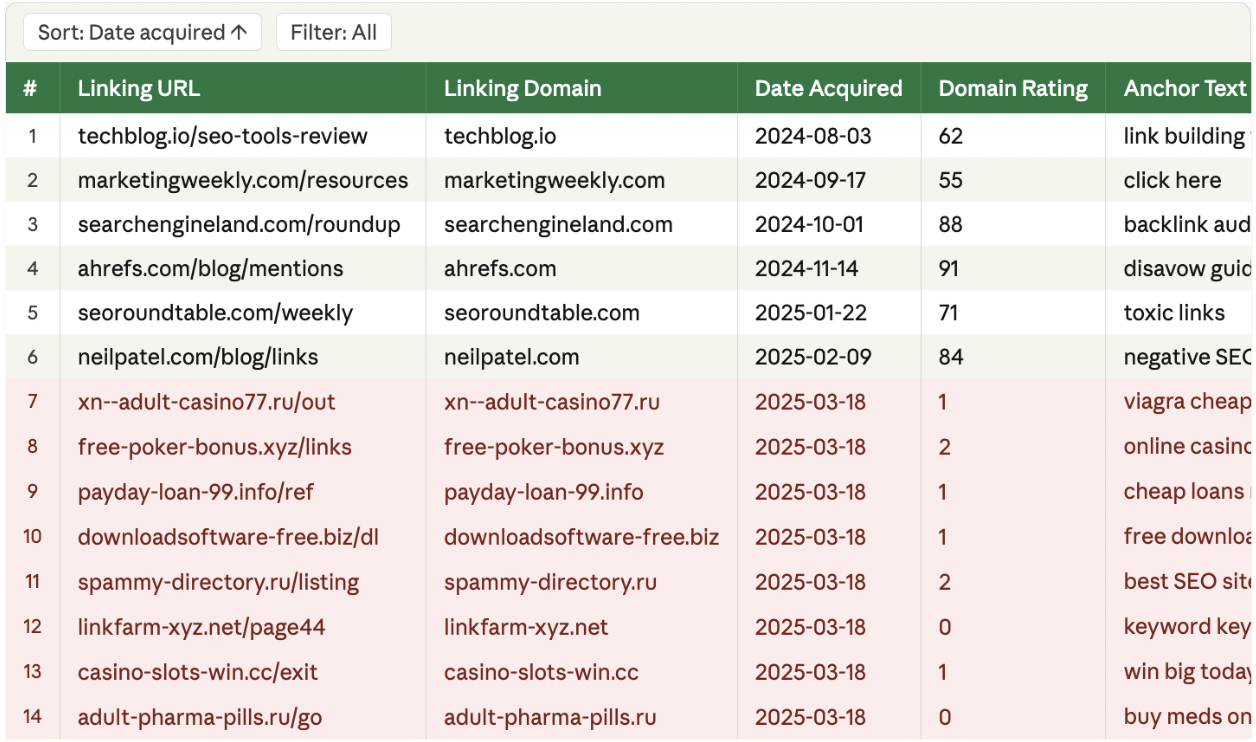
Instead of doing absolutely nothing, I recommend downloading your backlink profile into a spreadsheet and sorting your links by date acquired. All the spam links should appear around the same time, which makes it easy to add them to a disavow file.
You might see something like this:
Toxic Links
Toxic links are links from low quality, irrelevant, or clearly manipulative sites that damage your overall SEO. These links do more harm than good, especially when either you or someone else has built dozens or hundreds of them in a short time.
Toxic links include:
- Old forum blasts
- PBN networks built on expired domains
- Blog comments from the 2010–2014 era
- Web 2.0 spam
- Auto-generated foreign anchors
- Directory blasts
- Article spinning syndication
- Tiered link pyramids gone wrong
- GSA/SENuke footprints
Google (which never lies…) says that it ignores toxic links, but I’ve seen firsthand what happens when they reach a critical mass. They devalue good links, suppress pages, and can even lead to manual actions.
But the key here is “critical mass.” That is, when you have enough toxic links to appear on Google’s radar.
How many is too many? I wish I had a magic number for you, but I just don’t. It’s too hard to say.
Usually, it’s a lot.
A good rule of thumb is, if you have to scour your backlink profile for spam, you don’t have too many. If you audit your link profile and see a roughly even number of good links to bad ones, then that’s definitely a problem.
But it’s not always so simple.
Google’s algo looks for patterns of manipulation.
So, if 10% of your backlink profile is random spam, you’re probably fine. But if 10% is spam from the same type of sites, with the same anchors, and the same footprint, you might be in trouble.
Red flags I commonly see include:
- Thousands of comment links
- Forum spam across irrelevant niches
- Exact match anchors everywhere
Before you go on a disavowing crusade, I want to make this clear: Every site has some spammy links in its backlink profile. That’s not a big deal at all.
Comment links, forum profiles, and random mentions on sites you’ve never heard of are just part of having a website. As long as these toxic links look like natural background noise, they won’t affect your rankings.
Dealing with a Manual Action
If you’ve got a manual action, you don’t really have a choice. You must disavow links. This is Google telling you directly that there’s a problem with your link profile. In this case, even Google recommends disavowing links.
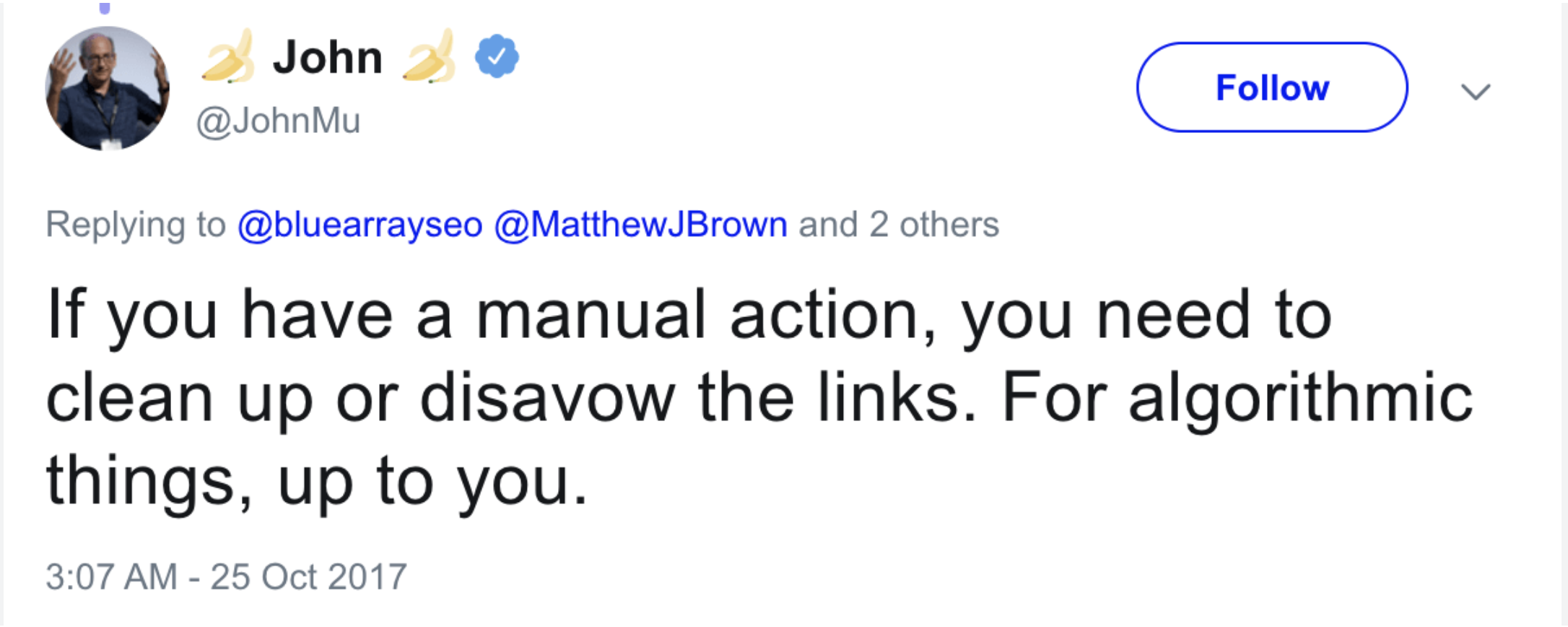
This is why I “love” Google. First, they say you don’t need to disavow links. Just ignore them. Then, after you’ve got a manual penalty, they turn around and say, “Oh, hi, you should have DISAVOWED those links.”
As always, thanks for the clarity, Google.
Anyway…
In the case of a manual action, you should still try to remove links where possible (instead of disavowing them), especially if you built them yourself or have access to the sites. But realistically, you won’t be able to clean everything manually.
How to Disavow Links?
To disavow links, start by auditing your backlink profile with tools like Ahrefs, Semrush, or Google Search Console. Then, submit a disavow file via GSC. If you don’t disavow links properly, you will cause more problems for your site than you solve.
Here’s how to disavow links the right way…
First, How to Disavow Links Safely?
If you do need to disavow links, here’s how to do it safely:
- Audit your link profile: Start with Ahrefs or Semrush and pull your referring domains.
- Identify dangerous links: Only target verifiable spam links, like mass links from similar domains, spam TLDs, and adult/casino niche sites. Low DR sites and foreign sites aren’t automatically bad, and nofollow links are almost never a problem.
- If possible, fix the link: If you think the link might send good referral traffic but isn’t good for SEO, reach out to the site owner and ask them to make it a nofollow link or to change the anchor text.
- If possible, remove the link: Removing a link is always better than disavowing. When you remove a link, you don’t have to rely on Google, and that’s always a good thing.
- Make the call to disavow vs. ignore: Most of the time, you should just ignore your toxic backlinks. But if you’re on the fence, use the table below to help you make the call.
| Situation | What it looks like | Action |
| Massive amounts of spam links | Thousands of junk domains, sudden spikes, irrelevant anchors | Disavow |
| Manual penalty | Google has flagged your link profile | Disavow |
| Old SEO spam | Forum blasts, directories, PBN leftovers at scale | Disavow |
| A few shady links | Random low quality sites here and there | Ignore |
| Nofollow links | Comments, forums, social mentions | Ignore |
| Tool says “toxic” | No clear pattern, just flagged by software | Ignore |
| “Expert advice” | Random SEO guy says disavow a few links | Ignore |
How to Disavow Links in Ahrefs
Ahrefs is the first place I go if I suspect a backlink issue. To be clear, you’re not disavowing links in Ahrefs. You’re using it to help audit your link profile before disavowing. You’re going to use this link analysis tool to find your lowest quality links, export them to a CSV file, and then use that to submit those URLs to Google.
Ready?
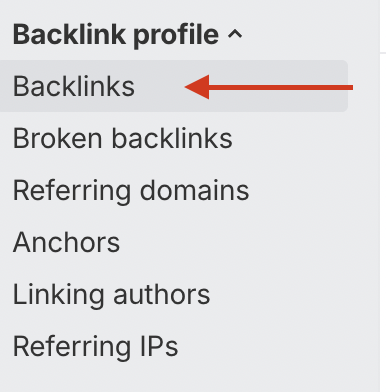
Start by dropping your domain into Site Explorer and going straight to the Backlinks on the left hand side:
From there, I sort by:
- DR
- organic traffic
- anchor text (sometimes)
And here’s my best trick…
Go to where it says “best links” and choose “low quality links only”:
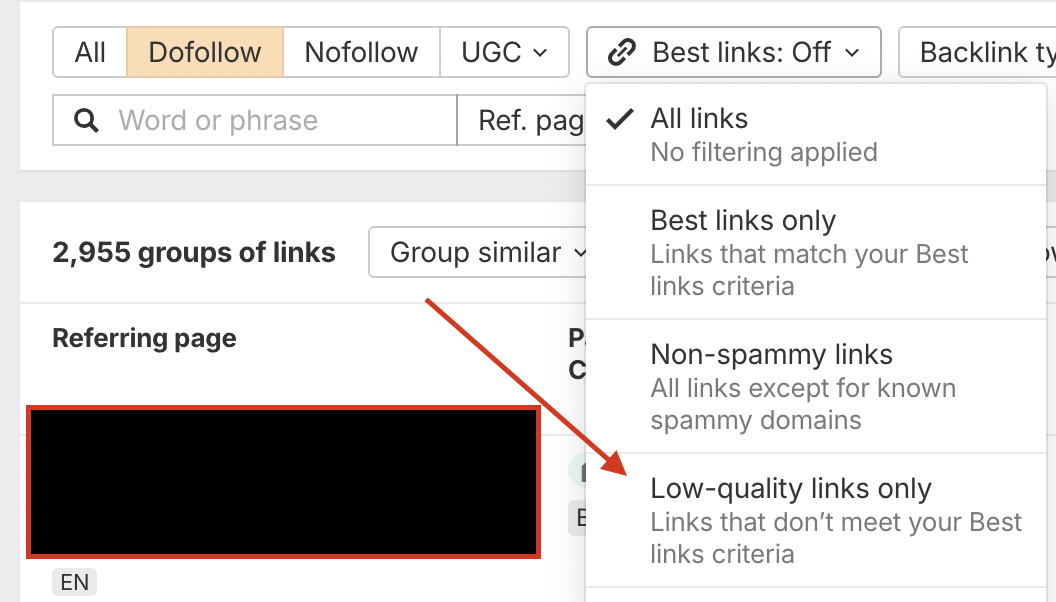
Once you have all of your low quality links in front of you, you can scroll through and use your eye test. Are there tons of low quality links? Did you acquire hordes of links at one time? Are there too many exact match anchors?
It’s not rocket science, so don’t overcomplicate it or spend loads of time. Remember, you’re not looking for a needle in a haystack. If you have a big toxic link problem, you’ll see it.
How to Disavow Links in Semrush
Semrush is another tool like Ahrefs that helps you evaluate your backlink profile and search for issues. Again, you can’t disavow links in Semrush, but it is a useful first step before disavowing in GSC.
Start by going into the Backlink Audit tool and running a full scan. I filter results by domain authority (DA) and sometimes anchor text.
Semrush also has a Toxicity Score (TS), so you can filter your search to view only links with a TS score of, say, 60+. This is fine as a starting point, but don’t just accept it at face value. I’ve seen perfectly normal links flagged as toxic and genuinely bad ones missed completely.
If you notice a spam problem, Semrush has a built in option to send links directly to a disavow file. This can save you hours… but you still need to double-check everything.
How to Disavow Links in Search Console
The only way to disavow links is via Google Search Console. But it’s not very easy to find the disavowal tool (because Google doesn’t want you to do it). I’ll show you how to find it in a minute.
But first, if you haven’t used Ahrefs or Semrush to audit your links, you can do it in GSC by viewing your links report. Just click Links in the left sidebar of GSC and focus on the External Links section.
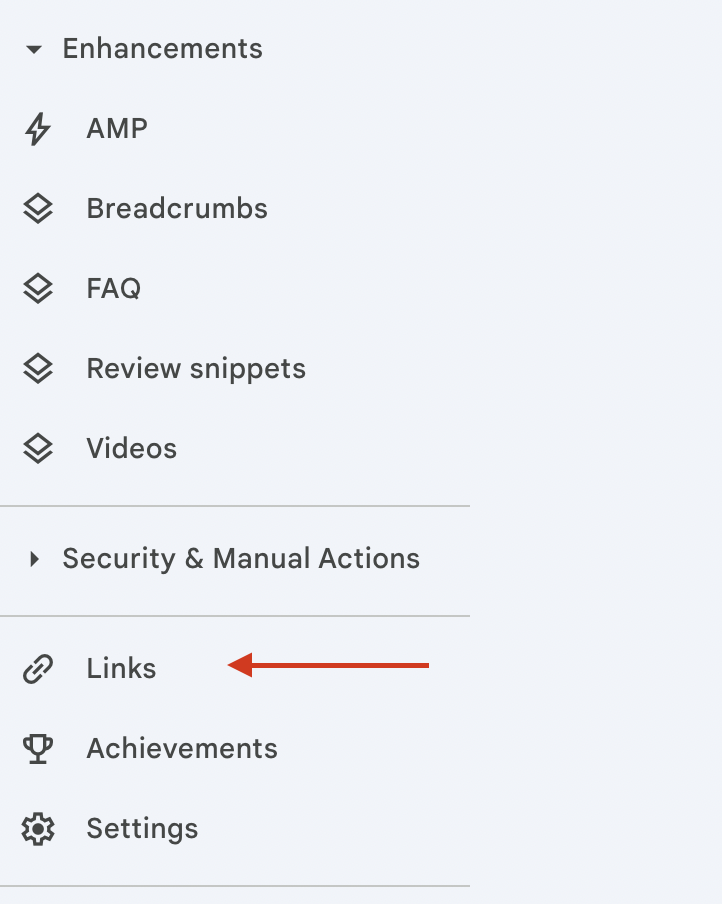
You’ll see three main reports:
- Top linked pages (which of your pages get links)
- Top linking sites (which domains link to you the most)
- Top linking text (your anchor text)
I usually start by checking Top linking sites. If you see pages and pages of junk here, I recommend you just disavow them completely. Don’t risk it. If you see a few odd domains, it’s no big deal.
Next, I glance at anchor text to check for blatant spam like adult or casino anchors.
If you decide to disavow links, you can click Export External Links and download them directly to sheets, where you can begin sorting through the junk.
DO NOT just dump the entire export into a disavow file because that’s how people end up nuking half their link profile for no reason. Yes, I’ve seen it happen many times.
How to Use Google Disavow Links Tool
To use the Google disavow links tool, you first need to make sure your site is verified in Search Console (I know, it’s obvious).
Next, just click here to go directly to the disavow tool. You can’t navigate to the tool via GSC, so this is the simplest way.
Before going further, Google will give you a scary warning.
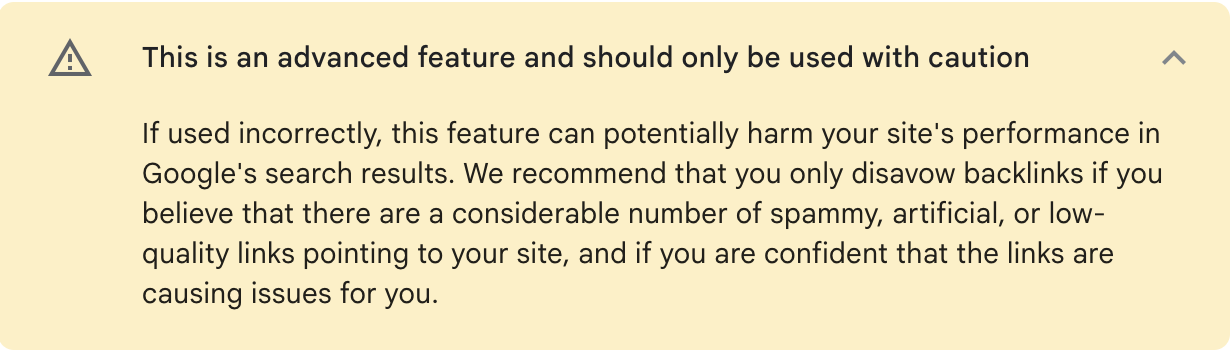
I’m literally shaking right now.
Google loves scaring people. Like how they always tell us not to buy backlinks or else…
In all seriousness, though, you really should only continue if you’ve found yourself in one of the situations described earlier in this article.
From here, just select your site from the dropdown menu, upload your disavow file, and click submit.
Easy peasy.
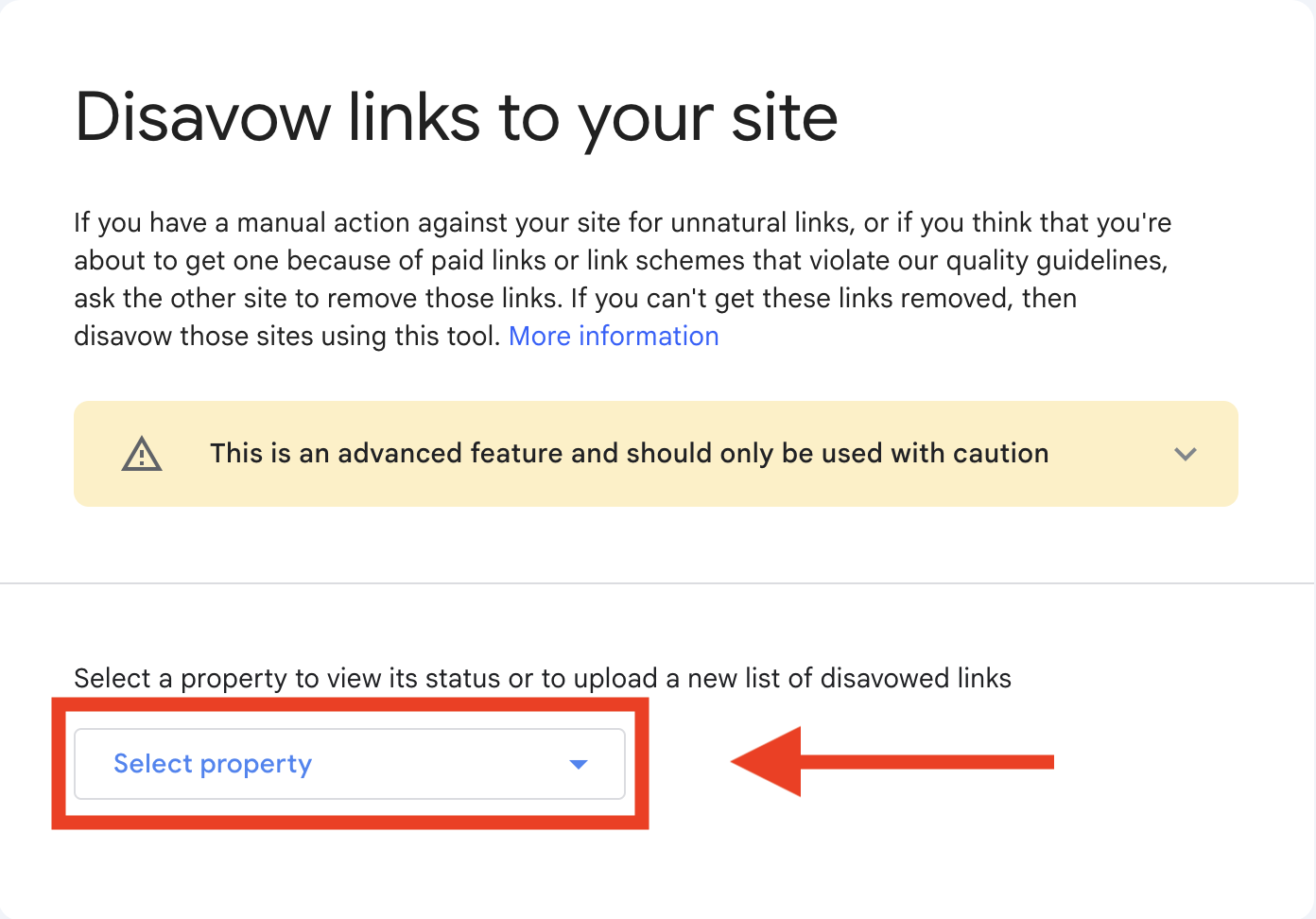
If you made any mistakes, Google will show you a list of errors immediately. You’ll need to fix them and submit the URLs again. Then, all you have to do is wait for Google to recrawl the sites and disavow your links.
If there’s already a disavow file for your property: If you’ve purchased a domain, a disavow file might already exist for your site. This will ruin your weekend. You can only have one disavow file, so you’re going to have to go through the entire thing line by line and figure out what’s worth keeping (AI can help, but you still need to double-check).
Here are a few more important bits to remember when submitting your disavow file:
- You can only post one disavow list per property (including child properties)
- Uploading a new disavow file will replace the previous one
- Disavowed links will still be visible in your links report
- You can undo disavows by going to the disavowal tool page, selecting your site, and clicking Cancel Disavowals
How to Create a Disavow File
You create a disavow file by opening a plain text file (.txt) encoded in UTF-8 or 7-bit ASCII. This is where you’re going to create your list of links to disavow. The maximum file size is 100,000 lines and/or 2MB (if you have more than 100k spam links, just dig a hole and bury your site).
There are three items you can place in this file:
- URLs (max 2,048 characters)
- Domains (starting with “domain:”)
- Comments (starting with ”#”)
You do not have to use them all.
Here’s a quick example:
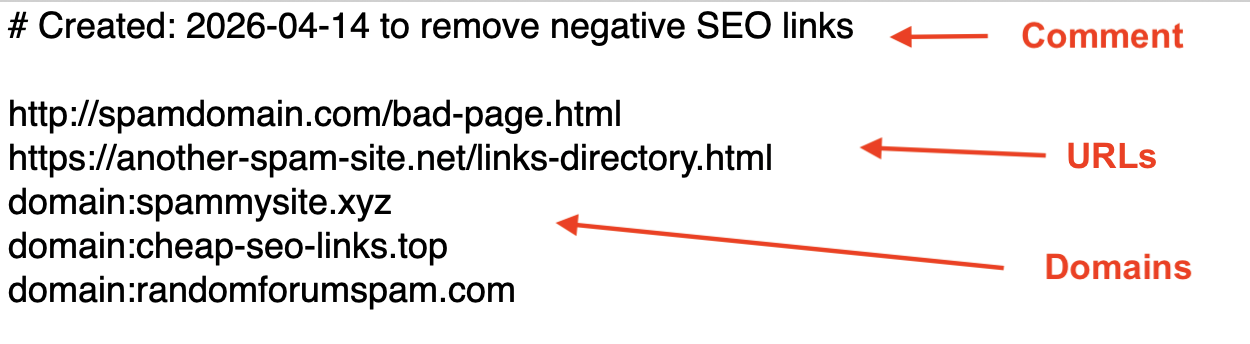
I usually only include domains in my disavow files. You can disavow individual URLs, but I almost never bother. If a site is bad, it’s usually easier to just disavow the whole domain and move on.
If you’re OCD about organization (like I am), you can add comments to your file using “#” (e.g., # PBN spam links), but it isn’t necessary. This can be helpful for keeping track of your disavowed links if you need to make regular updates to your file.
But Google doesn’t read the comments, so don’t bother writing “# Dear Google, I swear I didn’t know these 800 links were spam when I bought them off Fiverr for $22…”
Before you submit, make sure your file ends in .txt or Google’s army of bots won’t read it.
How Long Does it Take for Google to Disavow Links?
In my experience, it takes around 2-12 weeks for Google to disavow links. Google claims it takes “a few weeks” to incorporate a disavowal list into its index. But it really depends on how quickly Google recrawls those links, and that can vary quite a lot.
If the links are on active sites that get crawled often, you might see changes quickly. But if they’re buried on dead blogs or low quality domains that barely get crawled, it can take much longer. And that’s often the case with old spammy links.
Even if Google disavows your links in record time, you still might not notice a difference. That’s just the nature of disavowing. Unless you’re fighting a manual action, all you’re really doing is hopefully reducing risk and preventing a bigger problem later.
Final Thoughts
Disavowing links is one of the most misunderstood and obfuscated SEO techniques in the entire online marketing industry.
On one side, there’s Google claiming it’s almost unnecessary. On the other side, SEOs are trying to scare you and justify high prices by claiming you need to disavow every link that Ahrefs labels as spam.
Neither side is telling the truth.
The truth is that Google does not care about “toxic links”. They care about detectable manipulation patterns like acquiring dozens or hundreds of links very quickly or exact match anchor text abuse.
So, your default shouldn’t be “I need to disavow all of my low quality links”. Instead, I recommend that you strive to maintain the following baseline SEO strategy:
- Keeping a natural link profile (including some low quality links)
- Acquiring high quality backlinks at a normal cadence with natural anchor text distribution. Stick to the best places to buy backlinks, like PressWhizz, and avoid Fiverr
- Monitoring your links to ensure large amounts of spam don’t dilute your high quality links
If you do that, you’ll be fine. If someone tries a negative SEO attack or Google slaps you with a penalty, then you should disavow links. Or, if you’ve inherited a site with a dirty link profile, you should disavow too.
Other than that, there’s no reason to go on a crusade against spammy links. It’s just not worth the time and it could even harm your SEO if you do.